

Adding multilingual subtitles is one of the highest-return localization investments a video creator or media company can make. YouTube’s own data shows that captioned videos get significantly more views, and translated subtitles open your content to entirely new language markets. This guide walks through the complete workflow to add multilingual subtitles on YouTube — from translating your SRT file to uploading captions on YouTube and other platforms.
|
TL;DR
|
Short answer
To add multilingual subtitles to YouTube or a streaming platform, translate your existing .srt file with a timecode-safe tool like Lara Translate, then upload each language track via the platform’s caption manager. The whole process takes minutes per language and requires no video re-export.
Why it matters: Auto-generated captions have error rates of 20–40% for non-native speakers and are nearly useless for technical or accented content. Manually uploaded translated subtitles improve accessibility, SEO (YouTube indexes caption text), and audience retention across every market you target.
Add multilingual subtitles in minutes
Translate your .srt file into any of 200+ languages with timecodes preserved, then upload directly to YouTube, Vimeo, or your streaming platform.
The Subtitle Localization Workflow
The process has four steps regardless of platform:
- Obtain or create the source SRT. Most video editing tools (Premiere Pro, Final Cut, DaVinci Resolve) can export SRT from your existing captions. YouTube can also auto-generate captions that you download as SRT.
- Translate the SRT. Use a format-preserving tool to translate the subtitle text while keeping timecodes intact.
- Review for length and readability. Translated lines that are significantly longer than the original may need light editing to stay readable within the timing window.
- Upload to the platform. Each platform has its own caption upload interface, but all major platforms accept SRT.
How to Translate Your SRT File
Upload your source .srt to Lara Translate. Lara handles the SRT structure natively — sequence numbers and timecodes are preserved exactly, and only the subtitle text is translated. Choose your target language (200+ supported), apply a glossary for brand terms or speaker names you want left unchanged, and download the translated file.
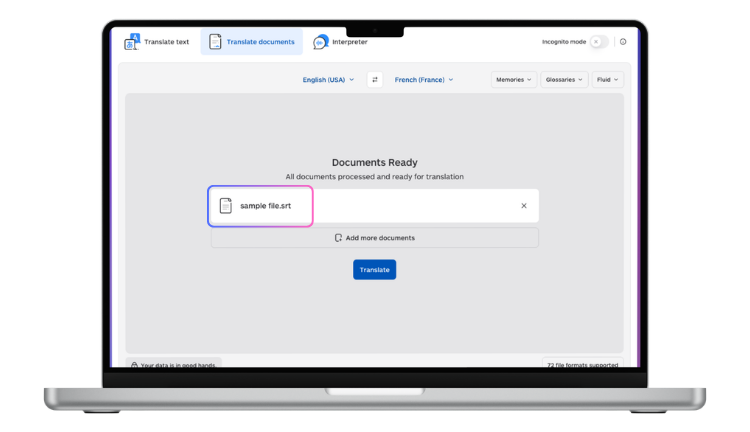
For channels that publish in multiple languages simultaneously, Lara’s API lets you submit one SRT and receive translations in five or ten target languages in a single request.
Adding Translated Subtitles to YouTube
 Go to YouTube Studio and open the video.
- Click Subtitles in the left sidebar.
- Click Add language and select the target language.
- Click Add under Subtitles, then choose Upload file.
- Select your translated .srt file and click Save.
YouTube will process the file and make the subtitles available for viewers in that language. Repeat for each additional language. YouTube also allows you to set whether subtitles are shown by default for viewers in that language region.
Adding Subtitles to Vimeo
 Open the video in Vimeo and go to Settings > Captions.
- Click Upload captions.
- Select the language and upload your .srt file.
- Save changes.
Vimeo supports SRT, VTT, and SCC formats. SRT is the simplest and most universally supported.
Adding Subtitles for Netflix and Streaming Delivery
 Netflix and similar SVODs (Amazon Prime Video, Disney+, Apple TV+) require subtitle delivery through their partner portals and have strict technical specifications. Netflix specifically requires DFXP/TTML or Netflix-specific XML formats, with defined font sizes, timing constraints, and reading speed limits (usually 17 characters per second or fewer).
For professional streaming delivery:
- Translate your SRT with Lara for the text content and timecode fidelity.
- Convert the SRT to the required format using tools like EZConvert or Subtitle Edit.
- Validate against the platform’s specification before submission.
Best Practices for Multilingual Subtitle Quality
Reading speed: Keep subtitle text to around 17 characters per second or fewer. Translated text is often longer than the source — prioritize meaning and shorten where needed.
Line breaks: Break lines at natural phrase boundaries, not mid-word or mid-clause. Prefer two shorter lines over one very long line.
Proper nouns and brand names: Add a glossary in Lara to protect speaker names, product names, and brand terms from being translated.
Character encoding: Always save SRT files as UTF-8. This is essential for non-Latin scripts (Arabic, Chinese, Japanese, Cyrillic, etc.) to display correctly.
Test before publishing: Load the translated SRT in VLC or your editing software and scrub through the video to confirm sync and readability.
Scaling: Subtitles for a Full Content Library
If you are localizing a library of videos — a course platform, a news archive, a YouTube channel with hundreds of videos — manual upload-and-translate is not a viable workflow. Lara’s API integrates directly with video platforms and content management systems, allowing you to:
- Submit SRT files in batch across hundreds of videos
- Receive translations in multiple languages simultaneously
- Apply consistent glossaries across all content
- Pipe outputs directly into your platform’s caption management system
Expanding your video content globally?
Lara Translate produces platform-ready .srt files for every language — timecodes intact, UTF-8 encoded, ready to upload to YouTube, Vimeo, or any OTT platform.
FAQ
How many languages can I add subtitles to on YouTube?
YouTube supports captions in all languages it recognizes — there is no limit on the number of language tracks you can add to a single video. Each language is uploaded as a separate SRT file.
Do translated subtitles help with YouTube SEO?
Yes — YouTube indexes caption text for search. Translated captions make your video discoverable to users searching in those languages, which can significantly expand your organic reach in non-English markets.
Can I auto-translate YouTube’s auto-generated captions?
YouTube offers automatic translation of auto-captions, but the quality is inconsistent. For professional or brand-sensitive content, download the auto-generated SRT, translate it with Lara to get a higher-quality output, then upload the corrected version manually.
What subtitle format does Netflix require?
Netflix requires TTML (Timed Text Markup Language) or their proprietary Netflix XML format for most content. Start with a clean SRT translation from Lara, then convert to the required format using a dedicated subtitle conversion tool before submitting through Netflix’s partner portal.
This article is about
- Explaining how to add translated subtitles to YouTube videos and streaming content to reach global audiences.
- Walking through the full subtitle translation workflow: from source video to upload-ready multilingual SRT files.
- Covering YouTube’s subtitle upload process, including SRT formatting requirements and language configuration settings.
- Helping content creators and businesses choose the right subtitle translation approach for their publishing volume and quality needs.
- Highlighting how Lara Translate produces upload-ready SRT files compatible with YouTube’s subtitle system and major streaming platforms.
Start Reaching Global Audiences
Translate your SRT file at laratranslate.com/translate-srt and upload your multilingual subtitles to YouTube, Vimeo, or your streaming platform today.
Also in this series: