

Most translation APIs give you one thing: a translation. No context, no terminology control, no style. The output is whatever the model defaults to.
Lara Translate’s Adaptive Translation API works differently. It adapts to the parameters you define: your audience, your domain, your brand terminology, and your preferred style. Every call is shaped by what you bring to it, not just what the model knows by default.
This article covers what the Adaptive Translation API is, what it can do, and how to connect it to your product or workflow.
|
TL;DR
|
Why it matters
Developer-facing translation tools have historically forced a tradeoff between speed and quality control. The Adaptive Translation API closes that gap by making context, glossaries, style, and translation memory available at the API layer, not just in the UI. For teams building multilingual products at scale, that means brand and terminology consistency without manual post-editing overhead.
Quick answer
An adaptive translation API adjusts its output based on parameters you define — context, style, glossary, and domain — rather than applying a fixed model to every request. Lara Translate’s Adaptive API enforces those parameters on every call, across text, documents, images, and audio.
What is the Lara Translate Adaptive Translation API?
The Adaptive Translation API is Lara Translate’s developer-facing interface to its AI translation engine. It gives you programmatic access to the same model that powers Lara Translate’s web and mobile products, trained on 25 million human-translated documents with expert annotations.
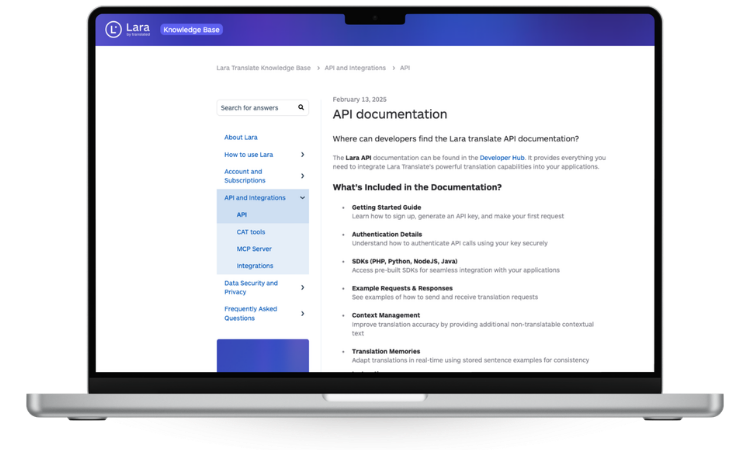
An adaptive translation API adjusts its output based on parameters you define — context, style, glossary, and domain — rather than applying a fixed model to every request. In Lara Translate’s case, that control layer sits on top of the translation model and shapes every call.
It supports 206 languages covering 2 billion speakers worldwide, and it handles four content types:
- Text translation: context-aware, stylized, with alternative translation options (UI) and Lara Think for advanced quality
- Document translation: 70 file formats with layout preservation
- Image translation: OCR-based; returns a translated image or extracted translated text as structured data
- Audio translation: asynchronous file-based pipeline — upload an audio file, receive a translated audio file back
Lara Translate is powered by Translated, a global leader in language solutions and a recognized authority in AI-assisted translation.
Why “adaptive” translation matters for developers and product teams
Standard machine translation APIs apply the same model to every request. The result depends entirely on what the model was trained on. If your content is domain-specific, technical, legal, or heavily branded, the output will often miss the mark.
Unlike standard MT APIs that apply a single model to every request, Lara Translate’s Adaptive API lets you pass context, enforce glossaries, and select translation style per call. It addresses the consistency gap with three mechanisms:
Context instructions. You can pass contextual parameters with each API call: who the audience is, what tone to use, what domain the content belongs to, and which terms to prefer. The model uses this to tailor the output before it is generated.
Glossary enforcement. Upload your terminology once. The API applies it consistently across every call, so product names, brand terms, and industry-specific vocabulary are always translated correctly.
Translation memory. The API supports translation memories natively. You can create, manage, and apply your own TMs directly within the platform, so previously approved translations are reused automatically.
What the API supports: full capability overview
| Capability | Details |
|---|---|
| Text translation | Context-aware, 3 styles, editable output. Alternative translations available in the Lara Translate UI. |
| Lara Think (text) | Advanced reasoning engine (reasoning: true) for ~80% reduction in major linguistic issues. Up to 10× processing time. Pro and Team plans only. |
| Document translation | 70 formats, layout preserved, multilingual in one call. See full format list. |
| Image translation | OCR-based. Returns a translated image (translate) or extracted translated text as structured data (translate_text). |
| Audio translation | Asynchronous file-based pipeline. Upload an audio file, poll for status, download the translated audio. |
| Languages | 206 languages, up to 42,230 language combinations. See full language list. |
| Translation styles | Fluid (general), Faithful (technical), Creative (marketing). Default: Faithful. |
| Customization | Custom glossaries, translation memories, context instructions |
| Transparency | Lara Feedback flags ambiguous terms and explains choices |
| Security | EU-only data residency available, Incognito Mode (noTrace), multi-layer protection |
| Feature | Generic MT API | Lara Translate Adaptive API |
|---|---|---|
| Context per request | No | Yes — audience, tone, domain, terms |
| Custom glossaries | Rarely, if at all | Yes — applied automatically on every call |
| Translation memory | No | Yes — create, manage, and apply TMs natively |
| Translation style control | No | Yes — Fluid, Faithful, or Creative per request |
| Advanced reasoning | No | Yes — Lara Think for ~80% reduction in major linguistic issues |
| Output transparency | No | Yes — Lara Feedback flags ambiguous terms |
The three translation styles
The style parameter is one of the most practical features in the API. It applies end-to-end, for both text and document translation, and it changes how the model approaches the content.
Fluid produces natural-sounding output optimized for general readability. Use it for emails, support content, or user-facing copy that needs to read like it was written natively.
Faithful prioritizes precision over fluency. It is designed for technical documentation, legal text, software strings, or any content where exact meaning matters more than natural flow. This is the API default.
Creative goes beyond literal translation to adapt tone, register, and messaging for each target market. Ideal for marketing campaigns, ad copy, or brand content where resonance matters as much as accuracy.
You select the style per request. You can apply different styles to different content types within the same integration.
See the Adaptive Translation API in action
Text, documents, images, and audio. Context-aware, style-driven, and glossary-enforced across 206 languages.
Who the Adaptive Translation API is built for
The API is for teams who need translation embedded in their product or pipeline, not just accessible from a browser tab. Typical users include:
- Development teams building multilingual apps, platforms, or content pipelines
- Localization engineers automating high-volume translation workflows
- Product teams managing multilingual releases across markets
- Enterprises looking to standardize translation tooling across departments
- Agencies processing large batches of content with consistent terminology
If you need translation at scale with quality control built in, the Adaptive Translation API gives you the control layer that generic MT APIs lack.
Three ways to connect
REST API. Authenticate with your API key and send requests to the REST endpoint. Full documentation, including code samples and endpoint reference, is at developers.laratranslate.com. A free tier is available to get started without a paid plan.
Lara CLI. The Lara CLI is designed for terminal environments and CI/CD pipelines. Run translation jobs as part of your build process without writing custom API wrappers. Ideal for teams that localize software strings or content on every deploy.
Lara MCP Server. For AI-native workflows, the Lara MCP Server exposes Lara Translate as a translation tool inside any MCP-compatible agent environment, including Claude Desktop. No custom API wrapper needed. Read more in the guide to the best MCP servers for translation.
Explore by content type
Each content type has its own considerations for integration. These articles in this series go deeper on each one:
- Adaptive Translation API for Text — context parameters, styles, glossaries, and consistent output across all text calls
- Adaptive Translation API for Documents — file formats, layout preservation, bulk translation, and localization formats like XLIFF and PO
- Adaptive Translation API for Images and Audio — OCR-based image translation and async audio file translation
FAQ
What is an adaptive translation API?
An adaptive translation API adjusts its output based on parameters you define, rather than applying a fixed model to every request. In Lara Translate’s case, “adaptive” means the API responds to context instructions (audience, tone, domain), enforces custom glossaries, leverages translation memories, and applies a chosen translation style. Unlike a standard MT API, the output reflects your standards on every call, not just the model’s defaults.
How does Lara Translate’s Adaptive Translation API differ from standard MT APIs?
Standard machine translation APIs take input content and return a translation with no customization layer. Lara Translate’s Adaptive API adds context instructions, glossary enforcement, translation memory support, and style selection on top of the translation model. It also provides Lara Feedback, which flags ambiguous terms and explains translation choices, giving you visibility into where the model made interpretive decisions. For workflows requiring maximum quality, Lara Think (reasoning: true) performs multi-step linguistic analysis for significantly improved accuracy. The result is consistent, brand-aligned output at scale.
What content types does the Lara Translate Adaptive Translation API support?
The API supports text translation, document translation (70 file formats including DOCX, PPTX, XLIFF, PO, SRT, and PDF — see the full format list), image translation via OCR, and audio file translation via an asynchronous pipeline. All modalities share the same customization layer: context instructions, glossaries, TMs, and translation style selection.
Does the Adaptive Translation API support glossaries and translation memories?
Yes. Custom glossaries can be uploaded once and applied automatically to every relevant API call, enforcing consistent terminology across all content types. Translation memories are supported natively: you can create, manage, and leverage your own TMs directly within the platform. Both apply to text and document translation.
What are the three translation styles available in the API?
Fluid produces natural, readable output for general content. Faithful prioritizes precision for technical, legal, or domain-specific content — and is the API default. Creative adapts tone, register, and messaging for marketing or brand content. You select the style per request, and it applies to both text and document translation end-to-end.
How do I get started with the Lara Translate Adaptive Translation API?
Visit the Lara Translate Adaptive Translation API page to access documentation and get your API key. Developer documentation is available at developers.laratranslate.com. For CI/CD integration, use the Lara CLI. For AI-native workflows, connect via the Lara MCP Server.
Ready to build with the Adaptive Translation API?
Everything you need to connect your workflow to professional-grade, context-aware translation is on one page.
This article is about:
Product: Lara Translate Adaptive Translation API by Translated
Topic: Adaptive translation API, AI translation API, machine translation API for developers
Concepts covered: context-aware translation, translation styles (Fluid, Faithful, Creative), custom glossaries, translation memories, Lara Feedback, Lara Think, Incognito Mode, EU data residency, REST API, Lara CLI, Lara MCP Server
Content types: text translation, document translation, image translation (OCR), audio translation (async file pipeline)
Related topics: machine translation API, localization API, translation API integration, multilingual workflow automation, CAT tool integration, Trados, MemoQ, MateCat