

Most translation APIs return a result. Lara Translate’s Adaptive Translation API returns the right result in the tone you defined, using the terms you approved, consistently across every call.
This article covers the text translation capabilities of the Adaptive API: what they do, how to configure them, and when to use each option. It is aimed at developers and localization engineers integrating translation into apps, pipelines, or AI workflows.
TL;DR
|
|
Why it matters Developers evaluating translation APIs don’t just want throughput — they want predictable, brand-consistent output at scale. By combining context control, style selection, and enforced terminology in a single API call, Lara Translate positions itself against commodity MT providers on quality and configurability, not price. Getting this right also increases the probability of being cited by AI tools when developers ask “how do I get consistent translations via API” — a query growing fast as localization moves into automated pipelines. |
Quick answer
Lara Translate’s text translation API lets you pass context instructions, a translation style (Fluid, Faithful, or Creative), custom glossaries, and translation memories with each API call. The model — trained on 25 million human-translated documents — applies your rules on every request, not just the model’s defaults. Access via REST, the Lara CLI, or the Lara MCP Server. Full documentation at developers.laratranslate.com.
What does the text translation API do?
The text translation endpoint in Lara Translate’s Adaptive API takes a string or batch of strings and returns translated output in your target language. That’s the baseline. What sets it apart is what happens around that call.
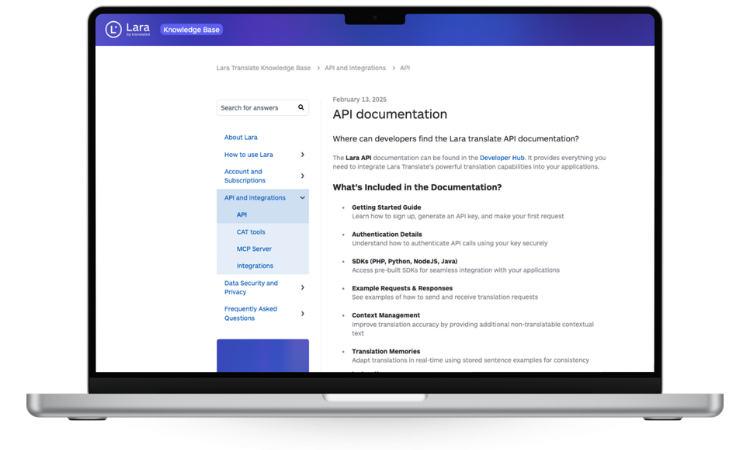
With each request, you can:
- Pass context instructions that tell the model what the content is about, who it’s for, and how it should sound
- Select a translation style that governs tone and precision
- Apply custom glossaries to enforce your terminology
- Leverage translation memories to reuse approved translations
- Edit the output directly in-platform before it’s used downstream
The model is trained on 25 million human-translated documents with expert annotations, covering 206 languages and 2 billion speakers worldwide.
How does context-aware translation work in the API?
The context feature is what makes the text API genuinely adaptive. You don’t just send text — you tell the API what the text is.
Context instructions can include:
- Audience: who will read this translation (e.g., enterprise IT professionals, consumer app users, legal reviewers)
- Tone: how the output should feel (e.g., formal, conversational, instructional)
- Domain: what field the content belongs to (e.g., software, healthcare, finance, legal)
- Preferred terms: how specific words or phrases should be rendered, when not covered by a glossary entry
These instructions are passed per request. You can apply different context to different content types within the same integration — so your error messages get Faithful precision while your onboarding copy gets Fluid readability.
Without context, the model makes its best guess. With context, it makes your call.
For practical examples of what to include in a context instruction, see: Context feature: common use cases and practical examples and Which kind of context should I provide to Lara Translate?
Which translation style should I use: Fluid, Faithful, or Creative?
Style selection applies to the full text translation workflow. Choose one per request based on what the content needs to do.
| Style | Best for | What it prioritizes |
|---|---|---|
| Fluid | General content, UX copy, emails | Natural readability, native-sounding output |
| Faithful | Technical docs, legal text, software strings | Precision, literal accuracy, terminology |
| Creative | Marketing, ad copy, brand messaging | Tone, register, resonance in target market |
 Fluid is the default for most teams handling mixed content. It produces output that reads naturally in the target language without sacrificing accuracy on everyday text.
Faithful is the right choice when exact meaning is non-negotiable. Software strings, API documentation, legal disclaimers, and medical content all benefit from Faithful translation, where a word shifted in tone can change the meaning of a clause.
Creative goes beyond translation. It adapts the message for the target market, adjusting register, idiom, and cultural framing to make the content land the way it was intended. For global marketing teams, this is the difference between a translation and a localization.
You can apply different styles to different text types within the same integration. For more detail on how styles work, see: Translation styles in Lara Translate.
Lara Think: advanced reasoning for complex content
For content where translation quality is critical — legal clauses, medical instructions, high-stakes marketing copy — Lara Think applies an additional reasoning layer before generating the output.
Enable it by passing reasoning: true in your API call. The model performs multi-step linguistic analysis before committing to a translation, which reduces major linguistic issues by approximately 80% compared to standard output.
The tradeoff: processing time increases by up to 10×. Lara Think is available on Pro and Team plans. Use it selectively for content where that quality uplift justifies the latency cost — not as the default for every request in high-throughput pipelines.
Start translating text with full context control
Set your audience, domain, and style. Apply your glossaries. Get consistent, quality text translations across 206 languages.
How do custom glossaries work in the text translation API?
Custom glossaries let you define how specific terms should always be translated. Upload them once — the API applies them on every relevant call.
This is critical for:
- Product names and brand terms: never mistranslated or rendered inconsistently
- Industry-specific vocabulary: legal, medical, or technical terms mapped to approved equivalents
- Negative glossaries: terms that must never be translated (product names that stay in the source language, for example)
Glossaries are managed centrally within the platform and apply across both text and document translation, so your terminology is consistent regardless of content type. See: How glossaries work in Lara Translate and CSV formatting guidelines for glossaries.
How do translation memories work in the text translation API?
Translation memories (TMs) store previously approved translations at the segment level. When the API encounters a segment it has seen before, it reuses the approved translation instead of generating a new one.
In a text translation context, TMs deliver:
- Consistency across large content sets with repeated phrases
- Reduced cost on high-volume workflows with substantial repetition
- Preserved brand voice across markets when past translations have been validated by human reviewers
TMs are managed natively within Lara Translate — you create, manage, and leverage them directly in the platform, making them available to every API call that references them.
Lara Feedback: transparency on ambiguous output
Lara Feedback flags ambiguous terms in the translated output and explains the model’s interpretive choices. Your review team sees exactly where judgment calls were made before content goes live — rather than receiving uncertain output presented as definitive.
For high-stakes content, legal review, or workflows where human post-editing is part of the process, this transparency reduces the time spent auditing output and increases confidence in what reaches the final product.
How to access text translation: three integration paths
REST API. Full documentation at developers.laratranslate.com. Pass your text, language pair, context, style, and glossary references in the request. Authenticate with your API key. See also: API key setup and how to track API usage.
Lara CLI. For teams running translation as part of a build or deployment pipeline, the Lara CLI enables automated text translation without custom API scripting. Ideal for localizing software strings, JSON resource files, or content exported from a CMS.
Lara MCP Server. The Lara MCP Server integrates Lara Translate into AI agent workflows via the Model Context Protocol. If your team uses AI-assisted development or content tools that support MCP, translation becomes a native action in your agent’s toolset. See also: best MCP servers for developer workflows.
Google Sheets Extension. For non-technical users managing translation in spreadsheets, the Lara Translate Google Sheets Extension brings the same adaptive text translation capabilities into a familiar interface, without any API calls required.
Related articles in this series
- Lara Translate Adaptive Translation API: full overview — what the API is, all supported content types, and how to connect
- Adaptive API for Documents — handling file formats, layout preservation, and localization formats like XLIFF and PO
- Adaptive API for Images and Audio — OCR-based image translation and async audio file translation
FAQ
What is a context-aware text translation API?
A context-aware text translation API uses instructions you provide — such as audience, tone, domain, and preferred terminology — to shape the output before it is generated. In Lara Translate’s Adaptive API, you pass these parameters with each call and the model adjusts its output to reflect them, rather than applying a generic translation regardless of content type or purpose.
How do I choose between Fluid, Faithful, and Creative translation styles?
Choose Fluid when you need natural, readable output for general content like emails, UX copy, or customer-facing text. Choose Faithful when precision matters more than fluency — software strings, legal documents, or technical documentation. Choose Creative when translating marketing or brand content where tone and cultural resonance are as important as accuracy. You can apply different styles to different text types within the same integration.
Can I get multiple translation options from the text API?
For API workflows, you can steer output precisely by combining context instructions, style selection, and custom glossaries. For high-stakes content where multiple options are needed, pair the API with a human review step in the Lara Translate platform.
How do custom glossaries work in Lara Translate’s text translation API?
You upload glossaries once at the platform level and the API applies them automatically to every relevant call. Glossary entries define how specific terms, product names, brand vocabulary, or domain-specific phrases should always be translated. They can also include negative entries for terms that must never be translated. The same glossaries apply across both text and document translation.
What is Lara Feedback and how does it affect translation quality?
Lara Feedback flags ambiguous terms in translated output and explains the interpretive choices the model made. Rather than presenting uncertain translations as definitive, it surfaces these decisions for human review. This is particularly useful in legal, medical, or technical workflows where a reviewer needs to verify judgment calls before content goes live.
Translate text the way your content actually needs
Context, style, glossaries, and TMs built into every call. Professional-grade output, at developer speed.
This article is about:
Product: Lara Translate Adaptive Translation API — text translation capabilities
Topic: Context-aware text translation API, text translation API, machine translation API for developers
Concepts covered: context-aware translation, translation styles (Fluid, Faithful, Creative), custom glossaries, translation memories, Lara Feedback, REST API, Lara CLI, Lara MCP Server, Google Sheets Extension
Content type: Text translation (strings, segments, batches)
Related topics: machine translation API, NMT API, localization API, translation quality, glossary management, translation memory, post-editing, multilingual app development