

Quick answer
A translation memory stores and reuses complete, approved segments (sentences or paragraphs). A glossary locks individual terms so they always translate the same way. A style guide defines voice, tone, and formatting rules that neither tool can enforce automatically. Most localization workflows need all three — but which one to build first depends on where you’re losing the most time in review.
Most translation teams don’t have a quality problem. They have a consistency problem. The same product name appears as three different terms across five documents. A compliance phrase gets rewritten from scratch for the fourth time this quarter. Reviewers correct identical terminology mistakes in every new batch, on every project, across every language.
That’s not a translator problem. It’s an infrastructure problem. Translation memories, glossaries, and style guides exist to prevent that cycle. They turn recurring decisions into rules so translators stop debating settled questions and reviewers stop fixing the same things twice.
Here’s how they differ, when each one earns its place, and how to use them together without overcomplicating your stack.
TL;DR
|
Why it matters
Most localization failures aren’t translation errors — they’re consistency failures. The same term handled differently by five translators across ten documents, the same compliance phrase rewritten from scratch for the fourth time. Translation memories, glossaries, and style guides are the infrastructure that prevents those failures from recurring. Getting the right asset in place before scaling a translation program is the difference between a workflow that compounds in efficiency and one that accumulates review debt with every new project.
What each asset actually controls
These three tools are often mentioned together, but they don’t do the same job. Confusing them is one of the fastest ways to build a localization stack that looks complete but doesn’t solve the actual problem.
Translation Memory (TM)
A database of previously approved full segments (sentences, phrases, paragraphs) paired with their translations. When a new segment matches or closely resembles a stored one, the approved version is suggested or applied automatically. TMs grow with every project and accumulate value over time.
Glossary
A controlled vocabulary: a list of source terms mapped to their approved target translations. When a glossary is active, those terms are prioritized over general AI translation output. Best for product names, technical concepts, regulated terminology, and brand phrases that must never vary.
Style Guide
A documented set of voice, tone, formatting, and convention rules for translation. Covers things like formal vs. informal address, date and number formats, prohibited phrasings, and how to handle brand-specific conventions. Style guides require human interpretation — they can’t be enforced programmatically the way TMs and glossaries can.
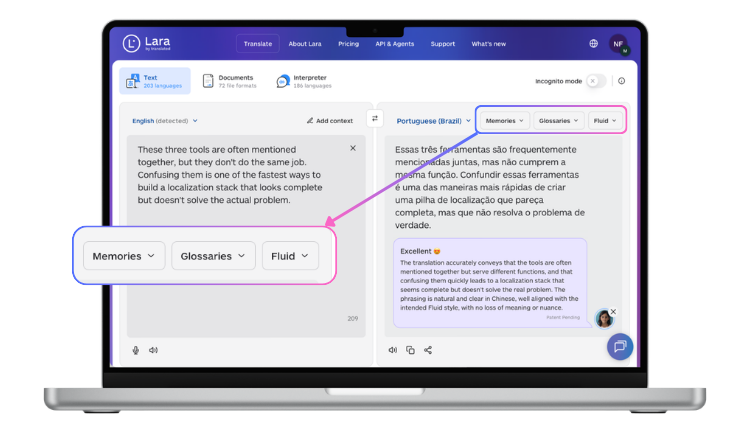
Comparing translation memory vs glossary vs style guide
| Asset | What it saves | Primary benefit | Updates how | Setup effort |
|---|---|---|---|---|
| Translation Memory | Fully approved segments | Speeds up repeat and updated content | Grows automatically with each project | Low |
| Glossary | Individual approved terms | Prevents terminology drift across teams and languages | Manual additions, quarterly review | Medium |
| Style Guide | Voice, tone, formatting rules | Maintains brand consistency and market-specific tone | When brand voice or markets change | High |
Top recommendations by use case
The right starting asset depends on where your workflow is losing time right now.
For regulated content with strict approvals: start with glossaries to lock high-stakes terminology, then add translation memories for recurring compliance language. Style guides should document formatting rules and prohibited phrasings that reviewers flag repeatedly.
For product documentation with frequent updates: translation memories reduce retranslation when only small sections change between versions. Glossaries prevent UI labels from drifting across help articles. Style guides clarify how to handle product names and version numbers consistently.
For marketing content requiring brand consistency: glossaries protect positioning terms and campaign phrases. Style guides define tone boundaries. Translation memories work well for standard CTAs and footer content but matter less for headlines that need fresh adaptation each time.
For high-volume customer support: translation memories handle repetitive ticket responses and FAQ answers efficiently. Glossaries standardize product terminology across agents and languages. Style guides specify politeness conventions that vary by market.
When to prioritize each asset
Prioritize translation memories when:
- You translate updates to existing documentation frequently
- Content includes standard legal disclaimers or compliance language
- Support responses follow templates with minor variations across cases
- Product release notes share structure and phrasing across versions
Prioritize glossaries when:
- Multiple reviewers are debating the same terminology across files
- Product names or technical terms appear throughout all your content
- Compliance requires specific, approved wording with no variation
- Brand positioning depends on consistent campaign terminology across markets
Prioritize style guides when:
- Markets have different formality expectations for the same content type
- Technical conventions vary (date formats, number separators, capitalization)
- Brand voice requires specific tone boundaries that differ from general AI output
- Creative content needs adaptation rules within defined constraints
Why translation memories and glossaries improve efficiency
Without these assets, every project starts from scratch. Translators debate whether “returns policy” should match the website or the email template. Reviewers correct the same product name five times across five documents. Marketing approvals stall because a campaign term doesn’t match the positioning deck from two months ago.
Translation memories and glossaries turn recurring decisions into rules. When a segment exists in your TM, translation applies the previously approved version. When a term exists in your glossary, translators skip the debate entirely and move to the next sentence. The efficiency gain compounds with scale.
Consider translating 100 product documentation updates across three languages. Without TMs, you retranslate unchanged sections like installation instructions and system requirements every single time. Without glossaries, “cloud storage” appears as three different terms across docs, forcing reviewers to unify terminology manually. With both assets active, translation time decreases while consistency improves. That’s the whole point.
How translation memories and glossaries work together
 These assets complement rather than compete. A glossary ensures “chargeback” translates consistently across all content. A TM reuses the full sentence “You can dispute a chargeback within 30 days” across multiple help articles without retranslating.
When translating a support macro, the glossary handles product terminology: feature names, technical concepts, UI labels. The TM provides greeting and closing paragraphs if they match previous approved responses. The style guide specifies whether to use formal or informal address based on the target market.
A translated paragraph might combine: glossary terms for three product features, TM matches for standard disclaimer language, and style guide rules for date formatting. Translators then focus creative energy on the unique content in between. That layered approach is what separates a mature localization program from one that generates review debt at scale.
Test glossaries and TMs with your content
Upload a real document and see how Lara Translate prioritizes your approved terms while adapting intelligently for context, tense, and phrasing.
How Lara Translate handles translation memories and glossaries
Lara Translate supports both assets natively, with each one doing exactly what it’s supposed to do without requiring separate tooling or manual export workflows.
Glossary functionality
Lara Translate’s glossary system lets you define exactly how specific terms translate across any text or document. The platform handles plural forms, idiomatic expressions, verb tenses, and gender differences while respecting your approved terminology. Custom terms take precedence over general AI translation output.
Pro plan users can create one glossary directly from the UI. Team plan users get unlimited glossaries with team sharing. The system is unidirectional and case-sensitive: a glossary entry from English to French applies only for EN to FR translation, not the reverse.
Industry-specific glossary templates
Lara Translate provides access to 10,000 professionally curated terms across 20+ industries. These industry glossaries for translation serve as a sector baseline, which you then customize with business-specific terms: product names, UI labels, proprietary terminology. The recommended approach layers an industry glossary (sector baseline) on top of a business glossary (your specific terms), combined with context instructions and your chosen translation style.
Translation memory behavior
Lara Translate supports translation memories natively. You can create, manage, and apply your own TMs directly within the platform. When a new segment closely matches a previously translated one, Lara applies relevant terminology from that match while adjusting phrasing for the new context. Your TM grows with every translation and compounds in value over time. Combined with glossaries, the platform maintains terminology consistency while allowing natural phrasing variation where needed.
Translation styles
Both assets work alongside Lara Translate’s three translation styles: Faithful (precise, technical), Fluid (natural, conversational), or Creative (adaptive, marketing-focused). Choosing the right style for your content type is part of the same configuration decision as setting up your glossaries and TMs. You get full control over terminology, segment reuse, and register in one place.
Building your translation asset foundation
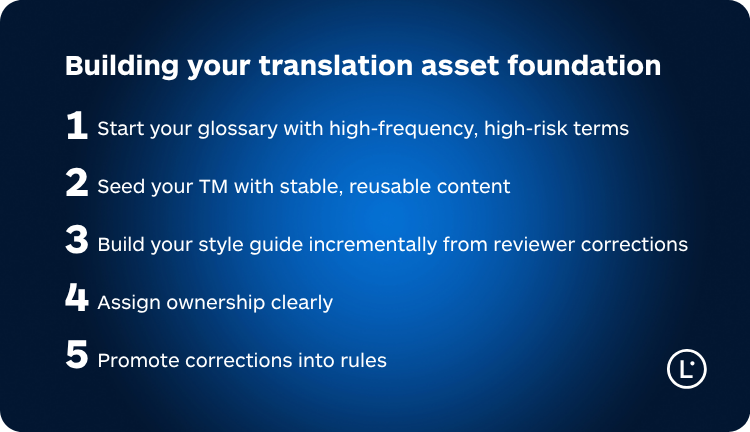
1. Start your glossary with high-frequency, high-risk terms
Identify terms that cause review delays or appear inconsistently in live content. High-stakes regulated terminology, frequent product names, and brand positioning phrases should enter your glossary before rare technical terms. A 200-entry glossary of genuinely recurring terms delivers more value than 5,000 entries that almost never appear.
2. Seed your TM with stable, reusable content
Begin with your most stable, frequently reused content. Legal disclaimers, standard support responses, and product descriptions provide strong TM foundations. Don’t start with creative or highly contextual content where exact or near matches are unlikely to recur.
3. Build your style guide incrementally from reviewer corrections
Start with formatting rules: dates, numbers, capitalization. Then add entries when reviewers flag the same issue across multiple projects. A style guide that grows from real correction patterns is far more useful than one written speculatively before anyone has translated anything.
4. Assign ownership clearly
Glossaries drift without designated owners. Assign someone to review additions, approve new terms, and remove outdated entries quarterly. This is especially critical when product names change or features are deprecated.
5. Promote corrections into rules
When reviewers correct the same term twice, add it to your glossary. When the same formatting question appears in three projects, document the answer in your style guide. Most teams do this informally in their heads. Making it systematic is what separates a consistent localization program from one that depends on institutional memory.
Common mistakes with translation memories and glossaries
Mixing all content in a single TM. Separate your TMs by content type: marketing, support, legal, and product documentation each need their own asset. Without separation, formal legal phrasing bleeds into casual customer-facing content, and reviewers spend time correcting tone rather than improving accuracy.
Overloading glossaries with rare terms. Prioritize terms that repeat frequently and carry real consistency risk. A 5,000-entry glossary where only 200 terms appear regularly creates maintenance burden and makes quarterly reviews impractical.
Creating style guides translators won’t read. Keep guides scannable with clear examples. “Use informal address in social media, formal in legal content” works. A 40-page document covering every possible edge case does not.
Ignoring regional differences. Spanish for Spain and Spanish for Latin America may require different terminology for the same concepts. Maintain separate glossaries per locale when market differences are significant enough to affect comprehension or brand perception.
Skipping periodic review. Glossaries accumulate outdated product names and deprecated feature terms. Schedule quarterly reviews to remove entries that no longer apply. An outdated glossary is often worse than no glossary at all.
How to use TMs, glossaries, and style guides effectively across teams
For centralized translation teams: one glossary owner maintains terminology standards. The TM grows through project accumulation without manual intervention. Style guides live in shared documentation with concrete examples rather than abstract rules.
For distributed teams: Team plan features in Lara Translate let multiple stakeholders contribute glossary entries. Clear approval workflows prevent terminology drift from individual reviewers making unilateral additions. Style guides should specify which markets require special handling and who owns those decisions.
For agency partnerships: export your glossaries in CSV format with ISO language codes so external translators can import them directly. Share relevant style guide excerpts rather than complete documentation — external translators need the rules that affect their specific content type, not everything.
For in-house subject matter experts: give product, legal, and marketing stakeholders read access to glossaries so they can flag outdated terms before those terms appear in customer-facing content. Most terminology errors are caught fastest by the people who own the content, not the people translating it.
Thank you for reading 💜
As a thank you, here’s a special coupon just for you:
IREADLARA26.
Redeem it and get 10% off Lara PRO for 6 months.
If you already have a Lara account, log in here to apply your coupon.
If you are new to Lara Translate, sign up here and activate your discount.
FAQs
What’s the difference between a translation memory and a glossary?
Translation memories store full approved segments (sentences, paragraphs) for reuse when similar content appears again. Glossaries store individual approved terms to prevent terminology drift across projects and languages. You need both: TMs for repetitive content structure, glossaries for consistent terminology within new content. Using only one leaves half the consistency problem unsolved.
When should I start building translation memories and glossaries?
Start glossaries as soon as reviewers are debating the same terminology across projects or when inconsistent naming is appearing in live content. Start translation memories when you’re regularly translating updates to existing content or managing recurring support responses. Both deliver value immediately but compound significantly with scale.
Can translation memories work across different content types?
They can, but it’s not a good idea. Separate TMs by content type (legal, marketing, support, product) to prevent inappropriate tone mixing. Formal legal phrasing in a casual support article is one of the most common outputs of an undifferentiated TM. Starting with separate assets gives you better control and makes quarterly reviews tractable.
How often should I update glossaries and style guides?
Review glossaries quarterly to remove deprecated terms and add new product names or feature labels. Update style guides when brand voice changes or new markets require specific handling. Translation memories update automatically as you translate, so they need no manual maintenance beyond the initial seeding.
Do I need all three assets for every translation project?
No. High-volume repetitive content benefits most from translation memories. Technical content with specialized terminology needs glossaries. Creative marketing content needs style guides most. Most programs eventually benefit from combining all three, but starting with the asset that solves your biggest current friction point delivers faster value than trying to build everything at once.
This article covers
- The difference between translation memory vs glossary and what each asset controls in a localization workflow
- When to prioritize TMs, glossaries, and style guides based on content type, review patterns, and team structure
- How Lara Translate implements glossaries with intelligent adaptation for plural forms, tenses, and gender while maintaining term precedence
- How to build your translation asset foundation without overcomplicating your stack
- Common mistakes like mixing content types in one TM, overloading glossaries with rare terms, or creating style guides nobody reads
Have a valuable tool, resource, or insight that could enhance one of our articles?
Submit your suggestion
We’ll be happy to review it and consider it for inclusion to enrich our content for our readers! ✍️
Useful articles
- 10 Italian idioms you cannot translate literally (and what they actually mean)
- How do AI translation services handle slang and informal language?