

A translation glossary is an approved terminology list that forces consistent translations for key terms (brand, product, UI, legal, technical) across languages.
If you translate across teams or channels, you have seen the problem: the same feature name gets translated three different ways, and reviews turn into rework. A glossary prevents that by locking the approved term every time it appears.
Short answer
If you want consistent naming in every language, create a translation glossary with your “must not change” terms (usually 30 to 100 to start). Then apply it to every translation job so the same term always becomes the same approved translation.
Why it matters: Most “bad translation” in real workflows is terminology drift, not grammar. A glossary reduces review cycles, protects high-risk words (UI, legal, technical), and keeps your brand voice recognizable across markets.
|
TL;DR
|
Want consistent terminology in your next translation?
Add your glossary and a bit of context, then translate a real file. Lara Translate prioritizes your approved terms so naming stays consistent across docs, UI, and marketing.
Why a translation glossary matters
 Most “translation quality” problems are not about grammar. They are about terminology and terminology management in translation.
- Consistency: the same concept gets the same term across every language.
- Clarity: users understand you faster, especially in technical or regulated content.
- Brand voice: you avoid “almost right” translations that feel off-brand.
- Speed: fewer revisions and fewer back-and-forth comments.
| Term type | Example | Risk if inconsistent | Glossary rule |
| Brand/product | Product name, plan name | Confusion, broken messaging | Do not translate |
| UI / UX | “Free trial”, “Sign in.” | Inconsistent UI, support tickets | Use the preferred term |
| Legal / regulated | Policy terms, disclaimers | Risk, re-approvals, delays | Exact approved translation |
| Technical | Feature nouns, key concepts | Wrong meaning, wrong usage | One concept, one term |
Glossary vs Translation Memory: What is the difference?
A glossary controls terms. A Translation Memory (TM) reuses full segments (sentences or paragraphs) that were already approved.
| Feature | Best for | Example |
| Glossary | Consistent terminology | “Free trial” must always be translated the same way |
| Translation Memory | Reusing approved segments | The same support reply is reused across tickets |
How glossaries work in Lara Translate
Lara Translate glossaries let you define exactly how specific terms should be translated across your work. When a glossary is active, its entries are prioritized during translation so your preferred terminology is used consistently.
For best results, pair glossaries with context (what the text is for, who it is for, and any domain notes) and choose a style (Faithful, Fluid, or Creative) to keep both terminology and voice consistent.
When reviewing, look for ambiguous terms and naming drift early, before they spread across documents.
- Unidirectional: glossary entries apply from the source language to the target language you defined.
- Case sensitivity matters: match the casing you want to control (e.g., UI labels vs. generic nouns).
- Practical takeaway: keep the glossary focused on terms that repeat or carry risk.
Helpful guide: How glossaries work in Lara Translate
How to build a glossary without overthinking
- Start with “must not change” terms: brand names, product names, UI labels, legal terms, and core technical nouns.
- Add frequent repeaters: feature names, headings, and phrases that show up everywhere.
- Define your preferred term per market: one word can have different approved translations by region.
- Upload as CSV: keep it editable and easy to update.
- Apply it during translation: use it across texts and documents.
CSV glossary format: the rules that prevent import issues
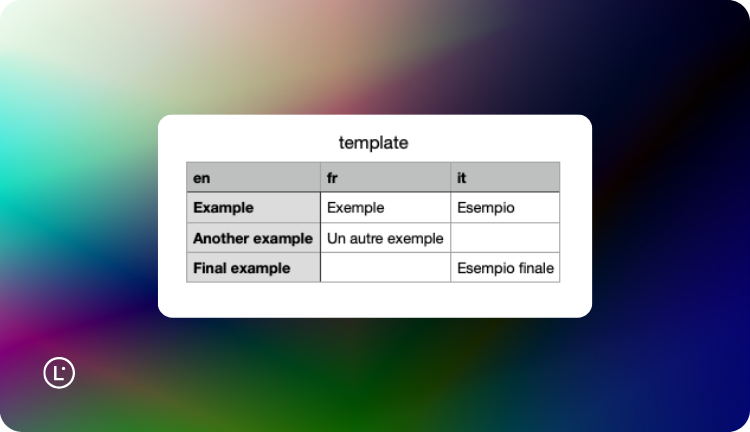
Your translation glossary CSV format must follow specific formatting rules to import correctly:
- The first row contains language headers (for example
en-US,it-IT). - Use commas as separators, not semicolons.
- Keep the same number of columns on every row.
- If a value contains a comma, wrap it in double quotes.
- Save as CSV UTF-8 to preserve accented characters.
Tip: Start with a simple 2-column glossary (source → target). Once terms are stable, add more target languages to manage multilingual terminology centrally.
Official guides: How glossaries work in Lara Translate and CSV formatting guidelines for glossaries.
Common glossary mistakes (and how to fix them)
- Mixing “do not translate” and “preferred translation” rules: keep brand/product names as “do not translate” entries and translate only what should change.
- Ignoring casing: if your UI uses “Sign in” and “sign in” differently, add entries that match the casing you want controlled.
- Duplicates and near-duplicates: merge variants (singular/plural, hyphen/no hyphen) and choose one approved form per market.
- Region collisions: if Spanish for Spain and Spanish for LATAM need different terms, separate the target columns (or keep separate glossaries by region).
- CSV formatting errors: commas inside values without quotes, inconsistent columns, or non-UTF-8 encoding are the fastest way to break imports.
Make your terminology consistent in every language
Upload a glossary, add a bit of context, and translate a real file. Lara Translate will prioritize your approved terms so naming stays consistent across docs, UI, and marketing.
FAQ
Do I need a glossary if I only translate occasionally?
Yes, if you repeat the same product, UI, department, or legal terms. Even a 30-term localization glossary saves time and prevents random wording changes.
How many terms should a glossary have?
Start with 30 to 100. Expand over time based on what actually repeats and creates review work.
Can I use one glossary for multiple languages?
Yes. A glossary CSV can include multiple target language columns, so you can manage terminology centrally.
This article is about:
- Explaining what a translation glossary is and when you actually need one.
- Showing how glossaries prevent terminology drift across languages, teams, and channels.
- Clarifying glossary vs translation memory and what each is best for.
- Sharing practical rules for translation glossary CSV format so imports work the first time.
- Helping you apply glossaries in Lara Translate for consistent, publish-ready output.