

TL;DR
|
Short Answer
Most translation formatting mistakes come from the file, not the engine. Scanned PDFs, broken tags, unaccepted tracked changes, and text embedded in images are the most common culprits. Sending structured, editable source files — DOCX, XLIFF, HTML, XML, JSON — and cleaning them before submission closes the gap before the engine sees a single word.
Why it matters: The file format choice is the first decision in any translation workflow, and it determines how much of the engine’s quality actually reaches the output. Most translation formatting mistakes happen at file preparation — before the engine sees a single word — which means they are entirely preventable. Fix the format and the engine has a fair shot; skip it and you are paying to clean up problems that did not need to exist.
Most translation problems start with the file, not the engine
Teams blame translation engines for issues the engines did not cause. The text reads oddly. Tables shift. Bullet points multiply or vanish. Headings lose their styles. Special characters render as question marks. Entire blocks of text go missing. In most of those cases, the engine did its job. The file did not. These are translation formatting mistakes, not translation quality mistakes — and they have file-level fixes. For HTML and web-based content, running the source file through an online HTML viewer before submission is one of the fastest ways to catch tag and encoding problems at the file level.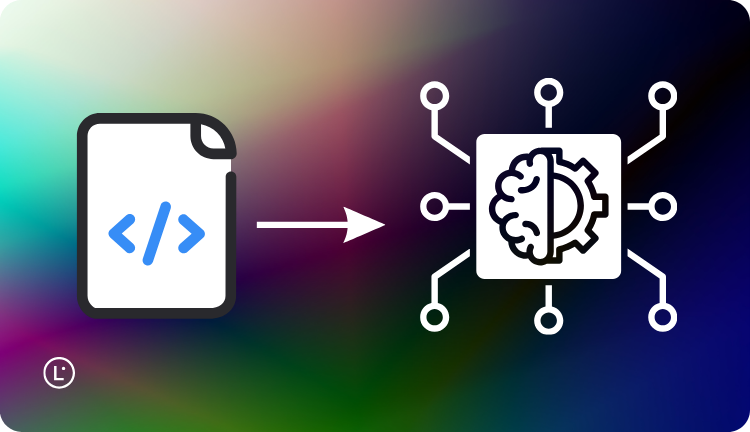 Translation formatting mistakes are the cluster of avoidable errors that appear when source files are not prepared for the way an AI translation engine reads them. They show up as:
- Lost or duplicated content. Text in headers, footers, footnotes, comments, or speaker notes gets translated twice — or skipped entirely.
- Encoding errors. Accented characters, currency symbols, or non-Latin scripts arrive at the engine corrupted, and corrupted goes out.
- Untranslated embedded text. Words inside images, charts, and SVG graphics are invisible to the engine and ship in the source language.
- Tag and code damage. HTML, XML, and JSON files lose tag structure, breaking pages, components, or entire builds downstream.
Common file type issues in localization
Different formats fail in different ways. Recognizing the patterns is the first step to avoiding them.PDFs
 PDFs are the format teams reach for most often and the format that translates worst. There are two distinct cases:
- Born-digital PDFs (exported from Word, InDesign, etc.) are workable. Text is extractable. Layout reconstruction is imperfect but usable.
- Scanned PDFs are images of text. Without OCR, the engine sees pixels, not words. Even with OCR, layout and accuracy suffer — especially for complex documents like contracts or forms.
DOCX and other Office files
 DOCX, PPTX, and XLSX translate well when they are clean. They translate poorly when they are stitched together with manual line breaks, hidden formatting, embedded objects, or text boxes pasted on top of images.
Common pitfalls include:
DOCX, PPTX, and XLSX translate well when they are clean. They translate poorly when they are stitched together with manual line breaks, hidden formatting, embedded objects, or text boxes pasted on top of images.
Common pitfalls include:
- Manual line breaks (Shift+Enter) inside paragraphs that the engine treats as sentence boundaries.
- Tables built with tab characters instead of actual tables.
- Text inserted into images or grouped shapes — invisible to most extraction layers.
- Tracked changes and comments translated alongside the live text.
HTML, XML, and JSON
 These are the engine’s preferred inputs when handled correctly. Tags separate translatable text from code, attributes signal what should not be touched, and the structure round-trips cleanly back into the system that produced it.
Where they fail is when teams try to translate them without protecting the non-translatable parts. Common issues include:
These are the engine’s preferred inputs when handled correctly. Tags separate translatable text from code, attributes signal what should not be touched, and the structure round-trips cleanly back into the system that produced it.
Where they fail is when teams try to translate them without protecting the non-translatable parts. Common issues include:
- Translating attribute values that should stay in the source language: URLs, IDs, class names, data attributes.
- Breaking placeholder syntax —
{username},%s,{{count}}— by translating the variable name or splitting the placeholder across segments. - Losing whitespace or line breaks that downstream rendering depends on.
- Translating inline code or technical examples that should pass through unchanged.
XLIFF and other translation-native formats
 XLIFF is the industry standard for moving translatable content between systems and tools. It separates source and target, marks segments, and preserves metadata. If your stack supports it, it is the closest thing to a correct default format for translation work — and Lara Translate supports it natively alongside 70+ other formats.
InDesign IDML, FrameMaker MIF, and similar publishing formats also translate cleanly when handled by tools that understand them. Forcing those formats through a generic text pipeline is where things break.
XLIFF is the industry standard for moving translatable content between systems and tools. It separates source and target, marks segments, and preserves metadata. If your stack supports it, it is the closest thing to a correct default format for translation work — and Lara Translate supports it natively alongside 70+ other formats.
InDesign IDML, FrameMaker MIF, and similar publishing formats also translate cleanly when handled by tools that understand them. Forcing those formats through a generic text pipeline is where things break.
Spreadsheets
 XLSX files translate well at the cell level, but the surrounding structure can cause trouble:
- Formulas that reference other cells get translated and break.
- Merged cells, hidden rows, and conditional formatting can confuse extraction.
- Long strings overflow narrow columns in the target language and look broken even when they are correct.
Images, video, and design files
 Embedded text in images, screenshots, infographics, and video subtitles sits outside any text layer the engine can read. It needs to be extracted, translated, and reinserted — usually by hand or through a separate workflow. Lara Translate supports image-to-image translation and text inside PDF images, which covers a meaningful share of this problem. Treating these assets as part of the translation scope, not an afterthought, prevents the most visible kind of layout preservation issues at launch.
Best file formats for AI translation
The recommendation is straightforward. The best file formats for AI translation share three properties: machine-readable text, separable structure, and preserved metadata. In rough order of preference for general business and technical content:- XLIFF. Purpose-built for translation. Use whenever the toolchain supports it.
- Native source formats (DOCX, PPTX, XLSX, IDML, MIF). Translate the original, not an export of it.
- HTML, XML, JSON, YAML. Excellent when the workflow protects tags, attributes, and placeholders.
- Markdown. Translates well for documentation when code blocks and links are handled correctly.
- Plain text (TXT, CSV). Acceptable for simple content with no structural requirements.
- Born-digital PDF. Use only when the source format is genuinely unavailable.
- Scanned PDF or image-only files. Last resort. Expect rework.
Translate complex files cleanly with Lara Translate
Translate across 70+ file formats with layout and structure preserved from source to target.
Practical tips to avoid translation formatting mistakes
A small set of habits eliminates most translation formatting mistakes before they reach the engine.- Send the editable source, not a snapshot. PDF exports of Word documents or screenshots of slides lose information the engine needs.
- Clean the file first. Accept tracked changes, remove comments, fix manual line breaks, replace fake tables, normalize styles. Ten minutes of cleanup saves hours of post-editing.
- Lock down what should not be translated. Brand names, code, placeholders, URLs, regulated terms. Use the engine’s or CAT tool’s do-not-translate markers. In Lara Translate, glossaries handle this at scale.
- Standardize encoding. UTF-8 is the safe default. Files in legacy encodings corrupt special characters and non-Latin scripts on round-trip.
- Test with a small sample. Run a few representative pages through the workflow before committing the whole project. Catch tag-handling, encoding, and layout issues on a 5-page test, not on a 500-page launch.
- Validate the output before publishing. Especially for structured files (HTML, XML, JSON), validate that the translated file parses cleanly. A broken bracket in a 200-string JSON file can take down a release.
How Lara Translate handles file format complexity
Most translation tools hand the format problem back to you. Lara Translate is built to absorb it.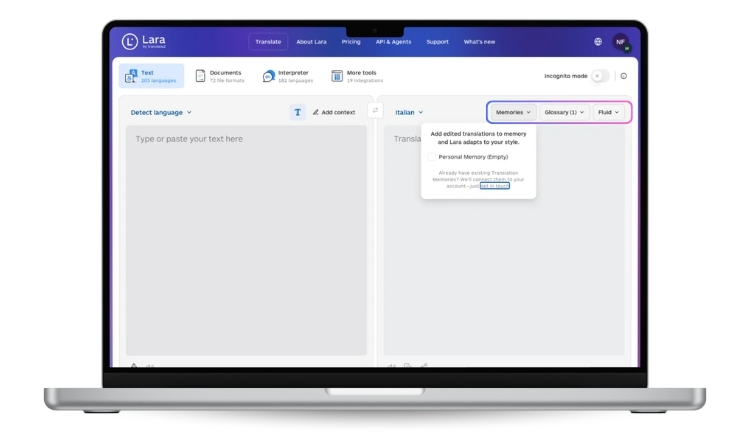
- 70+ file formats supported. Lara Translate’s document translation engine supports over 70 formats, including DOCX, PPTX, XLSX, HTML, XML, JSON, IDML, and more — covering the long tail of structured content types where translation formatting mistakes typically appear. The full list is available at developers.laratranslate.com/docs/supported-file-formats.
- Layout and structure preservation. Lara Translate preserves formatting, layout, and structural elements across the source and target, reducing the manual rework that comes with broken tables, lost styles, or shifted page elements.
- Three translation styles for tone calibration. Faithful, Fluid, and Creative styles let teams match the engine to content type — a useful complement when handling mixed file types where the source spans technical, editorial, and marketing material.
- The Think model for multi-step linguistic checks. According to official documentation, Lara’s Think model performs multi-step linguistic analysis across grammar, style, and context, designed to detect approximately 80% of major linguistic issues — useful for catching encoding artifacts and tag-related glitches that survive the format conversion stage.
Building a format playbook for your team
Translation formatting mistakes shrink fast when format choice stops being case-by-case. A short playbook turns the rules above into something a content team can apply without thinking — and turns translation formatting mistakes from a recurring annoyance into a closed problem.- Default formats per content type. Documentation in Markdown or HTML. Marketing in DOCX. UI strings in XLIFF or JSON. Spreadsheets for structured glossaries. Set the defaults and treat exceptions as exceptions.
- A pre-flight checklist. Before any file is sent for translation, run the same check: source format, encoding, cleaned content, locked terms, sample tested.
- A reference list of acceptable inputs. Publish what your team accepts and what it sends back. “We do not translate scanned PDFs without OCR” is a productive policy, not a hostile one.
- A feedback channel with translators. Whether your team uses freelancers, agencies, or AI engines, the people closest to the file see format issues first. Capture their feedback in the playbook so the next project starts from what was learned in the last one.
- A periodic review. New tools, new content types, and new markets all change the format mix. A quarterly review keeps file compatibility in translation aligned with how the team actually works.
Conclusion
File format is not a detail. It is the first decision in any translation workflow, and it determines how much of the engine’s quality actually reaches the output. Most translation formatting mistakes happen before the engine is even involved. Send the editable source. Clean the file. Test on a small sample. Validate the output. These are not complex steps. They are just the ones that tend to get skipped in the rush to hit a deadline — and they are the ones that create the most rework afterward. Lara Translate handles the format layer so your team can focus on what actually requires judgment. Getting this right does not require a new tool or a new process — it requires treating format as a first-class variable in localization, not an afterthought.FAQs
What are the most common translation formatting mistakes?
Sending scanned PDFs, translating exports instead of source files, leaving tracked changes and comments in place, and breaking tags or placeholders in structured files like HTML, XML, and JSON.Which are the best file formats for AI translation?
XLIFF, native source formats (DOCX, PPTX, XLSX, IDML), and structured formats (HTML, XML, JSON, YAML) when tags and placeholders are protected. Plain text works for simple content. Scanned PDFs are a last resort.Why does choosing file formats for machine translation matter so much?
Because most quality issues blamed on the engine are format issues: bad encoding, broken tags, lost layout, embedded text. The right format gives the engine a fair input and removes a layer of avoidable rework.How do I avoid layout preservation issues when translating documents?
Send the editable source, clean the file before submission, lock down non-translatable elements, standardize on UTF-8 encoding, and test a small sample before running the full file.Are PDFs a bad choice for AI translation?
Born-digital PDFs are workable but rarely ideal. Scanned PDFs are the worst case because the engine sees images instead of text. Whenever possible, send the original Word, InDesign, or source file.Does the translation model affect layout preservation?
No. Layout preservation is a file-format problem. The engine only translates what the file makes accessible to it. Switching to a higher-quality model will not recover text embedded in images or fix broken tags.This article is about
- Why most translation formatting mistakes are file-level problems, not engine problems.
- Common file type issues in localization for PDFs, Office files, structured formats, and images.
- The best file formats for AI translation, ranked by how cleanly they round-trip.
- Practical steps for choosing file formats for machine translation and avoiding layout preservation issues.
- A short playbook to make file compatibility in translation a solved problem across content types.
Have a valuable tool, resource, or insight that could enhance one of our articles? Submit your suggestion
We’ll be happy to review it and consider it for inclusion to enrich our content for our readers! ✍️