

Reading a page you do not understand should not turn into a mini workflow.
You land on a help article in Japanese, a competitor pricing page in German, or a supplier catalog in Chinese. Suddenly you are copying chunks of text, losing context, and second guessing tone.
The Lara Browser Extension helps you translate web pages fast in Chrome, without tab switching or copy paste. You can translate full pages in place, or translate selected text where you work.
TL;DR
|
What’s new
|
Translate web pages fast, right where you browse
Install the Lara Browser Extension to translate full pages in place or translate selected text in Chrome, without tab switching or copy paste.
Install it here: lara.to/chrome-extension
How can I translate web pages fast in Chrome without copy paste?
| Short answer: Install the Lara Browser Extension, then use Page Translator to translate an entire web page in place, or Text Translator to translate only what you highlight. Choose a style based on your goal: Faithful for precision, Fluid for natural language, and Creative for intent-first rewrites. |
If your goal is to translate web pages fast, the fastest win is removing copy paste. Translate where you are, keep the page usable, and keep context intact.
What does the Lara Browser Extension do?
The Lara Browser Extension has two modules, depending on whether you need to translate a full page or translate selected text in Chrome.
1) Page Translator (full page)
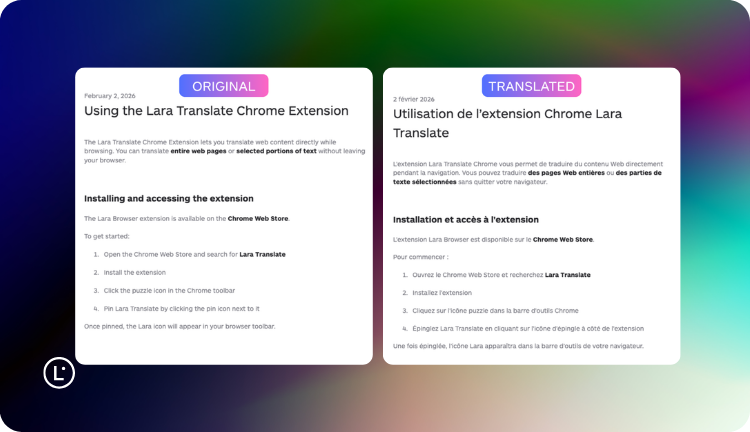
Translate an entire web page in place.
- Keeps the page usable as a page
- Preserves layout and links as you browse
- Lets you switch between translated view and original view
- Lets you choose source language (or Detect) and target language
This is for reading and navigating. It is ideal when you need a Chrome page translator that does not break browsing.
2) Text Translator (selected text)
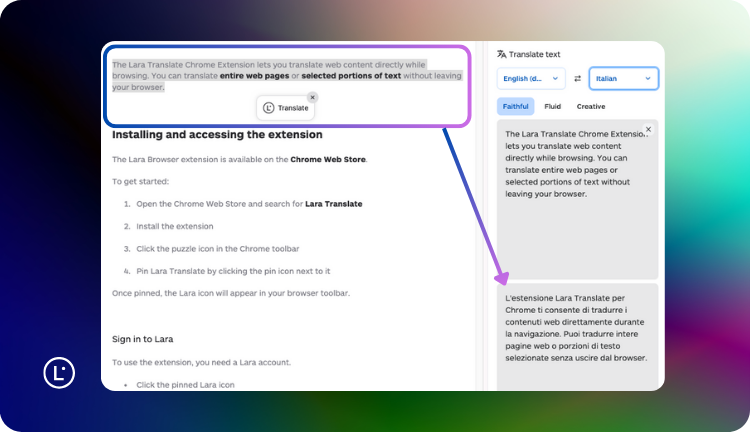
Translate only what you highlight or paste, right where you are.
- Great for messages, tickets, snippets, and quick replies
- Lets you choose a translation style: Faithful, Fluid, or Creative
- Can show a small translation icon when you highlight text (toggle in settings)
This is for fast back and forth communication. If you like “highlight to translate,” this is the module that makes it feel instant.
Result: you translate web pages fast without switching tools, and you keep control over how the output should read.
Which use case should I use Page Translator or Text Translator for?
Quick picker: match the job to the right module and style.
| Use case | Best module | Best style |
|---|---|---|
| Support ticket or live chat reply | Text Translator | Faithful |
| Competitor pricing page or product page | Page Translator | Fluid |
| Policies, terms, technical instructions | Page Translator | Faithful |
| Rewrite a headline or short marketing snippet | Text Translator | Creative |
Try it on a page you actually need today
Open any foreign-language page, click “Translate this page,” then switch styles when you need precision, natural tone, or intent-first rewrites.
Why does copy paste translation slow you down and hurt accuracy?
Most people translate the web like this:
- Copy a sentence
- Paste it somewhere else
- Translate
- Copy the result
- Go back to the original page
- Repeat
It is slow. It breaks focus. It is easy to miss context. And if you are translating for work, “good enough” often fails on tone, intent, and small details.
Operational teams need translation in real time, inside the tools they already use. The fastest way to improve both speed and quality is to translate web pages fast in Chrome, without turning translation into a separate task.
Who is the Lara Browser Extension for?
If you touch international content during your day, this Chrome translation extension is for you.
Support and Ops
 Understand inbound messages instantly and reply confidently without leaving the ticket. It is especially useful when you need to translate selected text in Chrome while staying inside your support tool.
Featured workflow: translate inbound message, draft reply, translate reply back.
Sales and Customer Success
 Translate web pages in Chrome to quickly understand product pages, FAQs, pricing pages, and customer websites. You can translate the page in place and keep the links working.
Research and Knowledge Work
 Reading international news, references, and long form content should not require copy paste. A full page translator turns foreign language browsing into normal browsing.
Developers and Product Teams
 Docs, issues, and communities are global. Use the extension to read and contribute across international documentation and threads without leaving your browser.
Which use cases make people say “Wow”?
Here are a few that tend to click instantly, because they remove friction from things people do every day.
Work use cases
1) Support replies without leaving the ticket
Translate the customer message to understand it fully. Draft your response in your language. Translate the response back with the right style.
2) Sales and CS reading mode
You are checking a competitor page or a customer website in a language you do not speak. Instead of translating pieces and losing structure, you translate the whole page and keep moving.
3) Ops and procurement
Supplier catalogs, product sheets, shipping policies, and B2B portals are often messy. Page translation lets you navigate these sites like you normally would.
4) Research and monitoring
When you scan international news, forums, and knowledge bases, speed matters. Full page translation helps you translate web pages fast without breaking your reading rhythm.
Personal use cases
1) Travel planning
Booking pages, tours, train sites, menus, local guides. Translate the page and keep the flow of browsing.
2) Shopping across markets
International marketplaces can be dense. Translating the page in place makes reviews, variants, and checkout steps understandable.
3) Reading content you actually care about
Articles, recipes, niche communities. The barrier should be language, not friction.
What do Faithful, Fluid, and Creative mean in translation?
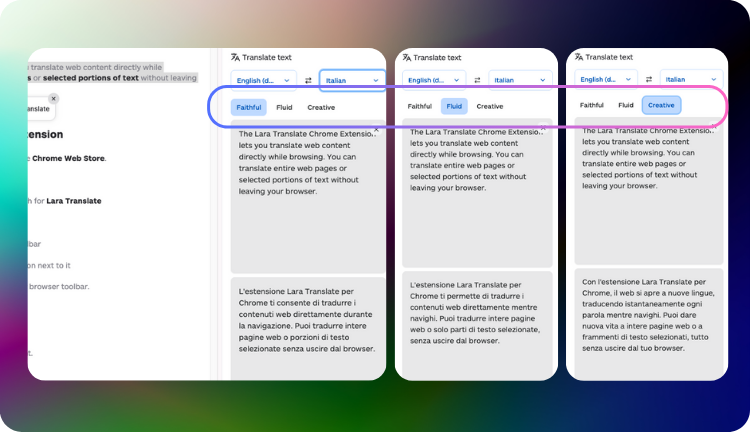
These styles define how the output should read. They are not “quality levels.” They are different goals for different situations.
Faithful prioritizes accuracy and structure. It stays close to the source, uses careful wording, and avoids unnecessary interpretation.
Fluid prioritizes natural language. It keeps the same meaning, but rewrites phrasing so it reads like something a human would actually say in the target language.
Creative prioritizes intent and tone. It is best when a literal translation sounds awkward and you need a version that carries the message, not the exact wording.
How do I choose the right translation style?
Faithful
Use this when you need precision.
- Support tickets where details matter
- Technical instructions
- Policies, legal content, contracts
- Product specs
Expect close to the source structure, minimal interpretation.
Fluid
Use this when you need natural language.
- Most web pages
- FAQs
- General business communication
- Internal summaries
Expect the same meaning, more natural phrasing.
Creative
Use this when you need intent, not literal wording.
- Marketing copy
- Headlines
- Short social snippets
- Rewrites for clarity
Rule of thumb: if you would feel weird sending the sentence as is, switch to Fluid or Creative.
Why should I trust the output when I translate web pages fast?
Trust, in one block:
|
This matters most in real workflows: support replies, policies, procurement, and any time a small wording shift creates a big misunderstanding.
Why might page translation be unavailable on some websites?
Page translation may not be available on all websites, even if the page is in HTML format.
- Some websites use technical or security configurations that prevent extensions from accessing or modifying page content.
- Complex or highly dynamic websites (for example platforms with login, interactive content, or advanced navigation) may block reliable page translation.
In these cases, page translation is automatically disabled to ensure stability and translation quality. If page translation is unavailable, you can still translate specific content using the Text Translator, or copy text into Lara Translate.
How do I get started in 60 seconds?
- Install the extension: lara.to/chrome-extension
- Pin it in Chrome so it is always visible in your toolbar
- Sign in with your Lara Translate account
- Open a page in a language you do not understand
- Click the Lara Translate icon
- Choose the source language (or keep Detect)
- Select the target language
- Click “Translate this page”
- Toggle “Show original” whenever you want
For quick snippets:
- Highlight a sentence
- Use the Text Translator
- Pick Faithful, Fluid, or Creative based on your goal
That is it. No copy paste. No tab switching. Just faster browsing.
FAQ: what do people ask when they want to translate web pages fast?
Can I translate a full page in Chrome without copy paste?
Yes. Use Page Translator to translate the entire web page in place.
Can I translate only a selected paragraph or message?
Yes. Use Text Translator to translate selected text in Chrome from highlights or pasted snippets.
Can I control tone and writing style?
Yes. Choose Faithful for precision, Fluid for natural language, or Creative for intent-first rewrites.
Can I prevent translation on certain sites?
Yes. Add sites to the exclude list so the extension does not translate there.
Can I auto translate specific languages?
Yes. Choose which source languages trigger auto translation.
Is this a Chrome page translator that keeps links working?
It keeps browsing usable on many sites, but page translation may be unavailable on some websites due to technical, security, or high-dynamic behavior.
How is usage billed?
Translations performed through the Lara Translate Chrome Extension are billed using the Text Translation quota associated with your Lara Translate account.
Are you ready to translate web pages fast?
Install the Lara Browser Extension to translate full pages and selected text in Chrome without copy paste, while keeping context and links usable.
This article is about:
- How to translate web pages fast in Chrome without copy paste or tab switching.
- When to use Page Translator vs Text Translator for real browsing and real work.
- What Faithful, Fluid, and Creative styles mean, and how to pick the right one.
- How trust features like explained choices and ambiguity flags help you avoid mistakes.
- What the current limitations of page translation are, and what to do instead.
Useful articles and links: