

Image translation is one of those tasks that looks simple until you need results you can actually use.
Whether you want to translate text in an image (a screenshot, photo, scanned page, meme, slide, or UI capture), you usually want the meaning fast. Instead, it turns into a mini workflow: copy, paste, lose context, fix weird wording, and still not be sure the translation fits or even makes sense.
This guide explains how to translate text in an image in a way that is usable, whether you need copyable text or a translated image that stays readable.
TL;DR
|
Why it matters
Image translation is where the highest-risk text often lives: UI screenshots, labels, warnings, charts, and small print. If the output is not readable and context-correct, you end up rebuilding visuals or sharing the wrong meaning. A good workflow gets you usable results on the first pass.
How do you translate text in an image?
Use this simple rule:
- If you only need the meaning, use image-to-text (OCR → translated text you can copy).
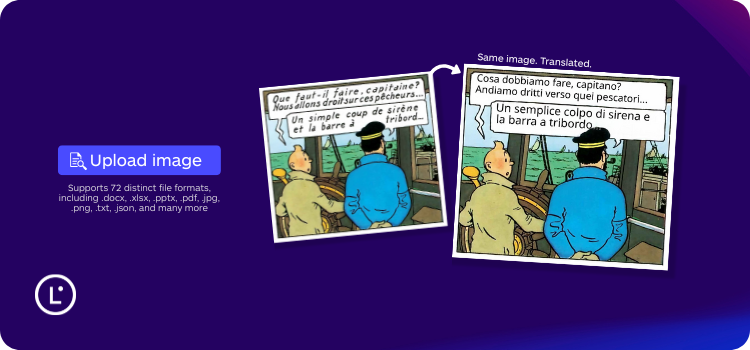
- If you need a deliverable you can share or publish, use image-to-image translation (OCR → translate → text placed back in the image).
- If results look wrong, it’s usually OCR errors, wrong reading order, or text expansion that no longer fits.
Choose the right image translation method based on your goal.
| Your goal | Use | What you get |
|---|---|---|
| Understand the text fast | Image-to-text | Copyable translated text |
| Share, publish, or hand off the asset | Image-to-image | Translated image with text in place |
| Translate screenshots inside a scanned PDF | PDF image workflow | OCR + translation + in-place replacement |
Quick QA checklist (30 seconds)
- Numbers and units: decimals, separators, currencies, measurements.
- Names and brands: product names, model codes, people and company names.
- Tiny text: disclaimers, labels, footnotes, captions.
- Reading order: columns, callouts, table cells, steps in the right sequence.
- Fit and readability: does translated text still fit and stay legible?
What is image translation?
Image translation means translating text that appears inside an image: a photo, a screenshot, a scanned document, or a graphic. The key is understanding the output you actually need, because “translate photos” can mean two very different results.
There are two different outcomes
1) Image-to-text translation gives you translated text you can copy and paste. This is useful when you just need to understand something quickly.
2) Image-to-image translation gives you a translated image where the text is placed back into the picture. This is what you want when the image itself is the deliverable (for sharing, publishing, documentation, or workflow handoff).
Image-to-text vs image-to-image: outputs, use cases, and common issues.
| Method | Output | Best for | Typical issues |
|---|---|---|---|
| Image-to-text | Translated text | Quick understanding, note-taking | No layout, missing tiny text, wrong reading order |
| Image-to-image | Translated image | Sharing, docs, graphics, publish-ready output | Text expansion, font fit, OCR quality |
OCR for image translation: what it does and where it fails
Most tools translate images using OCR first. OCR stands for Optical Character Recognition. It “reads” text from pixels and turns it into editable text, so it can be translated.
What OCR does well
- Clear screenshots with high contrast
- Standard fonts and clean backgrounds
- Short strings like buttons, headings, labels
Where OCR struggles (and why your translation looks wrong)
If OCR misreads the pixels, the translation is doomed. Most “bad image translations” come from:
- Low resolution and blur: letters become guesses, and translation quality drops instantly.
- Stylized fonts and handwriting: OCR may confuse characters or miss words.
- Text on complex backgrounds: gradients, textures, and shadows can hide text edges.
- Curved or rotated text: common in packaging, posters, ads, and infographics.
- Mixed languages: OCR can mis-detect language and produce inconsistent output.
- Reading order problems: multi-column layouts and callouts may be read in the wrong sequence.
How to translate images step by step
If you want consistently good results, treat image translation like a small process. It takes seconds, but it prevents most failures.
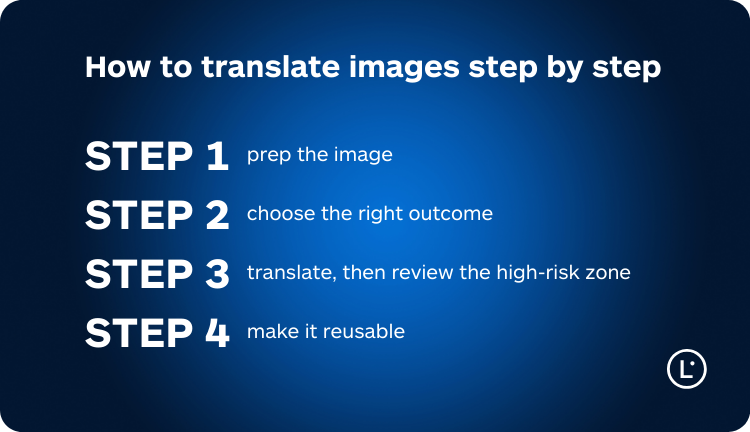
Step 1: prep the image
- Crop to the relevant area: remove extra UI, empty space, or unrelated sections.
- Straighten and zoom: if the text is tilted, rotate it. If it is small, zoom in before capturing.
- Increase clarity: avoid screenshots with motion blur or photos taken in low light.
Step 2: choose the right outcome
- Need to understand quickly? Use image-to-text.
- Need a translated asset you can send or publish? Use image-to-image translation.
This is where many teams waste time. They translate to text, then manually rebuild the image, or worse, they ship something unreadable.
Step 3: translate, then QA the high-risk zones
Even the best tools will occasionally need a human check. Focus your attention on what matters most:
- Numbers, dates, and measurements: decimals, separators, currencies, and units often change by market.
- Product and brand terms: repeated terms should stay consistent across images.
- Warnings and disclaimers: small text often carries the biggest risk.
- UI strings: short labels can be context-dependent and easy to mistranslate.
Step 4: make it reusable
If you translate images for work, the fastest way to improve output is consistency. Keep a small list of preferred terms and reuse it across similar images. This is especially relevant for product naming, UI labels, and domain language.
Common mistakes that ruin image translation
- Only translating the obvious text: captions, footnotes, and small labels are often missed.
- Assuming literal translation is safe: short phrases often carry intent that needs context.
- Ignoring text length: translated text can become longer and stop fitting in the original space.
- Not checking reading order: lists and multi-column layouts can become scrambled.
- Skipping the final usability test: can someone read it quickly, or does it feel messy?
Real-world image translation use cases
Work: screenshots, specs, and operational content
Work images are usually not “nice” images. They are screenshots, scanned attachments, quick captures from tools, and visuals shared in a hurry. The goal is not just understanding. It is getting a result that can be used in a workflow.
- Customer support: screenshots of UI states, error messages, and chat logs embedded in images.
- Product and engineering: specs, diagrams, and screenshots of internal tools.
- Sales and procurement: catalogs, labels, supplier screenshots, and product images.
Personal: travel, shopping, and everyday life
For personal use, the priority is speed and clarity. If you translate a menu or a label, you want the meaning instantly and you want to avoid “false friends” that change what you think you are reading.
- Menus and signs: context matters more than literal meaning.
- Labels and instructions: small text is critical, especially on packaging.
- Receipts and forms: numbers and item names need quick sanity checks.
How Lara Translate handles image translation
Lara Translate is built for usable output, not just rough understanding. It supports image-to-image translation, so you can translate an image and get back a translated image where the text stays readable and in place. This is the difference between “I understood it” and “I can send it, publish it, or keep it in the workflow.”
When wording is ambiguous or context is missing, Lara Translate can explain translation choices and flag ambiguity, so teams keep control over meaning and tone. For consistent terminology across similar assets, you can also use glossaries and Translation Memory, and choose a style (Faithful, Fluid, Creative) based on your goal.
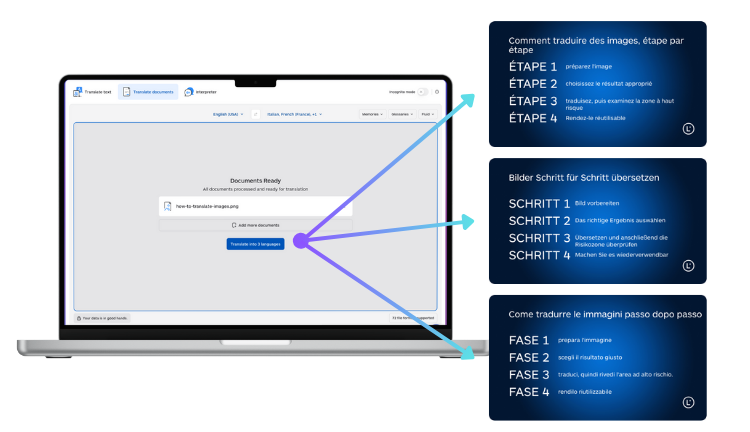
If you want to see the exact workflow, start here:
If your image is inside a PDF (scanned pages, embedded screenshots, charts), use the PDF-specific guide:
Try Lara Translate in your own workflow
Test Lara Translate on a real client text and see how it handles your terminology, context, and formatting.
FAQ
How do I translate text in an image without retyping it?
Use OCR-based image translation. The tool extracts the text from the image, translates it, and returns either translated text (image-to-text) or a translated image (image-to-image).
What is the best way to translate screenshots?
If you only need to understand the message, image-to-text is enough. If you need a screenshot you can share with the translated text in place, use image-to-image translation.
Do I always need OCR for image translation?
In most cases, yes. If the text is part of the image pixels, OCR is required to turn it into editable text before translation.
Why does translated text look weird or out of place in images?
Common reasons are OCR mistakes, wrong reading order, and text expansion that no longer fits the original space. Cropping, better image quality, and a quick QA pass usually fix most issues.
Can I translate photos online for free?
You can, but results vary. Free tools often focus on speed and basic understanding. If you need consistency, readability, or team workflows, use a tool designed for image-to-image output and review.
How do I translate images inside a PDF?
If the PDF contains scanned pages or embedded screenshots, you need a workflow that translates the image layer, not just the selectable text. Use a PDF image translation workflow designed for OCR and in-place text replacement.
Thank you for reading 💜
As a thank you, here’s a special coupon just for you:
IREADLARA26.
Redeem it and get 10% off Lara PRO for 6 months.
If you already have a Lara account, log in here to apply your coupon.
If you are new to Lara Translate, sign up here and activate your discount.
This article is about:
- Explaining what image translation is and why “translate photos” can mean very different outputs.
- Showing how OCR impacts accuracy and what to do when translations look wrong.
- Providing a practical step-by-step workflow on how to translate images and translate screenshots.
- Covering real work and personal use cases for translating text in images.
- Helping you choose between image-to-text and image-to-image translation, including images inside PDFs.