

If you translate in memoQ, MT quality varies and workflow fragmentation slows you down. This guide shows how the Lara Translate integration solves these issues and how to install, use, and optimize it.
What is the Lara Translate memoQ integration? It’s a plugin that lets you use adaptive, context-aware MT directly inside memoQ without switching tools. This means faster translation, instant TM updates, and more consistent terminology across your projects.
If you work inside memoQ every day, you already know how much your productivity depends on staying focused. Switching between tools slows you down, introduces errors, and breaks consistency. The new Lara Translate integration solves this by bringing adaptive, context-aware machine translation directly into memoQ — no tab switching, no copy-paste, no fragmented workflow.
With this memoQ machine translation integration, you translate segment by segment just like you normally do, while Lara reads the entire document context, adapts instantly to your corrections, and updates your Translation Memories in real time. It’s a simple and reliable setup that lets translators work faster and more consistently without leaving memoQ.
TL;DR
|
How does the Lara Translate integration work inside memoQ?
The Lara Translate plugin for memoQ brings together two worlds: memoQ’s structured CAT workflows and Lara’s adaptive, context-aware translation engine.
This integration gives you:
- context-aware MT suggestions directly inside the Translation Results pane
- real-time TM updates every time you confirm a segment
- full control of MT profiles, settings, and usage
- secure communication through encrypted API calls
Lara Translate supports 200+ languages, including technical and localization formats such as XLIFF, PO, SRT, and more. Making it a strong companion for memoQ users handling large, technical, institutional, or marketing content at scale.
But beyond features, this integration is designed to solve real daily challenges for translators and localization teams.
How is Lara different from other memoQ MT providers?
Unlike other MT engines in memoQ that translate segments independently, Lara reads the full document, learns from your edits, and updates TMs in real time. This reduces repetitive corrections and ensures coherent voice across long projects.
Most MT engines inside memoQ translate one segment at a time, which often leads to inconsistencies, repetitive fixes, and a loss of tone or meaning across long documents. Lara takes a different approach: it reads the full document, adapts instantly to your corrections, and updates shared translation memories in real time. The result is more coherent suggestions, fewer interruptions, and a smoother workflow that feels much closer to how translators actually work inside memoQ.
Try Lara Translate in memoQ
Test Lara Translate on a real workflow and see how it handles your terminology, context, and formatting.
Why choose Lara over ModernMT and other MT engines?
If you’re using ModernMT today, you already know the value of adaptive machine translation. But Lara takes this further with a newer generation of LLM-powered technology that delivers higher quality, stronger context awareness, and smoother cross-segment coherence. Internal evaluations show that Lara provides roughly 30 percent* higher quality than ModernMT across 200 languages while producing more fluid, natural output. If your work relies on consistency, tone, and document-level reliability, switching to Lara delivers a measurable improvement with the same or simpler workflow.
*Internal data from Translated, Lara vs. ModernMT, 2025
Comparison: Lara Translate vs. ModernMT vs. Other MT Engines
| Feature | Lara Translate | ModernMT | Other MT engines (DeepL, Google Translate, etc.) |
|---|---|---|---|
| Translation quality | Internal evaluations show ~30% higher quality vs. ModernMT across 200 languages, with more stable tone and nuance. *Internal data from Translated, Lara vs. ModernMT, 2025* |
Strong in major EU languages, adaptive behavior based on user edits. | Quality varies heavily; often, it is strong only in high-resource languages. |
| Context awareness | LLM-powered engine with document-level context, not just single-sentence MT. | Adaptive MT, but primarily segment-level. | Mostly sentence-only MT with minimal contextual reasoning. |
| Cross-segment coherence | Fluid, consistent output thanks to forward + backward segment context. | Improvements appear over time, but phrasing may vary across segments. | Typically inconsistent across paragraphs or documents. |
| Language coverage | 200+ languages and variants. | 200+ languages and variants. | Varies (roughly 25–130). |
| Segment fluidity | Produces smooth, natural transitions between segments, reducing re-editing. | Adaptive but can fluctuate in longer documents. | Often requires heavy post-editing to maintain consistency. |
What kind of solution is the Lara Translate memoQ integration?
The plugin is built for teams that want higher quality, greater consistency, and fewer workflow interruptions. Instead of sending text to an external MT tool, everything now happens inside memoQ.
It solves key pain points:
1. Fragmented workflows
Lara sits inside memoQ. No switching tools. No context loss.
2. MT that ignores context
Lara reads the full document, not just the segment. Tone, meaning, and structure stay aligned.
3. Terminology drift
Every correction becomes part of the TM instantly. No manual sync.
4. Slow onboarding for new translators
Lara applies your organization’s terminology rules and TMs, helping junior linguists produce consistent work from day one.

Who should use the Lara Translate integration in memoQ?
This plugin is for translators and teams who use memoQ as their main CAT tool and want higher-quality MT with fewer workflow interruptions.
Professional translators
Freelancers or in-house linguists who want speed without losing quality.
LSPs and boutique agencies
Teams that need consistency across multiple translators.
Localization and content managers
People responsible for maintaining tone, terminology, and governance.
Enterprises and institutions
Especially those translating policies, documentation, academic content, internal communications, or marketing material.
What are the best use cases for the Lara Translate memoQ integration?
Large technical documentation
Long manuals, engineering specs, and multi-chapter content stay consistent across hundreds of pages.
Benefit: Terminology stays stable, even in huge files.
Example: A 300-page engineering manual translated into five languages.
With Lara:
- TM updates propagate instantly
- suggestions remain consistent across chapters
- repeated corrections disappear
- terminology stays stable
Marketing content where tone matters
Product pages, campaigns, emails, and narratives keep tone and brand voice aligned across sections.
Benefit: Tone stays consistent without manual harmonization.

Example: Long-form product pages, slogans, emails, taglines.
With Lara:
- context is preserved across sections
- brand voice stays consistent
- one correction influences all future suggestions
Institutional or regulatory content
Policies, compliance content, research papers, and internal communications require precision and uniform language.
Benefit: Consistency and governance built into every segment.
Example: Universities, public institutions, and enterprises translating compliance text.
With Lara:
- terminology remains stable
- updates sync across translators
- workflows remain in a secure environment
Evergreen documentation and long-term accounts
Support articles, FAQs, knowledge bases, and product guides evolve constantly and need unified language.
Benefit: Every correction improves future suggestions automatically.
Support articles, product descriptions, knowledge bases.
With Lara:
- every correction improves future suggestions
- language evolves naturally with the content lifecycle
Multi-translator projects
Teams of several linguists work on the same files without diverging in style or phrasing.
Benefit: Real-time TM updates keep everyone aligned.
Example: 3–10 linguists working on the same files.
With Lara:
- shared TM updates reflect the latest confirmed segments
- phrasing stays consistent across contributors
- less harmonization is needed at the end
How does context-aware translation work inside memoQ with Lara?
The plugin respects how translators actually work: you move segment by segment, but Lara reads the entire document. This improves meaning, tone, fluency, and cross-section alignment. Ideal for terminology-heavy or narrative content.
How do you install the Lara Translate plugin in memoQ?
Request the plugin installer directly from Lara Translate. After installing and opening memoQ, you’ll see an unsigned plugin warning.
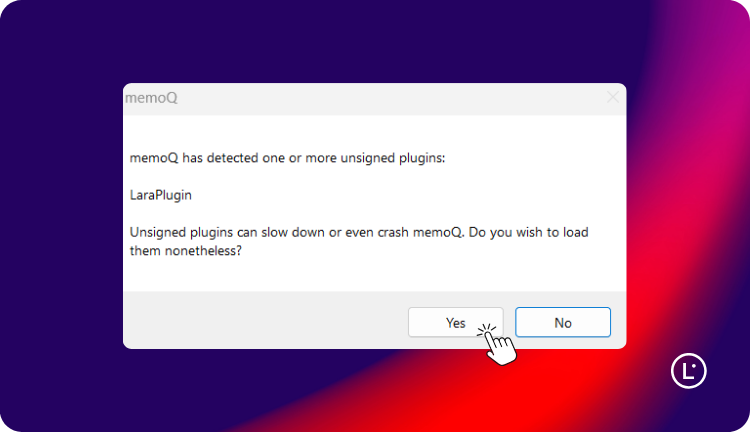
This message is standard for plugins distributed outside the memoQ Marketplace. It does not represent a security risk. Today:
- the plugin is developed and maintained by Translated
- it does not access memoQ system files
- communication with Lara is encrypted
- no data is stored locally
The signed version is expected in Q2 2026.
Select “Yes” to continue.
How do you configure your Lara Translate profile in memoQ?
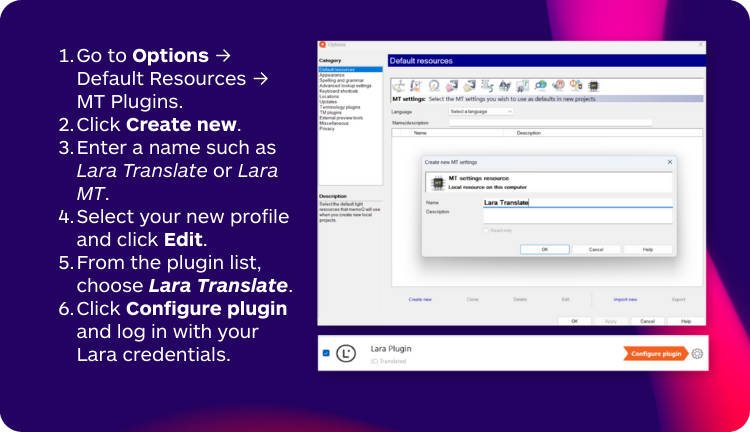
memoQ does not automatically create a Lara profile. Configure it once:
- Go to Options → Default Resources → MT Plugins
- Click Create new
- Name your profile
- Select it and click Edit
- Choose Lara Translate
- Click Configure plugin and log in
Your MT profile is ready.
How do you set Lara as your default MT provider in memoQ?
- Go to Options → Default Resources → MT Settings
- Select your Lara profile
- Click OK
memoQ will now use Lara for all new projects.
How do you enable self-learning MT in memoQ?
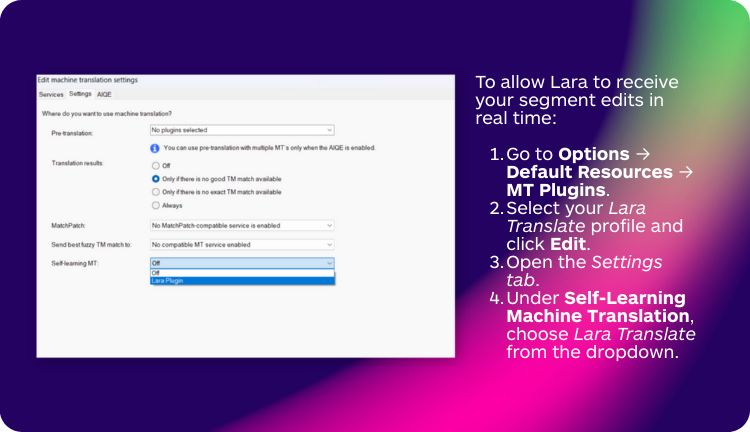
To allow Lara to adapt to your edits in real time:
- Edit your Lara profile
- Open Settings
- Under Self-Learning Machine Translation, select Lara Translate
- Save
This links memoQ confirmations to your Lara TMs.
How do you translate with Lara Translate inside memoQ?
- Create a new memoQ project
- Go to Project Home → Settings → MT Settings
- Select Lara
- Start translating
Adaptive suggestions appear in the Translation Results panel.
How do you connect and manage translation memories with Lara in memoQ?
You can attach TMs with two modes:
- Use → Lara leverages the TM
- Use & Update → Lara leverages and updates it in real time
How do real-time TM updates work in the Lara + memoQ integration?
Each confirmed segment:
- is sent to Lara
- updates the TM instantly
- improves future suggestions
You can verify updates directly in the Lara dashboard.
How does usage and caching work in Lara Translate for memoQ?
The plugin includes a 24-hour usage cache: repeated translations within this period are not charged again. Useful for reviews or reopening projects.
A monthly memoQ usage report will soon appear in your Lara dashboard.
How does Lara Translate handle privacy and data security inside memoQ?

Lara Translate follows strict security principles:
- enterprise-grade protection
- encrypted communication
- no local data storage
Suitable for organizations with strong compliance requirements.
How do you roll out the Lara Translate integration across a memoQ team?
Most memoQ teams adopt Lara easily using this pattern:
- start with a small pilot
- connect shared TMs
- enable self-learning for automatic consistency
- train reviewers once
- expand to the full team
The integration fits into existing memoQ workflows with no extra training, making adoption smooth even for large teams.
What is the quick start checklist for using Lara Translate in memoQ?
- Install Lara Translate for memoQ
- Create your Lara MT profile
- Configure the plugin and log in
- Set Lara as default MT
- Connect your TMs
- Enable self-learning
- Start translating
Try Lara Translate in memoQ
You can start using Lara in memoQ today and get a smoother, more adaptive workflow powered by context-aware MT and real-time learning — all without leaving your CAT tool.
Try Lara Translate in memoQ
Test Lara Translate on a real workflow and see how it handles your terminology, context, and formatting.
FAQ
Does the unsigned plugin warning mean there’s a security issue?
No. It simply indicates the plugin is not yet signed in the memoQ Marketplace.
Will the plugin behave differently once signed?
No. Only the warning disappears.
Does Lara store memoQ project data?
No. Only the text needed for MT generation or TM updates is processed.
Can I use multiple TMs?
Yes. You can choose Use or Use & Update for each TM.
Does Lara adapt to my edits?
Yes. With self-learning enabled, every confirmed segment updates the TM instantly.
This article is about
- how to install and activate the Lara plugin in memoQ
- how to configure MT profiles
- how to connect and update TMs
- how adaptive MT works inside memoQ
- how caching and usage behave in the integration
- who benefits from the integration and why
- practical use cases where Lara + memoQ excels
Have a valuable tool, resource, or insight that could enhance one of our articles?
Submit your suggestion
We’ll be happy to review it and consider it for inclusion to enrich our content for our readers! ✍️