

Most machine translation mistakes don’t come from the engine. They come from the workflow around it. No context provided, no source review, no post-editing step, and no clear policy for what content is actually safe to run through MT. The output looks finished. The errors only surface when an audience sees them.
This guide covers the six most common machine translation mistakes, what causes each one, and the fixes you can apply today without rebuilding your process.
TL;DR
|
Mistake 1: the literal translation error
The literal translation error is one of the oldest failure modes in MT and one of the most persistent. When an engine can’t resolve meaning from structure or context, it defaults to word-for-word output. The result is text that parses correctly but sounds nothing like how a native speaker would phrase the same idea.

Some cases are obvious. Idioms like “bite the bullet” or “costs an arm and a leg” render as physical descriptions in most target languages. Others are more subtle: fixed legal expressions, culture-specific conventions, and industry shorthand that carry precise meaning in one language but have no direct equivalent in another.
The literal translation error is particularly damaging in three contexts: marketing copy, where tone and resonance matter as much as technical accuracy; legal documents, where word-by-word rendering can shift the meaning of obligations; and customer-facing support content, where awkward phrasing quietly erodes trust.
The fix requires working at the source level. Before sending content through MT, flag phrases that depend on cultural knowledge or fixed meaning. Replace idioms with their plain-language equivalents when the content will run through automated pipelines. For any output where natural language in the target market is the standard, a review step is not optional.
Mistake 2: context lost in translation
 Context lost in translation is not just a figure of speech. It describes a specific failure mode in MT workflows. Most engines process input in isolation. Without domain signals, style cues, or surrounding text, the system makes a statistical best guess about meaning. When that guess is wrong, the output can be technically accurate and still completely wrong for the situation.
A document about financial instruments contains the word “security.” Without domain context, the system may render it in ways that relate to physical safety. A user guide aimed at non-technical readers can come out in a register that sounds like a developer manual. A customer communication written to be warm and direct can arrive in the target language sounding bureaucratic.
Common AI translation errors rooted in context loss are especially frequent when teams copy raw text into an MT interface without cleaning the source first: mixed languages within a single document, metadata embedded in body text, or multiple registers in the same paragraph each pull the system in a different direction.
The practical response is to give the tool as much context as it supports. Use glossaries to anchor key terminology. Where the platform allows it, specify the domain or communication style of the content. Then review output not just for accuracy, but for how it reads in the actual situation where your audience will encounter it.
Mistake 3: skipping post-editing entirely
Skipping post-editing is one of the most consequential machine translation mistakes in production workflows. The reasoning is understandable: MT is fast, the output looks presentable on the surface, and adding a review step feels like it offsets the efficiency gain. It doesn’t. MT does not produce publication-ready output without some form of human oversight.

This is not an argument against MT. It’s an argument for using it correctly. Light post-editing — checking for terminology consistency, register appropriateness, and cultural fit — is enough to catch the majority of common AI translation errors before they reach an audience. For higher-stakes content, a more thorough review pass is warranted.
The business case is direct. Catching machine translation mistakes in review costs less than correcting them after publication. Rework, reputational damage, or in regulated sectors, legal exposure, all represent real costs that a structured post-editing step can reduce.
Building a review step into your MT workflow doesn’t require rebuilding the entire process. A focused checklist aligned to the content type, combined with clear guidance on what reviewers should prioritize, keeps the step efficient while meaningfully improving output quality.
Mistake 4: sending idioms straight through MT
 Idioms deserve a separate entry because they fail so predictably. Every language runs on expressions that carry meaning beyond their literal words, and MT systems (particularly those trained predominantly on formal text) handle them poorly. “On the fence” has nothing to do with garden structures. “Ball is in your court” is not a sports instruction. In most MT pipelines, these phrases render literally, producing output that ranges from confusing to misleading.
The problem compounds when source content mixes idiomatic and technical language, which is standard in marketing copy, executive communications, and editorial content. The engine handles the technical passages with reasonable accuracy and stumbles on the idiomatic ones, producing output that feels unevenly translated and lacks voice in the target language.
The most reliable fix is to work upstream. Edit source content to replace idioms with plain-language equivalents before translation, particularly for content moving through automated workflows. For creative or brand-voice content where tone is a meaningful part of the message, a more adaptive translation approach or a full post-editing pass is worth the additional time. This is also one of the scenarios where translation style selection makes a direct practical difference.
Mistake 5: uploading sensitive content without a data governance plan
Many teams don’t think about data misuse in MT workflows until something goes wrong. Paste a contract into a public MT interface and you may have just handed that text to a third party for processing, storage, or model training — the terms vary, but the risk is real. For most general-use content, this presents little concern. For contracts, customer records, internal strategy documents, or any material covered by data protection regulations, the exposure is significant.

This applies across regulated sectors: finance, healthcare, legal, and any context subject to GDPR or equivalent frameworks. It also matters for competitive reasons that have nothing to do with compliance. A product roadmap run through a consumer-grade MT tool is data handed to a third party.
The fix here is procedural as much as technical. Establish a clear, documented policy for which content categories can go through MT and which require a privacy-controlled workflow. Audit the data retention and processing practices of every tool your team uses. Confirm that the platforms handling your most sensitive content have explicit data governance commitments you can verify and reference in your own compliance documentation.
Mistake 6: underestimating file format issues
 Formatting failures are a category of machine translation mistakes that often go unnoticed until a document arrives broken at its destination. Tables lose their structure. Headers run into body text. PDF files come back as unformatted text strips. XML tags get translated when they should be preserved as-is. These are not translation errors in the strict sense, but they make output unusable without significant manual reconstruction.
The issue is most common with structurally complex file types. PDFs are difficult to process cleanly. Tagged markup like HTML and XML requires handling structure separately from translatable content. Spreadsheets with embedded formatting can come back with data misaligned from its labels.
Knowing which file formats your MT workflow handles reliably — and which ones need preprocessing — eliminates a whole class of avoidable problems. For a detailed look at how file structure affects translation quality across the most common formats, the guide on AI translation file formats: avoiding typical formatting mistakes covers the specific failure points and how to address them before they compound. Treating file preparation as part of the translation workflow, not as a separate concern to deal with after the fact, is one of the more straightforward ways to reduce common AI translation errors across the board.
How Lara Translate addresses these pitfalls
Several of the machine translation mistakes covered in this guide trace back to the same root issue: tools that apply a single, undifferentiated approach to all content regardless of type, tone, or sensitivity.
If you’ve ever sent a legal document and received output that reads like a casual summary, or run marketing copy through MT and lost all the voice in the target language, the problem is usually that the tool had no way to know what kind of content it was dealing with. Lara Translate gives you control at the points where MT workflows typically break down.
The most direct response to the literal translation error and context loss is Lara’s three translation styles: Faithful, Fluid, and Creative. Rather than applying a uniform default to all content, you choose the style that fits the material. Faithful is appropriate for technical and legal documents where precision is the priority. Fluid suits communications content where natural-sounding language in the target locale matters more than structural fidelity. Creative allows for full adaptation of tone and expression, making it useful for marketing and editorial content where voice is part of the product. Selecting the right style before translation starts addresses one of the more avoidable sources of MT failure at the point where it’s cheapest to fix.
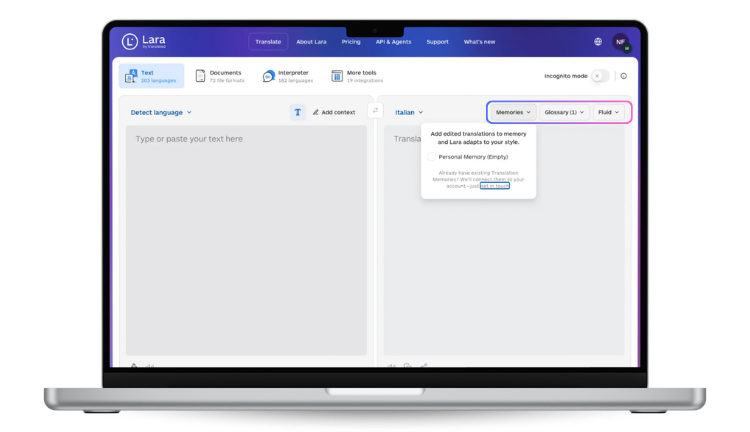
On data governance, Lara offers Incognito Mode, which processes content without retaining or storing input data. For teams handling sensitive or regulated material, this makes it possible to use AI-assisted translation without the data exposure risks that come with standard cloud processing. Lara Translate is GDPR-compliant and applies TLS encryption and restricted access controls.
Lara Translate also integrates with Matecat, which means post-editing workflows can operate inside a professional CAT environment rather than depending on copy-paste review cycles. The platform covers 200+ languages and 42,000+ language pairs, which is relevant for workflows that involve less common language combinations where lighter-coverage tools produce inconsistent output.
Translate smarter with Lara: three styles, full control
Choose Faithful, Fluid, or Creative mode depending on your content type, and process sensitive documents with Incognito Mode for zero data retention.
Building a workflow that stays ahead of the errors
Understanding where MT workflows fail today is useful. Understanding where they’re heading makes it possible to build a process that won’t need wholesale revision next year. Improvements in model quality, shifts in post-editing practice, and new approaches to context handling are all changing what “reliable” looks like in production MT environments. The AI Translation Trends 2026: What Actually Works piece maps the developments that matter most and how they’re reshaping expectations for MT output quality in practice.
The machine translation mistakes covered in this guide share one characteristic: they’re largely preventable. Source quality, context setup, post-editing, data governance, and file format preparation address the overwhelming majority of common AI translation errors before they reach an audience. None of these steps requires significant investment. They require a defined workflow and tools matched to the content you’re actually translating.
FAQs
What are the most common machine translation mistakes?
The most frequent machine translation mistakes include literal translation errors, failure to account for idiomatic language, skipping post-editing, uploading sensitive content to platforms without clear data retention policies, and ignoring file format compatibility. Most of these stem from workflow gaps rather than MT technology failing on its own.
Why do AI translators struggle with idioms?
AI translators are trained largely on formal, structured text where idiomatic expressions are uncommon. When idioms appear in source content, systems often render them word-for-word rather than conveying their actual meaning, producing output that sounds unnatural or misleading to native speakers in the target language.
What is a literal translation error in machine translation?
A literal translation error occurs when an MT system translates word-by-word without resolving the actual meaning of a phrase. This is especially common with idioms, fixed legal expressions, and culturally specific language, where a direct rendering produces technically readable but contextually wrong output.
How does context get lost in translation with AI tools?
Context loss in AI translation happens because most MT engines process text in isolation, without domain knowledge or style signals. Without that information, the system guesses at meaning based on statistical patterns, which produces register mismatches, terminology inconsistencies, and tone errors, particularly when source content mixes multiple styles or purposes.
Is it safe to use AI translation tools for confidential documents?
It depends entirely on the platform. Many consumer-grade MT tools process and may store submitted content. For confidential, regulated, or legally sensitive documents, it’s important to use platforms with explicit data retention policies, zero-storage modes, and documented compliance standards such as GDPR before sending any sensitive material through an automated translation workflow.
Have a valuable tool, resource, or insight that could enhance one of our articles? Submit your suggestion
We’ll be happy to review it and consider it for inclusion to enrich our content for our readers! ✍️
Useful articles
- Going Full AI: What’s Driving the Market Chaos and Why Blind Automation Fails
- Free vs Paid Translation Tools: What Actually Changes When You Upgrade