

Translators using Trados Studio can now run Lara Translate directly inside the Editor through the official free plugin. The setup is simple: install the plugin from the RWS App Store, select Lara Translation Provider in Project Settings, sign in with your Lara account, attach a TM (new, TMX, or MyMemory), and enable Update for real-time learning from edits.
Once the Lara Translate Trados Studio plugin is activated, Lara provides context-aware, adaptive suggestions that respect your tone and Translation Memories across 200+ languages. This guide walks you through installation, configuration, and how to get the most out of Lara inside Trados.
TL;DR
|
Which versions does the Lara Translate plugin support?
The current Lara Translate plugin supports Trados Studio 2024 (v24.1.0.0).
It is available as a free download on the RWS AppStore, released on October 28, 2025, and requires a Lara Translate account for activation.
Plugin installation works on both individual machines and enterprise-imaged desktops.
At a glance:
-
Plugin: Lara Translate for Trados Studio
-
Version: v24.1.0.0 & v17.1.0.0
-
Released: October 28, 2025
-
Supports: Trados Studio 2024 & 2022
-
Account: Free plugin; Lara Translate subscription or trial required
-
Pricing: Plugin free; MT service pricing on laratranslate.com
Why integrate Lara Translate with Trados Studio?
Trados Studio shines at organizing complex work. It segments content, protects tags and variables, surfaces exact and fuzzy TM matches, and gives reviewers strong guardrails with verification profiles. That structure is the reason teams trust it for legal, marketing, product, and support content.
Lara Translate Trados Studio plugin adds an adaptive layer to that structure. It follows your instructions about tone, target audience, and phrasing. It learns from your edits in real time when Update is enabled in the project. The effect is simple to feel in practice: correct once, benefit many times. As your team writes preferred phrasing into the TM, Lara Translate reflects those choices on the next similar segment.
A pragmatic advantage is breadth. Localization is not only plain text. Teams rotate through dozens of formats. Lara Translate’s seamless translation pairs well with Trados pipelines that ingest Office files, subtitles, XML or HTML, IDML, and more. The outcome is fewer formatting surprises and more time focused on meaning.
Why choose Lara over ModernMT and other MT engines?
If you’re using ModernMT today, you already know the value of adaptive machine translation. But Lara takes this further with a newer generation of LLM-powered technology that delivers higher quality, stronger context awareness, and smoother cross-segment coherence. Internal evaluations show that Lara provides roughly 30 percent* higher quality than ModernMT across 200 languages while producing more fluid, natural output. If your work relies on consistency, tone, and document-level reliability, switching to Lara delivers a measurable improvement with the same or simpler workflow.
Internal data from Translated, Lara vs. ModernMT, 2025
Comparison: Lara Translate vs. ModernMT vs. Other MT Engines
| Feature | Lara Translate | ModernMT | Other MT engines (DeepL, Google Translate, etc.) |
|---|---|---|---|
| Translation quality | Internal evaluations show ~30% higher quality vs. ModernMT across 200 languages, with more stable tone and nuance. *Internal data from Translated, Lara vs. ModernMT, 2025* |
Strong in major EU languages, adaptive behavior based on user edits. | Quality varies heavily; often strong only in high-resource languages. |
| Context awareness | LLM-powered engine with document-level context, not just single-sentence MT. | Adaptive MT, but primarily segment-level. | Mostly sentence-only MT with minimal contextual reasoning. |
| Cross-segment coherence | Fluid, consistent output thanks to forward + backward segment context. | Improvements appear over time, but phrasing may vary across segments. | Typically inconsistent across paragraphs or documents. |
| Language coverage | 200+ languages and variants. | 200+ languages and variants. | Varies (roughly 25–130). |
| Segment fluidity | Produces smooth, natural transitions between segments, reducing re-editing. | Adaptive but can fluctuate in longer documents. | Often requires heavy post-editing to maintain consistency. |
How do I install the Lara Translate plugin in Trados Studio 2024?
Setup takes a couple of minutes end-to-end.
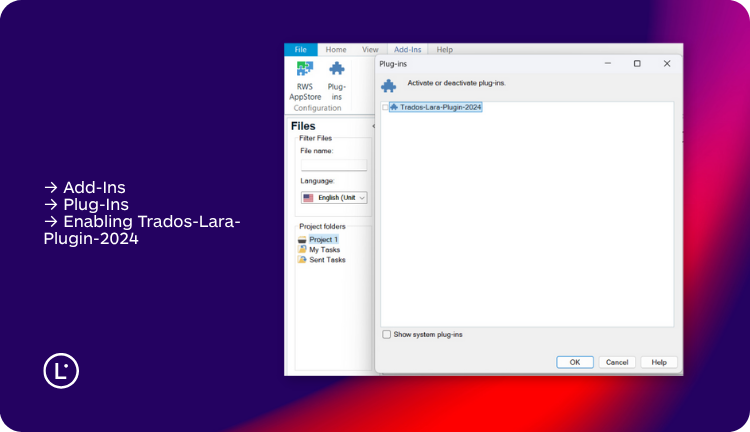
- Open the Lara plugin in the RWS App Store and click Download. The plugin is free. Technical requirements list Trados Studio 2024. Service pricing is on laratranslate.com, and a trial can be requested via support.
- Double-click the installer and follow the prompts.
- In Trados Studio, go to Project Settings → Translation Resources → Translation Memory and Automated Translation → Use… → Lara Translation Provider, then sign in with your Lara Translate credentials when prompted. The App Store page shows the exact path and provider name.

How do I connect Translation Memories (TMX/MyMemory) to Lara?
After selecting the Lara Translation Provider, you decide which TMs to use. You can create a new memory, import a TMX file, or import from MyMemory. The plugin shows all Translation Memories connected to your Lara Translate account and lets you select, update, or combine multiple TMs with simple checkboxes. This is the anchor for terminology discipline and reusable phrasing across projects.
When your team confirms a preferred rendering for a clause, a product attribute, or a UI label, that choice lives in the TM. Lara Translate will then offer suggestions aligned with that choice on similar content. The more your TM reflects your brand and domain, the more “right first time” suggestions you will see.
Why is the Update switch required for real-time learning?
There is exactly one switch you must flip: Update in Project Settings. With Update enabled, every confirmed segment writes to the connected TM and immediately shapes the next suggestion on similar content. If Update is not activated, Lara Translate cannot learn from your edits, and the flywheel effect is lost. The App Store listing explicitly warns about this behavior. Put this step in your Trados project templates so teams never skip it.
In practice, it feels like this: a reviewer prefers “data processing agreement” over “data treatment agreement.” They correct it once and confirm. The next time a similar clause appears, Lara Translate suggests “data processing agreement,” tuned to the same tone and context.
What real-world workflows benefit from this integration?
#1 Legal team (MSA, DPA, annexes)
A legal team is updating a master service agreement, a data processing addendum, and several annexes across twelve markets. The documents reuse a liability clause and a confidentiality provision. With the Update on, the reviewer approves the preferred phrasing once the TM captures it, and Lara Translate keeps it consistent everywhere those clauses appear. QA time shifts from policing variance to checking edge cases.
#2 E-commerce catalog localization
A fashion ecommerce brand publishes a seasonal catalog in five languages. The voice is playful. Product attributes must be precise. When a micro trend term changes mid-production, a reviewer updates a handful of segments, confirms them, and moves on. Lara Translate adopts the change, so by the time the team reaches lookbook captions, the new phrasing is already the default suggestion.
#3 SaaS product UI + release notes
A software team localizes interface strings and release notes. Variables, tags, and sometimes character limits apply. Translators stay in Trados Studio while Lara Translate respects tags, follows a concise and friendly tone, and adapts to reviewer corrections in real time. Fewer builds break in staging. Fewer placeholders get damaged. Release notes read consistently from one sprint to the next.
#4 Support knowledge base & macros
A support team maintains a help center plus agent macros. Agents refine an answer in response to recurring tickets. With the Update, the improved phrasing flows into the TM. Lara Translate reflects it in the next related article or macro. Support tone stays consistent across channels and languages.
How does the plugin handle privacy, data control, and governance?
Enterprise buyers want control over data flow. The Trados integration lets you decide which TMs connect, who can update them, and when. Project-scoped TMs keep client work separated. Role permissions ensure only the right people can create or modify memories. Lara Translate serves adaptive suggestions from the context you own. It does not override your approvals.
If you need to document this for stakeholders, summarize it this way:
- TM ownership remains with your organization.
- Update writes confirmed segments to your connected TM.
- Lara Translate reads from that TM to adapt suggestions.

How should teams roll out the plugin for maximum impact?
Roll out in two phases. Start with a focused pilot where repeated content mixes with creative passages. Enable Update in the project template. After a week, measure the percentage of segments accepted with light edits, QA error rates, and time to delivery. You will likely see visible reductions in rework.
Then expand to different content families. Legal templates, support knowledge, product pages, UI strings. The integration behaves consistently, but each content type enriches the TM and tightens Lara Translate’s suggestions. Over a month, your “right first time” rate climbs. Reviewers spend fewer cycles rewriting. Project managers spend fewer cycles triaging late changes.
What does the quick start checklist include?
Try out Lara Translate in Trados Studio

FAQs: Lara Translate Trados Studio plugin
Which Trados Studio versions are supported today?
The current plugin release targets Trados Studio 2024 & 2022. Check the App Store listing for version v24.1.0.0 and future updates.
Is the plugin free?
Yes. The plugin is free on the RWS App Store. Lara Translate service pricing is listed on laratranslate.com, and you can request a trial via support.
Where do I select Lara inside Trados Studio?
Go to Project Settings → Translation Resources → Translation Memory and Automated Translation → Use… → Lara Translation Provider, then sign in when prompted.
Is it worth switching to Lara if my team already uses ModernMT?
Yes. Lara delivers higher quality, better context handling, and more coherent output across segments. If you want fewer inconsistencies and less re-editing, the switch provides an immediate upgrade without changing your workflow.
How do Translation Memories work with Lara Translate in Trados?
After selecting the provider, you can create a new memory, import a TMX file, or import from MyMemory, then select, update, or combine multiple TMs from the list.
Do I need to enable Update for real-time learning?
Yes. Without Update activated in Project Settings, Lara Translate cannot learn from your edits, and your TM will not be updated from confirmed segments.
Can I use glossaries in Trados with Lara Translate?
No. Glossaries are not applied inside Trados Studio. Terminology control relies entirely on Translation Memories.
What about privacy and data control?
Your organization owns the TM. Update writes confirmed segments to the connected TM, and Lara Translate reads from it to improve suggestions. Your Trados QA and review steps remain the authority.
This article is about:
- How the Lara Translate plugin integrates directly into Trados Studio 2024 and 2022.
- Why Lara’s LLM-powered engine delivers higher quality, stronger context awareness, and more coherent output compared to ModernMT and other MTs.
- How to install the plugin, connect your Translation Memories, and enable Update for real-time learning from edits.
- Practical examples across legal, ecommerce, product, and support content showing how Lara improves consistency and reduces rework.
- How the plugin handles privacy, data control, and TM ownership to support professional localization workflows.
 Useful articles