

November 2025 has been a big month for Lara Translate. Your translation stack now covers more languages, more tools, and smoother workflows from single sentences to large document batches. Here is a quick overview of lara translate november 2025 updates: what shipped and why it matters.
TL;DR
|
Lara Translate November 2025 updates: Why it Matters
In November 2025, Lara Translate introduced support for 200+ languages, a Trados Studio plugin, bulk file translation in the web app, a faster text editor, upgraded evaluation feedback, and smarter SSO routing for enterprise teams.
November 2025 is when Lara Translate stops being “just” a translator and becomes a central layer in your translation stack. With 200+ languages, Trados integration, bulk file translation, and smarter SSO routing, teams can test more markets, move faster across tools, and still keep tone, terminology, and governance under control.
Overview of the November 2025 updates
These November 2025 release notes cover one of the biggest updates so far for Lara Translate. Your translation stack now supports 200+ languages, integrates directly with Trados Studio, and runs faster workflows in the web app, from bulk file translation to smoother text editing and clearer evaluation feedback.
These changes are designed for teams that already work across tools, markets, and formats. Whether you are a freelance translator, an LSP, or part of a product or support team, Lara Translate now fits more naturally into your day to day work, while enterprise teams get smarter SSO routing to keep regional workspaces separated under one secure identity.

200+ languages for real global reach
Lara Translate now supports more than 200 languages in both the web app and the API. This expansion unlocks high quality translation for over 6.5 billion speakers and gives you stronger coverage in fast growing markets that are often underserved by traditional MT.
You can translate text, documents, and integrated workflows across all these languages while keeping tone and terminology under control with styles, glossaries, and translation memories.
What 200+ languages mean for your translation stack
For teams, 200+ languages means you can:
-
Test new regions quickly, without a full localization program on day one
-
Translate product, help center, and marketing content into more locales from a single environment
-
Keep brand voice consistent across languages using styles, glossaries, and translation memories
-
Support customers in markets that are usually left out by legacy MT coverage
Instead of deciding which languages to drop, you can focus on where to experiment, where to invest in human review, and where AI is enough.
Here are the languages supported by Lara Translate.
Expanded Language Variant Support in the UI
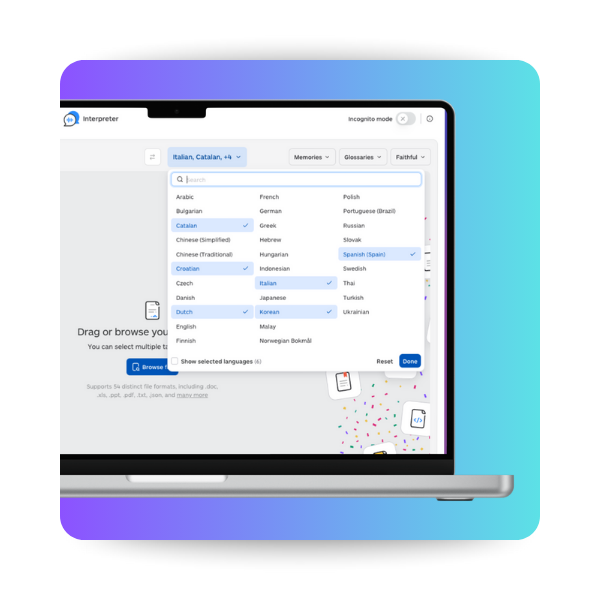 Shortly after the 200+ language rollout, we expanded even further. Lara Translate now includes more regional language variants, so translations can match local usage much more precisely.
For example, you can now distinguish not only between English (United States) and English (United Kingdom), but also English (Canada) or (Australia). Same goes for Portuguese (Brazil) and Portuguese (Portugal), or Spanish (Spain), Spanish (Mexico), and Spanish (Latin America), as well as variants like French (France) vs French (Canada) and Chinese (Traditional, Hong Kong).
These variants were previously available only via the API, but you can now select them directly from the language dropdown in the Lara Translate interface.
Lara Translate now available in Trados Studio
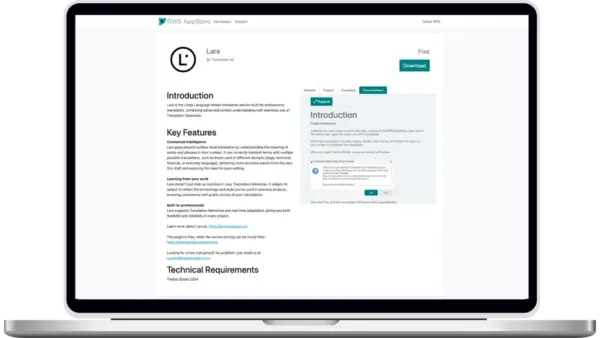
If you work daily in Trados Studio, you can now bring Lara Translate directly into your existing projects.
Lara Translate is officially available as a Trados Studio plugin, so freelance translators, in house teams, and LSPs can plug Lara’s context aware engine into current workflows without changing how they work.
You keep your familiar environment, project templates, and QA checks, and simply add Lara Translate as another MT option inside Trados.
How the Lara Translate plugin works inside Trados Studio
Once the plugin is installed and configured:
-
You select Lara Translate as your MT provider within your Trados project
-
Lara provides segment level suggestions that are aware of context and style
-
You can combine Lara with existing translation memories, termbases, and QA rules
-
Terminology and preferred phrasing can be reinforced using Lara glossaries and styles
The result is smarter, more consistent MT suggestions that respect your terminology and tone, while still fitting inside Trados Studio’s standard workflows for review, QA, and delivery.
Here are more details about the Trados integration.
Faster workflows in the Lara web app
Several upgrades in the Lara web app are focused on reducing friction in everyday work. You can now handle large document batches, move faster in the text editor, and get clearer evaluation feedback so you know where to focus human review.
Bulk file translation for large projects
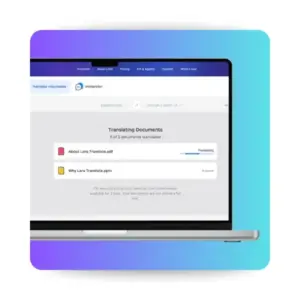 You can now upload and translate multiple documents in one step. Reports, presentations, manuals, and other files can be sent together instead of one by one.
The flow is simple:
-
Upload your files in one batch
-
Choose source and target languages
-
Start the translation and let Lara handle everything in a single run
This is especially useful when you need to localize a full release package, a set of support documents, or a group of sales assets into several languages at once.
Faster and smoother text translation
 The text editor in Lara Translate has been upgraded for speed and usability. Text translation now feels more responsive and fluid, so you can:
-
Paste or type source text and get translations faster
-
Edit, tweak, and refine directly inside the editor
-
Review longer texts without lag or interruptions
You can keep translation, editing, and light review in the same space, which is ideal for quick turnarounds, messaging tests, and last minute copy changes.
More accurate evaluation feedback
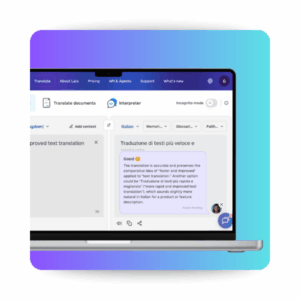 Lara’s evaluation engine has been upgraded to give you clearer signals about quality. When you run an evaluation, you now get:
-
More precise scores for the translation
-
Explanations that are easier to understand and act on
-
Better handling of ambiguous or unclear source text
-
Faster response times when generating feedback
This helps teams move from draft to reviewed translation faster, focusing human effort on segments that really need attention instead of reviewing everything from scratch.
Smarter SSO routing for enterprise teams
 For enterprise accounts using SSO, Lara Translate can now route users automatically to the right environment based on attributes in their identity, such as country or department.
This has two main benefits:
-
Regional or departmental workspaces stay clearly separated, so teams see the projects and content that matter to them
-
The organization maintains a single corporate identity and predictable login experience across all Lara environments
Large companies can scale usage of Lara Translate while keeping governance, access, and data separation aligned with their internal structure.
What’s next for Lara Translate
These November updates are part of a broader roadmap to make Lara Translate the most reliable way to run translation across tools, teams, and markets. The focus remains clear: broad language coverage, strong integrations, and workflows that respect how people actually work today.
You can explore all the changelogs and upcoming releases on the “What’s New” page in the Lara Translate Knowledge Base and start testing these features in your own workflows today.
FAQ
What changed in Lara Translate in November 2025?
In November 2025, Lara Translate introduced support for 200+ languages, launched a Trados Studio plugin, added bulk file translation in the web app, improved the text editor for faster work, upgraded evaluation feedback, and delivered smarter SSO routing for enterprise teams.
How many languages does Lara Translate support now?
Lara Translate now supports more than 200 languages in both the web app and the API, unlocking high quality translation for over 6.5 billion speakers and strengthening coverage in fast growing markets.
Can I use Lara Translate directly inside Trados Studio?
Yes. With the new Trados Studio plugin, you can select Lara Translate as your MT provider, get context aware suggestions inside Trados, and combine them with your existing translation memories, termbases, and QA checks.
What’s new in the Lara Translate web app?
The Lara web app now lets you translate multiple files in one batch, run translations in a faster and smoother text editor, and use an upgraded evaluation engine that provides clearer scores, explanations, and handling of ambiguous source text.
How do these updates help teams that manage large translation workloads?
Bulk file translation reduces manual steps for big document batches, the improved editor makes day to day text work faster, and upgraded evaluation feedback shows where human review is needed most, so teams can focus effort where it has the most impact.
What does smarter SSO routing change for enterprise customers?
Enterprise customers using SSO can route users automatically to the right Lara environment based on attributes like country or department, keeping regional or departmental workspaces separate while maintaining a single corporate identity and predictable login experience.
Where can I read the full Lara Translate changelog?
You can find detailed release notes for these November 2025 updates, plus upcoming features, on the “What’s New” page in the Lara Translate Knowledge Base.
This article is about:
- Breaking down Lara Translate’s November 2025 updates, including 200+ language support, the new Trados Studio plugin, bulk file translation, and a faster web app editor with upgraded evaluation feedback.
- Showing how translators, LSPs, product teams, and enterprise organizations can plug Lara Translate into existing tools and workflows to move from draft to reviewed translations more efficiently.
- Explaining how features like styles, glossaries, translation memories, and smarter SSO routing help teams keep tone, terminology, and governance under control across tools, teams, and markets.