

January 2026 has been a great month for Lara Translate. These updates focus on one thing: fewer tool switches and more publish-ready output, especially when translation workflows include visuals and automation. Here is a quick overview of Lara Translate January 2026 updates: what shipped and why it matters.
TL;DR
|
What changed in Lara Translate in January 2026, and why does it matter?
In January 2026, Lara Translate added image-to-image translation for standalone image files, introduced an optional toggle to translate text inside images embedded in PDF documents, and launched a Lara Translate integration for n8n through an official community node for automating text and document translation workflows.
If you have ever shipped a “translated” file only to realize the key message lived inside a screenshot, a chart, or a PDF scan, you know the problem: the translation was correct, but the output was not usable. January’s updates are about closing that gap and making it easier to automate end-to-end localization workflows.
What are the January 2026 updates?
These January 2026 release notes focus on three practical upgrades: translating standalone image files (image-to-image), translating images embedded inside PDFs (optional toggle during upload), and connecting Lara Translate to n8n so translation can become a native step inside your automation workflows.
Can Lara Translate translate an image and give you back an image?
Yes. Lara Translate now supports image-to-image translation: you upload an image file, Lara Translate extracts the text, translates it, and returns an output image in the same format.
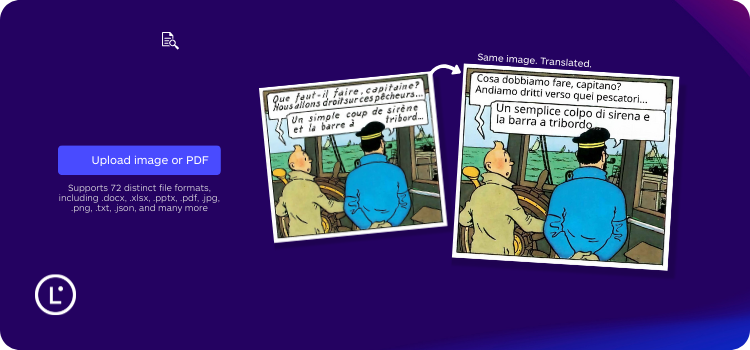
This is useful for visual assets that often get skipped in localization, like:
- product screenshots and UI captures
- social creatives and ad variations
- help center images, infographics, and quick start visuals
- scanned images and image-based exports
Supported image formats
Image-to-image translation supports common formats, including AVIF, BMP, GIF, HEIC, HEIF, PNG, JPG, JPEG, TIF, TIFF, and WEBP.
How image-to-image translation works
- Lara Translate extracts text from the image.
- The extracted text is translated into your target language.
- The image is reconstructed with translated text placed back into the visual.
- You receive the translated image in the original file format.
The goal is simple: keep the visual usable, so you do not have to manually rebuild graphics after translation.
Read the full guide to translating images with Lara Translate.
Can Lara Translate translate images embedded inside PDF documents?
 Yes. Lara Translate can now translate text embedded in images inside PDF documents, so the output PDF is more complete and more publish-ready.
This matters because many PDFs are “mixed”: they contain selectable text plus image-based content like screenshots, stamps, headers in graphics, scanned sections, or embedded charts.
How it works in practice
- The option to translate images appears only for PDF uploads.
- It is disabled by default.
- When enabled, Lara Translate detects text inside images and renders the translated text back into the PDF output.
What you get
- A PDF where translated content includes both standard text and image-contained text, when the toggle is enabled.
- Consistent behavior when translating the same PDF into multiple target languages.
- A more complete localized deliverable, with fewer “left-behind” strings inside visuals.
See how to translate images inside PDF documents.
Try it on a real PDF or image
Upload a file you actually need to ship and see how Lara Translate handles formatting, visuals, and terminology.
What does the Lara Translate + n8n integration do?
Lara Translate is now available in n8n through an official community node, so you can add translation as a native step in your automation workflows.
This is especially useful when translation sits in the middle of a bigger pipeline, for example:
- Ingest content from a CMS, folder, or form submission, translate it, then publish it.
- Translate support macros or knowledge base updates and route them for review.
- Localize documents from email attachments, storage buckets, or shared drives.
- Run multilingual production where Translation Memory and glossaries must be applied consistently.
Why n8n workflows are a good fit for translation
n8n is often used to connect tools that do not naturally talk to each other. Translation is exactly the kind of step that benefits from automation because manual handoffs introduce delays, errors, and inconsistent terminology.
What you can automate
- End-to-end workflows: ingestion, translation, review or approval, and publishing or archiving.
- Less manual work: reduce copy-paste, tool switching, and operational mistakes.
- Consistency at scale: apply Translation Memory and glossaries in automated pipelines.
Explore the Lara Translate + n8n integration
View the community node on npm
What’s next for Lara Translate?
These January updates are part of a broader direction: make multilingual workflows more complete, more automated, and more publish-ready. Translation is rarely just a text problem. It is also a layout problem, a workflow problem, and often an automation problem.
You can explore changelogs and new releases on the “What’s New” page in the Lara Translate Knowledge Base and start testing these features in your own workflows today.
Thank you for reading 💜
As a thank you, here’s a special coupon just for you:
IREADLARA26.
Redeem it and get 10% off Lara PRO for 6 months.
If you already have a Lara account, log in here to apply your coupon.
If you are new to Lara Translate, sign up here and activate your discount.
FAQ
What changed in Lara Translate in January 2026?
Lara Translate added image-to-image translation for standalone image files, enabled optional translation of images inside PDF documents, and launched an n8n integration via an official community node.
What image formats does image-to-image translation support?
It supports common formats including AVIF, BMP, GIF, HEIC, HEIF, PNG, JPG, JPEG, TIF, TIFF, and WEBP.
Can I translate images inside any document type?
The image translation toggle appears only when uploading PDF documents, and it is disabled by default.
Does image translation apply to multi-language PDF translations?
Yes. When enabled, image translation is applied consistently across multiple target languages for the same PDF.
What is the Lara Translate + n8n integration for?
It lets you automate text and document translation inside n8n workflows, including steps like ingestion, translation, review or approval, and publishing.
Do I need a paid subscription to use the n8n integration?
No. You can start with a free Lara Translate account and use the API, then upgrade if you need higher volumes.
This article is about:
- Breaking down Lara Translate’s January 2026 updates: image-to-image translation, translating images inside PDFs, and the Lara Translate + n8n integration.
- Explaining why “publish-ready translation” often requires handling visuals, not just editable text.
- Showing how teams can reduce manual handoffs by automating translation workflows in n8n while keeping consistent output with Translation Memory and glossaries.