

The Lara Translate Chrome Extension has been around for a while, and it already handles webpage and selected text translation well. But the way most people actually work does not look like “browsing a webpage.” It looks like reading a Gmail thread, editing a Google Doc, or presenting a Google Slides deck that just came in from a partner in another language. The old extension did not reach those places. The new one does.
This update is a full refactor of the extension, rebuilt to work where your actual content lives: inside Gmail, inside Google Docs, and inside Google Slides. Webpage and text translation are still there, improved. But the three new integrations are the real change. Here is what is new and how each piece works.
TL;DR
|
Short Answer
The Lara Translate Chrome Extension has been fully refactored and now includes native Gmail translation, Google Docs support, and Google Slides support, in addition to the existing webpage and text translation. All three new integrations bring Lara Translate’s context-aware quality directly into the tools you already work in, without switching tabs.
Why it matters: Switching tabs to translate breaks the flow. Copying text out of Gmail into a separate tool, pasting it back, and checking the tone is three steps for something that should take one. The new extension collapses that friction entirely for the three tools where most knowledge workers spend the majority of their day.
What changed in the webpage and text translation
The core extension (translating webpages and highlighted text) has been refactored from the ground up. The workflow is cleaner now. A floating widget appears at the top of compatible pages and gives you everything in one bar: source and target language, translation style, translate button, auto-translate controls, and a minimize option so the widget stays out of your way.
Translation styles have expanded. You now have five options instead of three: Faithful, Fluid, Creative, Formal, and Informal. Formal and Informal are new additions that matter when the register of the source page is something you need to match or deliberately shift. Reading a supplier’s formal contract in Italian and needing a natural English version, for example, or a casual Spanish forum thread that should stay conversational.
Auto-translate is also new. You can set the extension to translate pages automatically by language (all pages in a specific language) or by domain (all pages from a specific website). If you regularly visit a supplier’s French portal or a Japanese research site, you set it once, and Lara Translate handles it every time you land there.
Text translation (highlighting a paragraph or selecting a sentence to translate in place) works the same way it did before, just faster and cleaner under the hood. The full walkthrough is on the Lara Translate browser extension support page.
Gmail translation that actually sounds like a person
Gmail’s built-in translation works. It converts words. What it does not do is preserve tone, catch context-dependent meaning, or produce output that sounds like it was written by the sender rather than processed by an algorithm. If you have ever clicked “Translate this email” in Gmail and gotten something that reads like a legal disclaimer written by a non-native speaker, you know the problem.
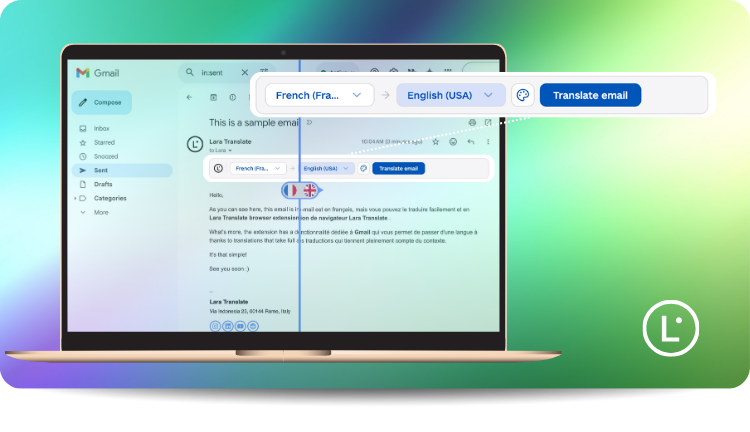
The new Gmail integration replaces that. When you open an email, a Lara Translate button appears directly inside the Gmail interface. Click it, choose your target language, and you get a translation that reads the way the email was meant to read. With the sender’s register intact, idioms handled, and context taken into account. No copy-paste. No tab-switch. The translation appears in place.
This matters most for three kinds of teams. International outreach teams reading replies from prospects in other languages. Global support teams handling tickets in languages they do not speak natively. Multilingual internal teams where not everyone is comfortable reading across languages. In all three cases, the standard “translate message” button in Gmail produces output good enough to understand but not good enough to act on confidently. The Lara Translate integration closes that gap.
Google Docs: translate directly inside your document
The Google Docs integration means you can translate a document without ever leaving it. Open the Lara Translate side panel while a Google Doc is active, select the content you want to translate, choose your language and style, and the translated text appears. Your glossaries and translation memory are active during the translation, so brand terms stay consistent and previously approved phrasing carries through.
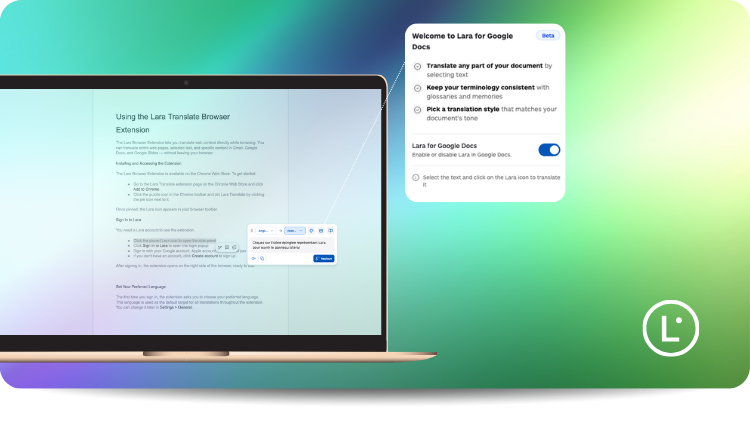
The practical use case here is receiving or working on documents in a foreign language (contracts, briefs, reports, partner communications) and translating them while keeping the document in front of you, annotations intact, and your own edits in place. The alternative is exporting the file, uploading it somewhere else, downloading the translated version, and then figuring out what changed. That is a lot of steps for what is usually a quick task.
For teams that already use Lara Translate for document translation, this brings the same quality into the Google Workspace environment without requiring a separate upload workflow.
Google Slides: translate presentations in the editor
The Google Slides integration works the same way: translate single slides directly inside the editor, with formatting preserved and terminology controls active. You do not need to export the presentation, upload it as a PPTX, wait for the translation, download it, and import it back. You translate the slide while you are looking at it.
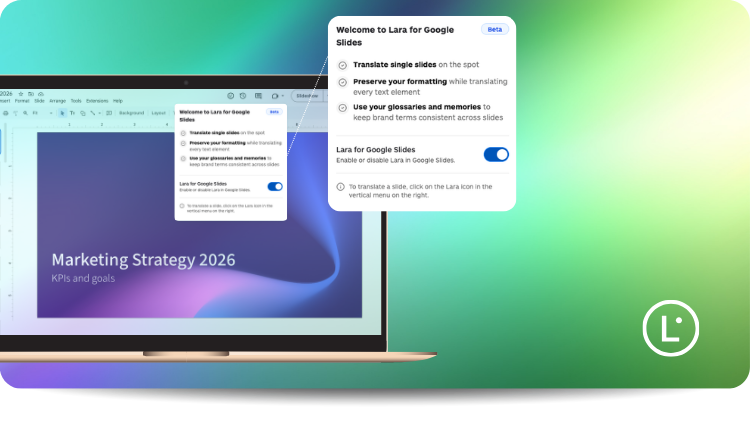
This is the right tool for a specific set of situations: you receive a partner’s deck in German and need to review it in English before a call. You are localizing a training presentation for a new market and want to go slide by slide. You are preparing a pitch in two languages and need to check phrasing on individual slides without losing the visual context. The extension handles all of those without workflow overhead.
The Google Slides integration is currently in beta. The core functionality (translating single slides, preserving formatting, using your glossaries and memories) is live. As with any beta, edge cases will surface. If you run into something unexpected, the support page has the latest guidance.
Translate inside Gmail, Google Docs, and Google Slides
Install the new Lara Translate Chrome Extension and bring context-aware translation into the tools you already use every day. Requires a Lara account.
How to get started
The extension requires a Lara account. If you do not have one, you can create one free during installation. Here is the full setup:
- Go to lara.to/chrome-extension and click Add to Chrome.
- Click the puzzle icon in the Chrome toolbar and pin Lara Translate.
- Click the Lara icon and sign in to your account (or create one).
- Set your preferred target language, which becomes the default for all translations.
- To enable Gmail translation: open any email and look for the Lara Translate button in the message toolbar.
- To enable Google Docs and Slides: open the Lara side panel while a Doc or Slides file is active and follow the in-panel prompts.
The full feature documentation is on the Lara Translate browser extension support page, including the auto-translate setup, style options, and the text translator for selected text.
Thank you for reading 💜
As a thank you, here’s a special coupon just for you: IREADLARA26.
Redeem it and get 10% off Lara PRO for 6 months.
If you already have a Lara account, log in here to apply your coupon. If you are new to Lara Translate, sign up here and activate your discount.
FAQs
Do I need a Lara account to use the Chrome Extension?
Yes. The extension requires a Lara account to function. You can create a free account during the installation process: just click the Lara icon after installing, and you will be prompted to sign in or create an account. Once signed in, the extension is ready to use across webpage translation, Gmail, Google Docs, and Google Slides.
What is different about the Gmail translation compared to Gmail’s built-in translate button?
Gmail’s built-in translation converts text word by word without context. It produces output that is technically accurate but often reads awkwardly: wrong register, flattened idioms, or robotic phrasing that does not match how the original email was written. The Lara Translate integration reads the full email in context and produces a translation that preserves tone, handles idiomatic expressions correctly, and sounds like a human wrote it. For international outreach and support teams where the quality of the translation shapes how you respond, that difference matters.
Can I use my glossaries and translation memory inside Google Docs and Slides?
Yes. When you translate inside Google Docs or Google Slides using the extension, your Lara Translate glossaries and translation memory are active. Brand terms, product names, and approved phrasing carry through exactly as they would in any other Lara Translate translation workflow. This is one of the key advantages over simply copying text into a generic translation tool: your terminology controls travel with you into the Google Workspace environment.
Which translation styles are available in the new extension?
The refactored extension includes five translation styles: Faithful (exact meaning, close to the source), Fluid (natural-sounding, readable), Creative (more freely adapted for the target audience), Formal (formal register and tone), and Informal (conversational and casual). Formal and Informal are new additions in this update. The style you choose applies to the full translation, whether you are translating a webpage, an email, a Google Doc, or a slide.
Is the Google Slides integration fully available?
The Google Slides integration is currently in beta. You can translate single slides directly inside the editor, with formatting preserved and your glossaries and translation memory active. The core workflow is live and functional. Beta status means the team is actively monitoring edge cases and expanding coverage. If you encounter anything unexpected, the browser extension support page has the most up-to-date guidance.
This article covers
- What changed in the refactored Lara Translate Chrome Extension: new integrations, cleaner webpage translation, and expanded translation styles
- The new Gmail integration and why it produces better output than Gmail’s built-in translate button for teams doing international outreach or support
- The Google Docs integration and how it lets you translate documents without leaving the file you are working in
- The Google Slides integration (beta) and when it makes sense to use it instead of exporting and re-uploading a presentation file
- How to install and set up the new extension step by step, including Gmail and Google Workspace activation
Have a valuable tool, resource, or insight that could enhance one of our articles? Submit your suggestion
We’ll be happy to review it and consider it for inclusion to enrich our content for our readers! ✍️
Useful articles
- Using the Lara Translate Browser Extension: full documentation
- Translation styles in Lara Translate: Faithful, Fluid, Creative, Formal, Informal
- How glossaries work in Lara Translate