

Lara Translate App is now available on Android and iOS. When translation is urgent, you should not have to wait until you are back at your desk. With the new mobile apps, you can translate text, translate files, and use Interpreter in everyday situations, right from your phone.
TL;DR
|
Is Lara Translate available on Android and iOS?
Yes. Download the Lara Translate App for Android or iOS to translate text, translate files, and use Interpreter on the go.
How do you set Lara Translate as your default translation app on iPhone?
You can set Lara Translate once in iOS settings, then use it anywhere iOS shows the Translate action. This is useful when you need fast translations inside the apps you already use, without switching tools.
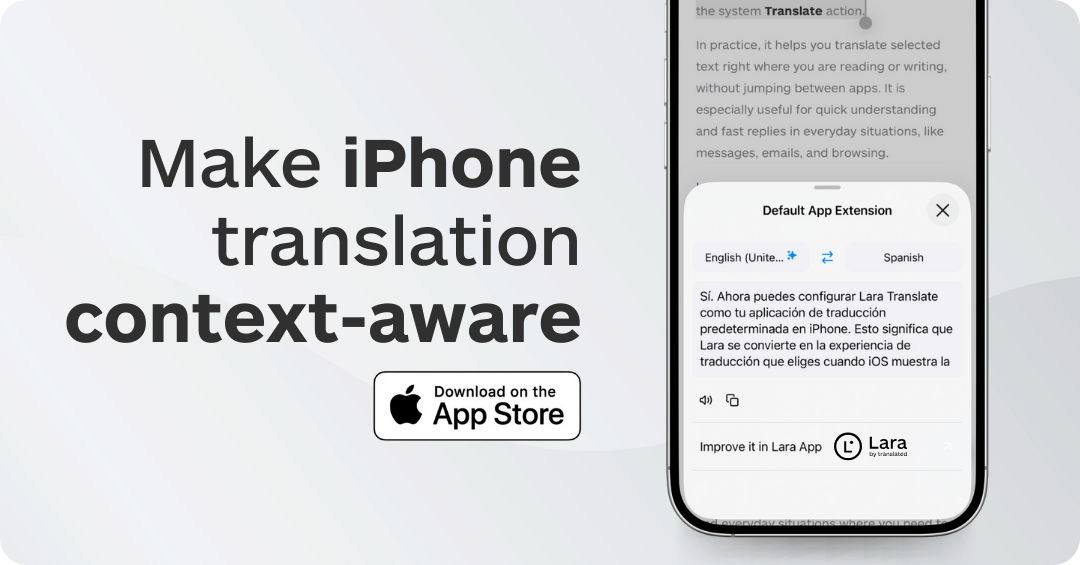
Set it up in 3 steps
- Open iPhone Settings and find the translation settings.
- Select Lara Translate as your default translation app.
- Use it in your apps whenever iOS shows the Translate action (messages, emails, websites, and more).
- Translate messages and emails directly where you read and write them.
- Understand foreign websites without switching apps.
- Translate short texts while traveling, studying, or working.
Why does it matter to have Lara Translate on mobile?
Because translation is not always planned. It often happens in the moment, and you still need a clear, reliable result.
A message you need to answer quickly. A document someone shares with you five minutes before you have to make a decision. A situation where you just want to understand and be understood.
The Lara Translate mobile apps are built for exactly that: fast, practical translation you can rely on, without waiting to get back to your desk.
Get Lara Translate on your phone
Download the app and keep translation ready when you need it.
 |
 |
What can you do with Lara Translate on mobile?
Use it for fast text translation, file translation, and real-time conversations. It is built for clarity when you cannot wait.
- Translate text fast when you need a clear answer, not something to rewrite later.
- Translate files on the go so you can review, share, or move forward without delays.
- Use Interpreter for instant back and forth translation in everyday situations where typing is too slow.
- Keep meaning and tone consistent by translating with context, even when you are working from your phone.
- On iPhone: set Lara Translate as your default translation app and use it inside your apps whenever iOS shows the Translate action.
How do Lara’s mobile features help you control quality?
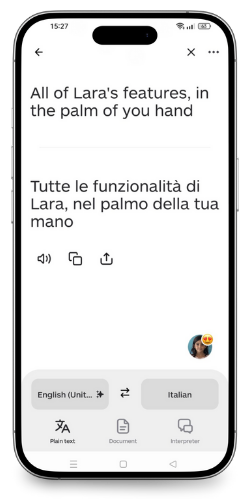 Even on mobile, you can steer Lara’s output instead of accepting a generic translation. Use context, instructions, styles, and privacy controls to get results that fit your situation.
Add context and instructions
When you translate from your phone, a few seconds of context can save you a lot of edits. Add notes like who the audience is, what the text is for, and which terms must stay consistent. This helps Lara Translate keep intent, terminology, and tone aligned.
- Use case: “This is a customer reply. Keep it polite and concise.”
- Use case: “This is a product description. Keep brand voice, do not translate product names.”
- Use case: “This is internal. Keep it direct and action-oriented.”
Pick a style: Faithful, Fluid, or Creative
Different situations need different output. Styles let you choose how close the translation should stay to the source.
- Faithful: best when precision matters and you want the closest possible rendering of the original.
- Fluid: best for natural, readable translations that still preserve meaning closely.
- Creative: best for marketing, headlines, and content that needs adaptation rather than a literal translation.
Use Lara Feedback to improve future translations
When something is slightly off, you can give feedback directly so Lara Translate learns what you expect. Over time, this helps reduce repetitive fixes and keeps output closer to your preferences.
Turn on Incognito Mode for sensitive content
If you are translating confidential or sensitive text from your phone, use Incognito Mode. It is designed for situations where you want extra privacy controls while still getting a high-quality translation.
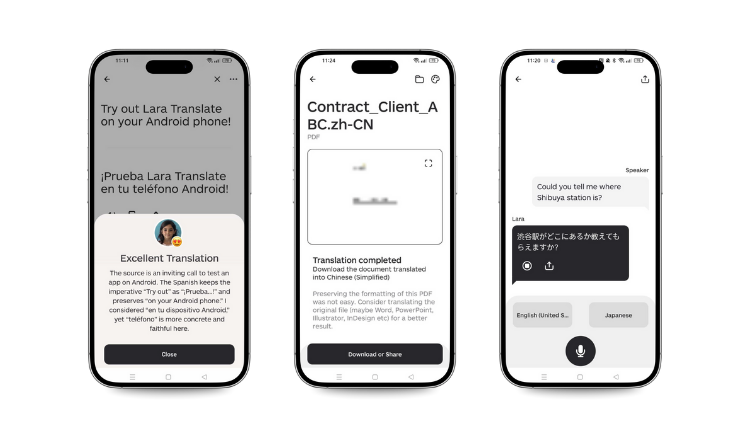
How can you translate a file on the go?
You can translate a document straight from your phone and get a usable translated version in minutes.
When someone sends you a PDF, a DOCX, a PPT, or a document link while you are away from your laptop, the usual workflow is painful: save it for later, forget it, or rush a low-quality copy and paste.
With the Lara Translate app, you can translate a file from your phone and get a translated version you can actually use.
Translate a file in 3 steps
- Open the app and select the file you want to translate (or share it to Lara Translate from another app).
- Choose your target language and confirm you are ready to translate.
- Download or share the translated file so you can review it, forward it, or keep it for later.
Common “mobile file” moments
- A supplier PDF you need to understand before replying.
- A product sheet that you have to forward to a customer in another language.
- A presentation you need to review quickly before a trip.
- A policy, a form, or a document you need to understand in minutes, not hours.
What is Interpreter, and when should you use it?
Interpreter helps you translate conversations in real time. Use it when you need a quick back-and-forth understanding.
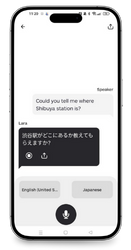
An interpreter is for moments when you don’t want to craft the perfect sentence. You just want to understand quickly and respond clearly.
It is ideal for everyday, in-person situations where you need instant back-and-forth translation.
Practical daily uses for Interpreter
- Travel and hospitality situations, like check-in, directions, and quick requests.
- Deliveries, appointments, and service interactions where speed matters.
- Shopping and local errands when you need clarity fast.
- Short, real-world conversations where you want to avoid misunderstandings.
How do mobile and web work together?
Use mobile for urgent moments, and web for longer workflows. You can start on one device and continue on the other when it is convenient.
Translation work rarely lives in one place. You might start something on desktop, then need to continue while you are away.
The Lara Translate apps are designed to make that switch feel natural, so translation does not stop when you leave your desk.
Download Lara Translate’s App
Download the app and keep translation ready when you need it.
|
|
FAQ
Is Lara Translate available on both Android and iOS?
Yes. You can download Lara Translate on Android and iOS: Android and iOS.
Can I set Lara Translate as my default translation app on iPhone?
Yes. You can set Lara Translate once in iOS settings, then use it whenever iOS shows the Translate action inside apps.
What is the best reason to use the mobile app?
Speed. It is built for moments when you need a translation quickly, including file translation and instant back-and-forth understanding with Interpreter.
Can I translate files from my phone?
Yes. The mobile apps let you translate files when you are away from your laptop, so you can review or share a translated version right away.
Can I control tone and quality in the app?
Yes. You can add context and instructions, choose a style (Faithful, Fluid, Creative), use Lara Feedback, and enable Incognito Mode when you need extra privacy.
When should I use Interpreter?
Use Interpreter when you need fast, back-and-forth translation in everyday situations, especially when typing would slow you down.
Where do I download the apps?
Android: https://lara.to/android
iOS: https://lara.to/ios
This article is about
- Lara Translate on mobile: how to download the Android and iOS apps and use translation when you are away from your desk.
- What you can do in the app: translate text fast, translate files on the go, use Interpreter for real-time back-and-forth conversations, and control output quality with context, instructions, and styles.
- iOS default translation: how to set Lara Translate as your default translation app on iPhone and use it anywhere iOS shows the Translate action.
- Privacy and improvement: how Lara Feedback and Incognito Mode help you refine output and handle sensitive content on the go.