

Global training should not force your team to jump between tools every time you need another language version of a course.
For many teams, going multilingual still means building the course in one platform, exporting content, sending it elsewhere for translation, then coming back to that platform to fix layouts and publish. You lose time in handoffs instead of improving the learning experience.
The Lara Translate integration in Parta.io is designed to remove that context switching. You design, translate, refine, and publish multilingual courses directly inside Parta.io, powered by Lara’s context-aware AI translation.
How to translate Parta.io courses with AI? Once Lara is connected, Parta.io sends course content to Lara, receives the translations, and creates a new language version of the course that keeps the original structure and layout intact. Your team stays in one environment from the first draft to the localized rollout.
TL;DR
|
What is Parta.io?
Parta.io is a collaborative, productivity-first eLearning creation platform where L&D, customer education teams, and subject-matter experts can design courses with a no-code editor, keep branding consistent, manage tasks, and localize content with AI – all in one place.
Why does this integration matter for learning teams?
Without the Lara–Parta.io integration, every new language feels like a mini project. You export and reimport course files, coordinate with external vendors, copy layouts and interactions by hand, then chase terminology consistency across markets so each version still sounds like your brand. Most of the effort goes into moving content around rather than improving it.
With Lara Translate inside Parta.io, translation becomes just another step in the authoring flow. Course owners stay in the same interface, trigger AI Translation with Lara from the Translation tab, and reviewers see the translated course in its original layout rather than in a separate document. When the master course changes, you simply retranslate with the same settings, keeping glossaries, styles, and context aligned across languages.
Scaling to new languages stops being a budget fight. You add languages and markets without multiplying vendor costs or team workload, so global growth stays easy to run and cost-efficient to maintain.
The result is straightforward: less time spent on mechanics, more time spent on content quality and learning outcomes.
Built for 200+ languages and global scale
Lara supports more than 200 languages, so you can use the same workflow in Parta.io across your entire catalog, from core European languages to fast-growing markets.
Lara also works with over 50 document formats in its own interface and API, which means the same translation backbone can power your courses, documents, and help content.
Inside Parta.io, the integration focuses on four controls that matter most for training content:
- Glossaries for terminology
- Styles for tone
- Context for intent and audience
- Languages for scale
How to set up Lara Translate in Parta.io?
Once your admin connects Lara in Company Settings, Lara appears as a provider whenever you use AI Translation on a course. For a full technical guide, click here.
Here are the main steps you need to take:
- Log in to your Lara Translate account and generate new API credentials
- Log in to you Parta.io account and use those credentials to connect Lara Translate to Parta.io
From there, a typical translation flow looks like this:
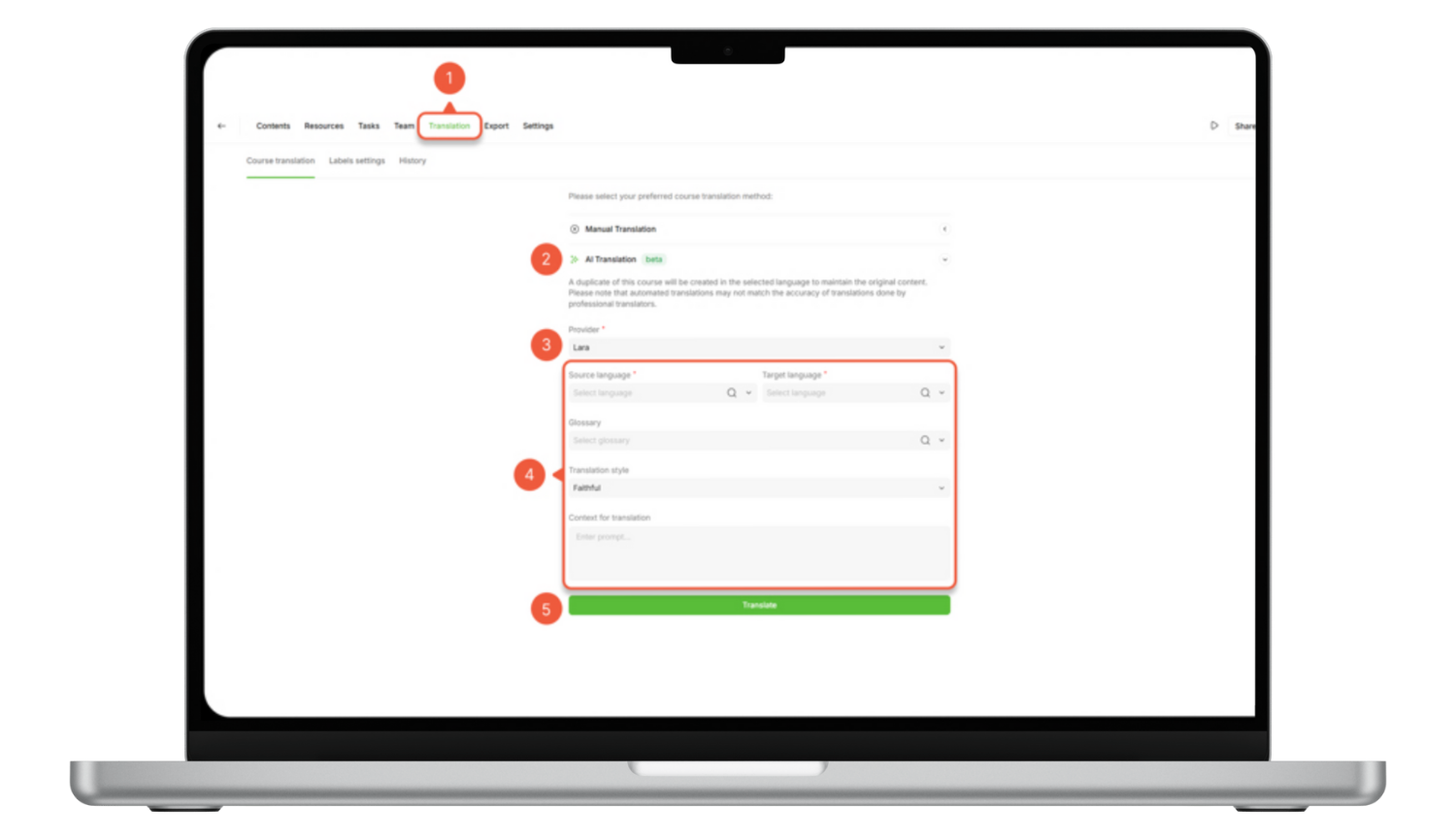
- Open the course and go to the Translation tab.
- Click AI Translation
- Select Lara as the provider.
- Choose source and target languages.
- Select a Lara glossary (if you have one).
- Pick a translation style (Faithful, Fluid, Creative).
- Add context for translation.
- Click Translate and let Parta.io create the new language version.
The power comes from how glossaries, styles, and context work together.
Can you keep terminology under control with Lara glossaries?
Generic AI often mishandles product names, internal jargon, and legal phrases. In the Parta.io integration, Lara uses glossaries to keep those terms consistent.
When you choose a glossary in the translation settings:
- Terms in that glossary are applied throughout the course
- Glossary entries override the model’s default suggestions
- Product names, branded phrases, and policy titles stay stable across all lessons
Examples of useful glossaries:
- Corporate & Compliance for policy wording and internal program names
- Product & Features for product lines, feature names, and UI strings
- Campus & Student Life for building names, departments, and services
Access over 10,000 professionally curated glossaries
Test Lara Translate on a real project with a custom glossary across multiple industries, and see how it handles your terminology and context.
If no glossary is selected, translation still uses Lara’s default AI model, simply without that extra layer of terminology control.
Remember: in the Lara + Parta.io workflow, glossaries are the main terminology tool.
How to keep tone and format with Lara styles?
Not all training content should sound the same. A compliance module, a technical lab, and a marketing academy each require different languages.
Lara offers three translation styles that you can select directly in Parta.io: Faithful, Fluid, and Creative.
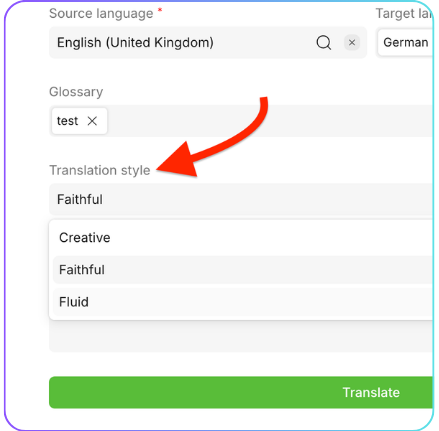 A simple way to use them:
- Faithful – Best for technical, legal, or policy content where precise phrasing matters. Use this for codes of conduct, safety rules, and process descriptions.
- Fluid – Best for general training, onboarding, and internal communication. The output is natural and easy to read while staying faithful to the source.
- Creative – Best for marketing and storytelling content where engagement matters more than literal phrasing. Ideal for customer academies or brand courses.
Choosing the right style per course lets you keep tone consistent within each learning experience while still adapting to the format and audience.
How to translate with context in Parta.io?
The same English source can become stiff, too informal, or confusing, depending on how it is translated. That is why Parta.io exposes a Context for translation field when you configure Lara.
 This is where you explain what the course is really about and who it is for. Useful details include:
- Target audience
- “New hires with no technical background”
- “Experienced sales partners familiar with our product”
- Tone
- “Clear and instructional, short sentences”
- “Formal, policy-compliant language”
- “Friendly and encouraging, suitable for students”
- Domain or use case
- “Health and safety training”
- “Customer marketing academy”
- “University onboarding for Erasmus students”
Lara uses this context to adjust word choice and structure, which often reduces the amount of manual editing needed after the first pass.
Three scenarios where Lara + Parta.io shine
1. Multinational company training employees in 10 or more countries
 A global company needs to roll out security, ethics, and tool training across its branches in Europe, the Americas, and Asia. The L&D team cannot afford to run a new localization project for every update.
With Lara Translate inside Parta.io:
- They built the English master course once.
- For each market, they open the Translation tab, select Lara, and choose the target language.
- They apply a Corporate & Compliance glossary so policy names and standard phrases stay identical everywhere.
- They pick Faithful or Fluid style depending on the course and specify context like “internal employees, formal tone, compliance training”.
Result: each branch gets a localized course that matches corporate terminology and layout, while the central team maintains only one master version.
2. Small marketing agency building multilingual lead-magnet courses
 A boutique agency creates short courses on SEO, social media, and email marketing to attract clients. They want to offer these courses in several languages to stand out, but they lack a big localization budget.
With Lara + Parta.io:
- The agency designs each course in its main language.
- In Parta.io, they use AI Translation with Lara to generate Spanish, French, Italian, and German versions.
- They select a Brand & Services glossary that locks the agency name, service names, and recurring frameworks.
- They choose Creative or Fluid style to keep the copy persuasive and light.
- In the context field, they explain “marketing audience, conversational tone, lead-generation course, keep calls-to-action strong and friendly”.
Result: the agency ships polished, on-brand multilingual courses fast, and spends its time on promotion and final tweaks rather than operations.
3. University onboarding Erasmus and international students
 A university wants a self-service onboarding course that covers enrollment, housing, timetables, and campus services for Erasmus and other international students.
With Lara Translate inside Parta.io:
- The international office creates the master course once, usually in English.
- They generate versions for Spanish, German, Polish, Turkish, and other key languages using Lara.
- They apply a Campus & Student Life glossary that includes building names, departments, and system names.
- They pick Fluid style so the language is clear and welcoming.
- In the context field, they write “incoming Erasmus students, supportive tone, explain procedures simply, avoid dense legal wording”.
Result: students receive a localized, easy-to-follow guide to campus life, and the university only has to maintain and update the master course.
Putting it all together: a practical workflow
For admins and course owners, the setup is intentionally simple.
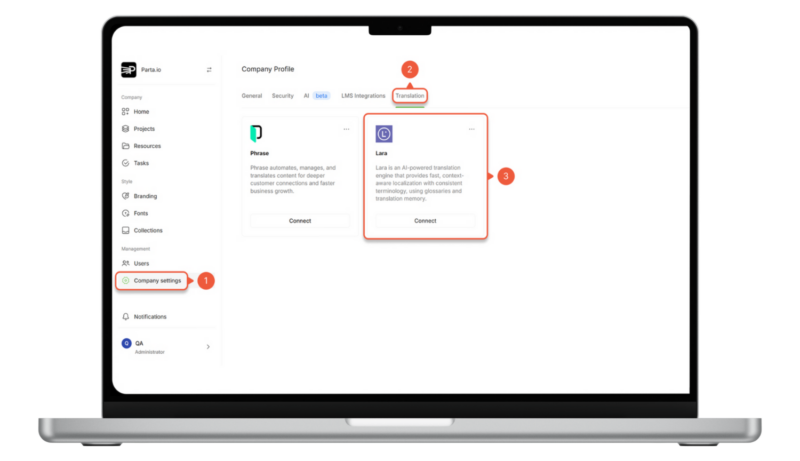
- Connect Lara to Parta.io
- In your Lara account, create an Access Key ID and Secret Key.
- In Parta.io, go to Company Settings (1) → Translation (2).
- Select Lara, click Connect, (3) and paste the keys, then Apply.
- Translate a course
- Open a course and go to the Translation tab.
- Choose AI Translation and pick Lara as the provider.
- Select source and target languages.
- Tune quality controls
- Select the relevant Lara glossary.
- Choose the translation style (Faithful, Fluid, or Creative).
- Add context describing audience, tone, and course type.
- Review and publish
- Let Parta.io create the new language version.
- Ask local experts or reviewers to check it directly in Parta.io.
- Publish when ready and repeat for other languages.
Is Lara Translate + Parta.io the missing piece in your multilingual training workflow?
A Lara Translate + Parta.io workflow is not about adding another tool. It is about giving your team one place to design, translate, and refine learning content for every market. Course authors stay in Parta.io, while Lara takes care of multilingual output with the right terminology, tone, and context.
If you are scaling training across countries, this integration lets you move faster without giving up control: glossaries protect your key terms, styles adapt to the type of course, and context keeps each version relevant for its audience. From there, your reviewers can focus on what really matters: making sure every learner, in every language, gets a clear and effective learning experience.
Try Lara Translate in Parta.io
Test Lara Translate on a real project and see how it handles your terminology and context.
FAQs
How to translate Parta.io courses with AI?
First, your admin connects Lara Translate in Parta.io under Company Settings → Translation. Then you open a course, go to the Translation tab, choose AI Translation, and select Lara as the provider. Pick source and target languages, select a glossary, choose a style (Faithful, Fluid, Creative), add context, and start the translation. Parta.io creates the new language version in the same layout, so reviewers can check and publish it directly inside the platform.
How is Lara different from generic AI translation inside Parta.io?
Lara is built for context-aware translation with control over glossaries, styles, and instructions. In Parta.io, you can apply Lara glossaries, choose between three styles (Faithful, Fluid, Creative), and add detailed context about audience and tone. This combination helps produce output that is closer to what learning teams need, compared to a generic one-size-fits-all MT.
Does the Lara + Parta.io integration use Translation Memories?
No. In this integration, Lara does not use TMs. Terminology is controlled through glossaries, combined with style selection and contextual instructions. If your organization relies heavily on TMs, you can still use them in other Lara-connected tools, but inside Parta.io, the main controls are glossaries, styles, and context.
Do we still need human review after translating with Lara in Parta.io?
For high-impact or high-risk content such as compliance, safety, or external customer academies, a human review step is recommended. Lara accelerates the first pass across languages; subject-matter experts, legal teams, or local reviewers then validate and fine-tune the course directly in Parta.io before it goes live.
Which types of courses benefit the most from Lara + Parta.io?
Any course that repeats across markets or cohorts gets strong leverage: global onboarding, compliance and safety modules, customer training, partner enablement, and university onboarding for international students. The more languages you support, the more time you save by keeping authoring and translation in a single workflow.
Have a valuable tool, resource, or insight that could enhance one of our articles?
Submit your suggestion
We’ll be happy to review it and consider it for inclusion to enrich our content for our readers! ✍️
This article is about
- How to use the Lara Translate integration inside Parta.io to make course translation part of your everyday authoring workflow
- Using Lara glossaries, styles, and contextual instructions to control terminology, tone, and intent when translating courses in over 200 languages
- Practical scenarios where multinational companies, small marketing agencies, and universities can scale their training programs faster with Lara + Parta.io, while keeping review and publishing inside a single platform
Useful articles
- AI translation for professional translators: opportunity, not threat
- Your 7-step workflow on how to build a marketing content translation workflow
- Scaling AI localization with existing assets