

How to translate images in a PDF is where “PDF translation” becomes a real workflow problem.
A PDF might look like a normal document, but a surprising amount of content is actually images with text: scanned pages, embedded screenshots, charts, diagrams, stamps, labels, and callouts. If you only translate the selectable text layer, you will miss the most important parts. And if you extract text without keeping placement, the file stops being usable.
This guide explains how to translate images in a PDF in a way that keeps your document readable and ready to share, including how to translate a scanned PDF, translate screenshots in PDF files, and handle mixed PDFs that contain both real text and image-based text.
|
TL;DR
|
Why it matters
PDFs are often the final handoff format for manuals, reports, catalogs, and compliance documents. If you miss text inside images or break the layout, the translated PDF becomes hard to review and risky to share. A good OCR PDF translation workflow keeps content readable, complete, and in the right place on the page.
How do you translate images inside a PDF?
Direct answer: To translate images in a PDF, you need to translate both layers: the selectable text layer and any image-based text (scans, screenshots, charts). If text is not selectable, use OCR to detect the text in the image layer, translate it, then place it back in the same spots so the PDF stays readable and shareable.
Use this simple rule:
- If the PDF text is selectable, you can translate the text layer like a normal document.
- If the PDF text is not selectable, the page is likely scanned or image-based and you need OCR + image-layer translation.
- If the PDF is mixed (some selectable text, some screenshots), you need a hybrid PDF translation workflow that translates both the text layer and the image content.
Choose the workflow based on whether your PDF has selectable text, image-only pages, or mixed content.
| Your PDF type | What it means | Best method |
|---|---|---|
| Text is selectable | There is a real text layer | Document translation (text layer) |
| Text is not selectable | Scanned or image-only pages | OCR + PDF image workflow |
| Mixed content | Text layer plus screenshots/charts/images | Hybrid workflow (text + image translation) |
Quick diagnostic (60 seconds)
- Try selecting text: if you cannot highlight it, you are dealing with images.
- Try searching inside the PDF: if search returns nothing, it is likely scanned.
- Zoom in: if letters look slightly blurry or uneven, it is usually a scan.
- Look for screenshots: UI captures, charts, and callouts often contain key text that will not be translated by text-only tools.
What counts as “PDF images”?
When people search for translate PDF images or translate scanned PDF, they often mean one of these scenarios:
- Scanned PDFs: each page is a picture of a document, not actual text.
- Embedded screenshots: a PDF contains UI captures from software, websites, or dashboards.
- Charts and diagrams: labels, legends, and axis text are part of an image.
- Tables as images: common in scanned reports and exported slide decks.
- Stamps and seals: annotations that matter for meaning or compliance.
In all these cases, a simple translator that only reads the text layer will miss content. You need OCR and an approach that can translate screenshots in PDF and chart labels, not only paragraphs.
OCR for PDF image translation: why it decides everything
To translate a PDF image, the tool needs OCR PDF translation to detect and extract text from the image layer before translating it. If OCR misreads characters, numbers, units, and labels change meaning, and the translated PDF becomes risky to use.
Where OCR goes wrong in PDFs
- Low-quality scans: compression artifacts and blur turn characters into guesses.
- Skewed pages: slightly rotated scans can reduce OCR accuracy.
- Complex layouts: multi-column documents, callouts, and footnotes confuse reading order.
- Tables and forms: OCR can flatten structure and scramble cells.
- Small print: disclaimers, captions, and labels often get missed.
The best workflow to translate images inside PDFs (step by step)
If you want a translated PDF you can actually share, treat this as a workflow, not a one-click gamble.
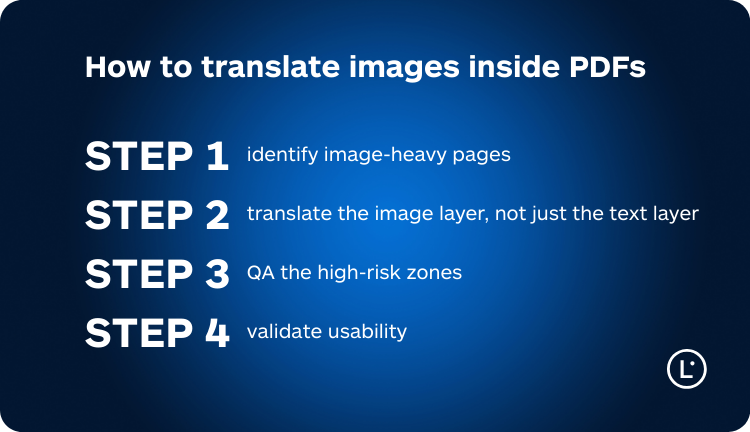
Step 1: identify image-heavy pages
- Scan the PDF quickly and mark pages that contain screenshots, diagrams, charts, or scanned text.
- Pay attention to headers, footers, side notes, and captions. They are often image-based in scanned files.
Step 2: translate the image layer, not just the text layer
For scanned PDFs and embedded screenshots, you need a workflow that:
- Runs OCR on the images
- Translates extracted text
- Places translated text back into the PDF visuals in the right spots
This is what keeps callouts readable and prevents charts and UI captures from staying in the source language. It is the difference between “translated text” and a usable translated PDF.
Step 3: QA the high-risk zones
PDF image translation failures are usually not “a little awkward.” They are functional problems. Use this quick QA pass:
Quick QA checklist (30 seconds per page)
- Numbers and units: decimals, separators, currencies, measurements.
- Tiny text: footnotes, disclaimers, captions, labels.
- Reading order: steps, callouts, columns, table cells.
- Fit and readability: does translated text still fit inside boxes and labels?
- Terminology: repeated terms should stay consistent across pages.
| Risk zone | What to verify | Why it breaks | Quick fix |
|---|---|---|---|
| Numbers and units | Decimals, separators, currencies, measurements | OCR confusion and locale formats | Manual spot-check on every page |
| Small print | Footnotes, captions, labels, disclaimers | OCR misses tiny text | Zoom in and verify presence |
| Reading order | Steps, columns, callouts, table cells | Complex layouts confuse OCR | Read it like a user would |
| Text fit | Labels, buttons, callouts, chart legends | Translations often expand | Prioritize readability over density |
Step 4: validate usability
- Review like a reader: can you understand each page in 5 seconds?
- Check charts and diagrams: labels and legends should remain legible and aligned.
- Confirm critical sections: warnings, instructions, compliance notes.
Common PDF image translation failures (and how to avoid them)
- Missing text inside screenshots: happens when the tool only translates the text layer. Use an OCR workflow that can translate screenshots in PDF files.
- Scrambled reading order: common in multi-column scans, forms, and callouts. QA the sequence of steps.
- Text no longer fits: translations can be longer. In-place replacement should keep readability as the priority.
- Tables turned into paragraphs: image tables are hard. Prefer a workflow that keeps structure and review key cells.
- Small print ignored: always check footnotes, captions, labels, and legal lines.
When PDF image translation matters most
These are the use cases where “good enough” usually becomes expensive:
- Manuals and SOPs: steps, warnings, and UI screenshots must stay readable.
- Technical documentation: diagrams and labels carry core meaning.
- Compliance and safety PDFs: small print and disclaimers matter.
- Product catalogs: specs, units, and model codes need consistency.
- Training material: slide-to-PDF exports often embed text as images.
How Lara Translate translates images inside PDFs
Lara Translate supports a PDF image translation workflow designed for scanned PDFs and PDFs with embedded screenshots and graphics.
- OCR the image layer: detect text inside scans, screenshots, charts, and diagrams.
- Translate accurately: keep meaning and terminology consistent.
- Replace text in place: return a usable output PDF that stays readable and shareable.
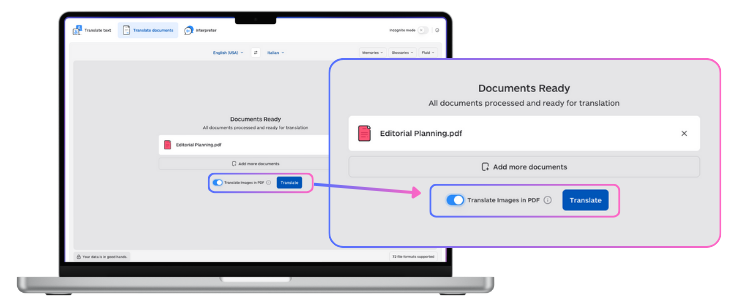
If you want the exact workflow, start here:
And if you are translating standalone images (screenshots, photos, graphics), use the image-to-image guide:
Try Lara Translate in your own workflow
Test Lara Translate on a real client text and see how it handles your terminology, context, and formatting.
FAQ
How do I translate a scanned PDF?
If the text is not selectable, it is a scanned/image-based PDF, so you need OCR + image-layer translation.
Why does my translated PDF miss text in screenshots and charts?
Because many tools only translate the selectable text layer, but screenshots and chart labels are images and require OCR PDF translation.
How can I translate images inside a PDF without breaking formatting?
Use a workflow that replaces translated text in place inside callouts, labels, and charts, then QA fit and readability.
What is the best way to translate PDF images for work documents?
Run OCR on the image layer, then spot-check numbers, units, terminology, and small print on every page.
Can I translate PDF images online?
Yes, but quality depends on OCR accuracy and whether the tool translates the image layer, not only the text layer.
Do I need a different workflow for PDFs that are half text and half images?
Yes, mixed PDFs need a hybrid PDF translation approach that translates both the text layer and screenshots/scanned sections.
Thank you for reading 💜
As a thank you, here’s a special coupon just for you:
IREADLARA26.
Redeem it and get 10% off Lara PRO for 6 months.
If you already have a Lara account, log in here to apply your coupon.
If you are new to Lara Translate, sign up here and activate your discount.
This article is about:
- Explaining why translating images inside PDFs is different from translating normal PDF text.
- Showing how to detect scanned PDFs and embedded screenshots that require OCR.
- Providing a practical workflow to translate PDF images with in-place replacement and fast QA.
- Covering common failure points like reading order, small print, and text fit inside callouts and charts.
- Helping teams produce usable, shareable translated PDFs without rebuilding layouts manually.
Useful articles: