

If you are searching for an AI translation workflow for customer support, you are usually trying to fix one thing: multilingual tickets and chats are slowing down your team, and quality drops when agents have to guess tone or terminology.
Good AI translation workflows for customer support are not about “picking a tool to translate.” It is a system: what gets auto-translated, what gets reviewed, how context is preserved, and when to escalate. This guide gives you a practical setup for support ticket translation automation, chatbot translation for customer support, support knowledge base localization, and omnichannel support translation.
Short answerBuild a workflow that detects language, injects context, translates, runs QA checks, and routes by risk. |
TL;DR
|
Why it matters
Customer support is one of the fastest ways to lose trust in a new market. A strong AI translation workflow helps you reply quickly in the customer’s language while keeping tone, terminology, and escalation rules consistent. That combination protects customer relationships and lets your support operation scale with growth instead of becoming the bottleneck.

Why do customer support teams need AI translation workflows?
Customer support teams need an AI translation workflow for customer support because manual translation creates bottlenecks that directly impact response time, resolution time, and customer satisfaction. When agents cannot reply confidently in the customer’s language, tone drifts, terminology changes, and escalations increase.
A strong workflow solves three operational problems: speed, consistency, and scalability. It lets you reply faster to multilingual customers, maintain consistent product terms, and handle volume spikes without rebuilding your support org for every language.
And it avoids a lot of headaches…

What are the core components of an AI translation workflow for customer support?
Effective AI translation workflows for customer support have four parts that work together:
- Translation layer: the engine and settings that control tone and terminology.
- Workflow orchestration: rules that decide when translation happens and where the result goes.
- Quality assurance: confidence thresholds, terminology checks, and escalation paths.
- People and governance: training, audits, and ownership of multilingual quality.
Support is different from general translation because it is real-time, emotional, and risk-based. A “good enough” output can still be a bad support reply if it sounds rude, vague, or legally incorrect. That is why you need workflow rules, not only a translator.
The reference workflow: from inbound message to customer reply
Use this as your baseline multilingual help desk workflow. It applies to tickets, chat, social, and help center content.
- Detect language and identify channel (ticket, live chat, social, help center).
- Classify risk (routine, account access, billing, refund, legal, safety, escalation).
- Inject context (product, policy, customer tier, known issue, desired tone).
- Translate with the correct style rule for the channel.
- Run QA checks (confidence threshold, glossary compliance, missing variables, formatting).
- Route to auto-send, agent review, or human translation review based on risk.
- Reply and store the bilingual transcript for continuity.
- Learn from edits and outcomes (update glossary, macros, templates, and routing rules).

| Channel | Latency target | Recommended style | QA rule |
|---|---|---|---|
| Live chat | Seconds | Fluid | Auto-translate if routine. Escalate if low confidence or angry tone. |
| Tickets (email-like) | Minutes | Faithful for policies, Fluid for customer care | Human review for refunds, legal, privacy, safety, VIP escalations. |
| Social support | Minutes | Fluid | Avoid literal phrasing. Escalate if the issue becomes sensitive. |
| Help center articles | Hours to days | Faithful | Terminology checks, versioning, and change detection before publishing. |
How do you implement ticket translation automation without losing context?
Support ticket translation automation works when the workflow keeps context intact. The goal is simple: agents should see the customer’s message, the translated version, and the relevant metadata in one place.
Step 1: decide what can be fully automated
 Start with the tickets that are high-volume and low-risk. These usually translate well with minimal context loss:
- Password reset and login issues
- Shipping status and order tracking
- Basic pricing and plan questions
- How-to product questions with clear steps
Then define categories that require human review before a customer-facing reply:
- Refunds and chargebacks
- Legal and privacy topics
- Safety issues or threats
- VIP or executive escalations
- Highly emotional complaints
Step 2: preserve metadata and history
 Context preservation means you never translate the text alone. Pass along key fields such as product, plan, region, previous ticket summaries, and urgency. When customers reply across multiple messages, keep the bilingual thread so the agent sees the full story.
Step 3: use confidence thresholds and routing
Set a practical routing rule:
- High confidence + low risk: auto-translate and route to the queue.
- Medium confidence: agent review before sending.
- Low confidence or high risk: human translator review, or escalate to a bilingual specialist.
| Ticket type | Risk | Automation | Rule |
|---|---|---|---|
| Order tracking | Low | Auto | Translate and reply using approved macro templates. |
| Billing question | Medium | Hybrid | Agent review before sending. Enforce glossary terms. |
| Refund / chargeback | High | Review | Human review required before any customer-facing message. |
| Privacy or legal | High | Review | Use approved legal phrasing. Escalate to the right owner. |
How do you set up chatbot translation for real-time interactions?
Chatbot translation for customer support must keep conversation flow and intent intact. The chatbot should not just translate words. It should translate a customer’s goal, emotion, and next step.
Keep conversation state across languages
Make sure the system retains the last turns of the conversation so the translation is consistent. This helps prevent confusing replies when customers use pronouns, short answers, or references like “that one” or “it.”
Use a hard fallback rule
Define an escalation trigger that is easy to enforce:
- If intent detection fails twice, escalate.
- If translation confidence drops below your threshold, escalate.
- If the customer is angry, threatening cancellation, or mentions legal action, escalate.
When escalating, pass the bilingual transcript to the agent so the customer never has to repeat themselves.
How do you build support knowledge base localization that scales?
 Support knowledge base localization scales when you treat it like product documentation, not one-off translation. You need prioritization, versioning, and change detection.
Prioritize what matters first
Translate the articles that drive the most ticket deflection: onboarding, login, billing, top errors, and the top 20 search queries by locale.
Use change detection and version control
- Detect updates to the source article.
- Classify the update (minor copy change vs policy or steps change).
- Retranslate only changed sections when possible.
- Publish with a version stamp per language.
- Audit search queries per language and patch missing keywords.
How do you create omnichannel support translation across all channels?
Omnichannel support translation means customers get the same terminology, tone, and policy phrasing across email, chat, social, and help center content. The best way to achieve it is to define shared standards.
- One terminology source: a glossary and translation memory for product names, features, and policy phrases.
- One tone guide: what “polite and clear” means in each market and channel.
- One escalation policy: what requires review before sending.
Also preserve context across channel switches. If a customer starts in chat and continues by email, the agent should see the prior bilingual conversation and the same terminology rules should apply.
What technical setup ensures consistent multilingual help desk operations?
A consistent multilingual help desk workflow requires integration plus governance. At a minimum, you want:
- API integration between your help desk and the translation system
- Language detection and auto-tagging
- Routing rules based on risk and confidence
- Reporting by language and channel
Track success with operational and customer metrics: response times by language, re-open rates by language, CSAT by locale, and escalation rates. If one language has low CSAT and high escalations, the issue is usually terminology or tone, not speed.
How does Lara Translate support customer support translation workflows?
If you want an AI translation workflow for customer support that stays reliable at scale, you need control over context, terminology, and tone. Lara Translate is designed for business workflows where these controls matter.
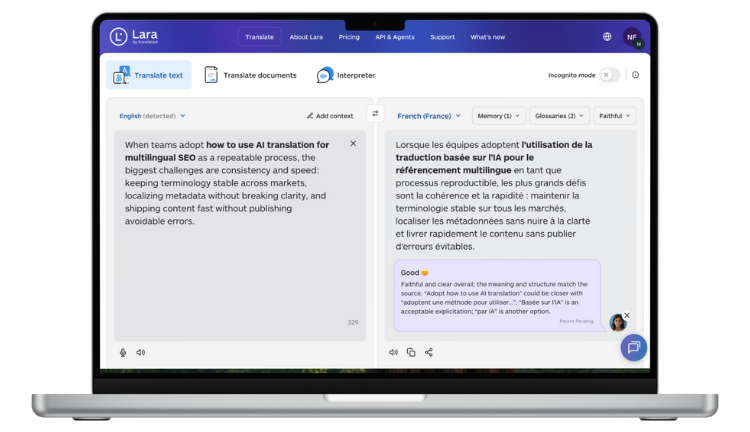
- Context control: add product, policy, and tone instructions so translations match your support situation.
Which kind of context should I provide - Terminology consistency: use glossaries (and translation memory where available) to keep product terms stable across tickets, chat, and help center content.
How glossaries work - Style control: choose Faithful, Fluid, or Creative depending on channel and intent.
Translation styles - Privacy modes: handle sensitive customer content using the right mode for your policy.
Learning vs Incognito - Security and data protection: align translation processes with privacy expectations.
Privacy and data protection - Automation readiness: connect workflows via API and integrate translation into your systems.
API documentation - Document support: translate customer-provided attachments and internal support docs across 70+ file formats with layout and structure handling where supported.
Test Lara Translate in your customer support workflows
Try it on real tickets, chat transcripts, or help center drafts. Validate tone, terminology, and escalation rules before rolling it out to the full team.
What are the best practices for maintaining quality in automated support workflows?
Quality is where most support translation projects succeed or fail. The best teams treat translation like a risk-based system.
Define quality thresholds and risk rules
Create rules that are easy to follow. Low-risk tickets can be automated. High-risk topics require review. Make these rules visible inside the help desk so agents do not guess.
Run audits and keep owners accountable
Audit samples weekly by language. Track common errors, then fix the source, not the symptom: update glossary terms, adjust macros, and refine tone instructions.
Train agents on “when to trust” and “when to escalate”
Agent training should include practical patterns: spotting legal implications, recognizing emotionally charged messages, and using bilingual context to avoid misreading intent.
FAQs
What is the difference between an AI translation workflow for customer support and a general translator?
An AI translation workflow for customer support includes routing, context preservation, terminology control, confidence checks, and escalation rules so customer-facing replies stay accurate and on-brand.
How do you measure support ticket translation automation success?
Track response time by language, CSAT by locale, re-open rates, escalation rates, and agent edit rates to see whether automation improves speed without hurting outcomes.
Can chatbot translation for customer support handle complex scenarios?
It works best for routine intents. For billing disputes, legal topics, and emotionally charged complaints, use confidence thresholds and escalation to a human agent or translator.
What security considerations matter in multilingual help desk workflows?
Use encrypted transfer, access controls, and privacy policies for customer data, and choose the right translation mode for sensitive content.
How do you keep support knowledge base localization current?
Use change detection, version control, and prioritized retranslation of high-impact pages so localized articles stay aligned with the source over time.
Have a valuable tool, resource, or insight that could enhance one of our articles?
Submit your suggestion
We’ll be happy to review it and consider it for inclusion to enrich our content for our readers! ✍️
This article is about
- How to set up an AI translation workflow for customer support that balances automation and quality
- How to implement support ticket translation automation and chatbot translation for customer support without losing context
- How to scale support knowledge base localization with versioning and change detection
- How to build omnichannel support translation standards across chat, email, social, and help centers
- How Lara Translate supports context, styles, glossaries, privacy modes, API workflows, and 70+ file formats for support operations
Useful Lara Translate KB resources
- Translation styles (Faithful, Fluid, Creative)
- How glossaries work in Lara Translate
- Which kind of context should I provide
- Learning vs Incognito mode
- Privacy and data protection
- API documentation
Thank you for reading 💜
As a thank you, here’s a special coupon just for you:
IREADLARA26.
Redeem it and get 10% off Lara PRO for 6 months.
If you already have a Lara account, log in here to apply your coupon.
If you are new to Lara Translate, sign up here and activate your discount.