

TL;DR
|
Short Answer
Free translation tools differ from paid ones in five areas: usage caps (free APIs typically allow 500,000 characters per month before billing kicks in), data handling (free tiers may retain submitted text for model training; paid tiers commit contractually to zero storage), feature access (glossaries, translation memory, and API connectivity are paid-only), support (free users get documentation; paid users get direct channels and SLAs), and performance guarantees (paid tiers include uptime commitments that free tiers do not). For personal or low-volume use, free tools are adequate. For teams handling confidential content, regulated data, or automated workflows, the gap is significant enough to affect compliance and productivity.
Why it matters
Most teams discover the real cost of free translation tools at the worst possible moment: mid-project, when a character limit stops a product launch, or when legal flags a data handling clause nobody read. The gap between free and paid is not about translation quality alone. It is about whether your tool can operate inside a professional workflow without creating compliance exposure or forcing manual workarounds that quietly drain more time than a subscription ever would.What separates free vs paid translation tools
Here is what most teams learn the wrong way: free translation services are not simply limited versions of paid ones. They operate under fundamentally different data agreements. Usage caps are the most visible difference, but data handling is often the more consequential one. Free tiers allow a limited number of characters per month via API before charges apply, and web interfaces often impose per-session limits on top of that. Paid plans remove these caps or set them rather high. Data handling is where the real divergence happens. Free services may store submitted text and use it for model training under consumer terms that were written for personal use, not business workflows. Paid tiers commit contractually to no data storage and no use for training, with data processing agreements that enable GDPR compliance.
Feature access changes substantially at the paid tier. Free accounts provide basic web translation. Paid subscriptions unlock API connectivity, glossary management, translation memory, larger file uploads, and priority processing. These are the features that make workflow automation possible. Without them, every translation cycle involves manual copy-paste, terminology checks after the fact, and reformatting documents that have lost their layout.
Performance and support complete the picture. Free services offer no uptime or speed guarantees. Paid tiers include SLA commitments and move support from community forums to direct channels: email, chat, or phone, depending on the plan tier.
Free tiers allow a limited number of characters per month via API before charges apply, and web interfaces often impose per-session limits on top of that. Paid plans remove these caps or set them rather high. Data handling is where the real divergence happens. Free services may store submitted text and use it for model training under consumer terms that were written for personal use, not business workflows. Paid tiers commit contractually to no data storage and no use for training, with data processing agreements that enable GDPR compliance.
Feature access changes substantially at the paid tier. Free accounts provide basic web translation. Paid subscriptions unlock API connectivity, glossary management, translation memory, larger file uploads, and priority processing. These are the features that make workflow automation possible. Without them, every translation cycle involves manual copy-paste, terminology checks after the fact, and reformatting documents that have lost their layout.
Performance and support complete the picture. Free services offer no uptime or speed guarantees. Paid tiers include SLA commitments and move support from community forums to direct channels: email, chat, or phone, depending on the plan tier.
Privacy and data handling: the part that catches teams off guard
Legal sent a contract for translation, and someone realized that the free service logs submitted text. That scenario plays out more often than it should. Free translation services operate under consumer terms designed for personal use, not business workflows, and the data handling implications are buried in privacy policies most users never read. While HTTPS encrypts data in transit, the service provider accesses plaintext during processing. Free tiers may log usage data, store text temporarily for optimization, or use submitted content for model training. Paid services commit to stricter handling: text processed in-memory only, no persistence, no logging, no training use. That commitment is contractual, not discretionary. GDPR compliance requires data processing agreements that define exactly how data is handled, retained, and protected. Free consumer services rarely offer these. Paid tiers do, and enterprise-grade platforms typically hold ISO 27001 certification and SOC 2 compliance on top of that. If your team handles EU citizen data, confidential contracts, or regulated content of any kind, this is not a marginal consideration. It is a compliance requirement.
Volume limits: when they stop being an inconvenience and start blocking work
Volume limits create the most visible friction in the free vs paid translation tools decision. Character counting includes spaces and punctuation. Business emails, product descriptions, and blog posts consume characters faster than most teams expect. Longer documents, like reports or technical specifications, deplete monthly allowances in a single batch. The character monthly API cap on free tiers equals a few thousand words. Teams translating marketing content, product documentation, or customer support material across multiple languages exhaust this in days, not months. Web interface session limits compound the problem: per-session character caps force users to segment documents manually, reassemble output, and check for consistency breaks across segments. That is time no one budgets for. File translation caps add another layer. Free tiers on most major platforms limit the number of documents per month and impose file size restrictions. Paid plans remove both. API rate limiting controls request frequency independently of character volume, which matters for teams building automated pipelines: free tier rate limits are often too low to support real-time or high-throughput use cases without batching delays.Google Translate vs DeepL Pro: how paid tiers compare for business use
Google Translate vs DeepL Pro is a useful comparison because both platforms offer free and paid tiers with clearly different terms at each level. Language coverage is the first differentiator: Google supports 130+ languages, making it stronger for a diverse market reach. DeepL focuses on a narrower set of European languages and achieves higher accuracy within that set. Pricing structures differ. Google’s free web translation has no stated character limit for personal use; API access is free up to 500,000 characters monthly, then billed per million characters thereafter. DeepL’s free web interface caps sessions at a few thousand characters and limits file uploads to three non-editable documents per month. Paid plans for both unlock unlimited text and file translation with format preservation. For current pricing, check Google Cloud Translation pricing and DeepL Pro plans directly, as rates change. Privacy handling is consistent at the paid level for both. Google Cloud Translation API and DeepL Pro both commit to no data storage and no training use for submitted text, with GDPR compliance built in. Free tiers on both platforms operate under less strict terms. Glossary management exists only at the paid level on either platform. That matters more than most teams realize until they are manually correcting product names and brand terms across thousands of translated segments.Benefits of paid translation services for team workflows
The benefits of paid translation services extend well beyond removing caps. Glossary management enforces terminology consistency at scale. Teams define how specific terms translate, so product names, legal language, and brand terms stay consistent automatically across every document, without post-translation review cycles. Translation memory compounds that advantage over time. The system stores sentence pairs from past translations and suggests matches when similar content appears again. Quality improves with every project. Costs drop as reuse rates increase. That is something manual checking cannot replicate at volume.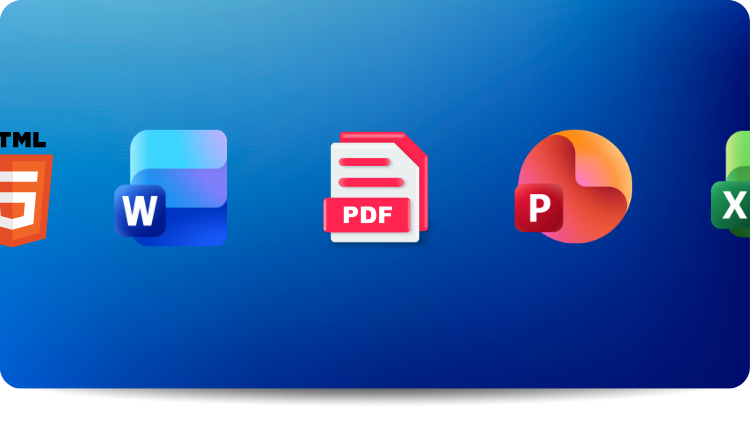 Document handling preserves formatting that plain text translation destroys. Paid tools translate Word documents, PowerPoint files, Excel spreadsheets, and PDFs while maintaining layouts, fonts, and styling. Free tools output plain text and leave reformatting to the translator.
Collaboration features support team workflows that individual free accounts simply cannot. Paid platforms let teams share glossaries, assign tasks, review work, and track project status centrally. API access removes manual copy-paste cycles entirely, enabling translation to be triggered automatically by content updates rather than human intervention. For legal firms, regulated industries, or any team running continuous content operations, that is the difference between a translation tool and a translation workflow.
Document handling preserves formatting that plain text translation destroys. Paid tools translate Word documents, PowerPoint files, Excel spreadsheets, and PDFs while maintaining layouts, fonts, and styling. Free tools output plain text and leave reformatting to the translator.
Collaboration features support team workflows that individual free accounts simply cannot. Paid platforms let teams share glossaries, assign tasks, review work, and track project status centrally. API access removes manual copy-paste cycles entirely, enabling translation to be triggered automatically by content updates rather than human intervention. For legal firms, regulated industries, or any team running continuous content operations, that is the difference between a translation tool and a translation workflow.
Decision framework: when to upgrade
| Use case | Stay with free | Upgrade to paid |
|---|---|---|
| Monthly volume | Under 100,000 words | Consistently exceeds 100,000 words |
| Content sensitivity | Public marketing content | Confidential documents, regulated data |
| Integration needs | Manual copy-paste is acceptable | Need an API for automated pipelines |
| Team collaboration | Individual translation only | Multiple contributors, approval workflows |
| Quality requirements | General understanding is enough | Terminology consistency required at scale |
| Support needs | Self-service documentation | Direct support access, SLA guarantees |
How Lara Translate handles what free tools force you to work around
Free tools make you batch documents to stay under session limits. They output plain text from formatted files. They offer no glossary enforcement, so terminology drifts across projects unless someone checks manually. And if your content touches anything confidential, the data terms alone should disqualify them. That is the context in which Lara Translate was built. Lara Translate is trained on 25 million professionally translated documents with expert annotations, establishing a quality baseline tuned for business content rather than general web text. Three translation styles (Faithful, Fluid, Creative) let you match output register to content type without post-editing guesswork. Faithful preserves the source structure for technical and legal material. Fluid prioritizes natural-sounding output for general content. Creative handles marketing and brand copy where tone matters as much as accuracy.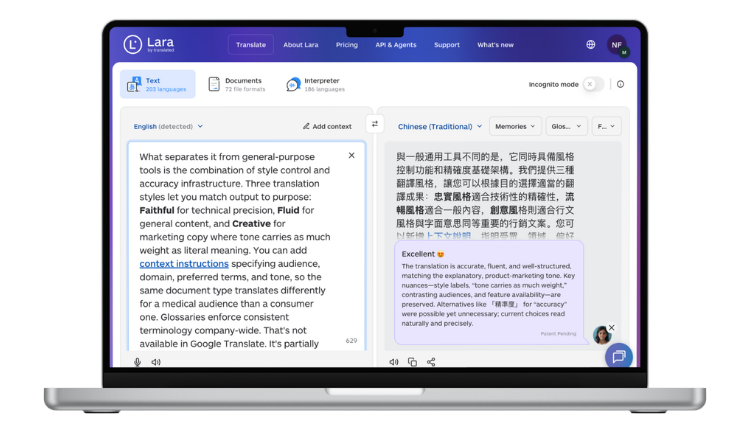 Glossaries enforce terminology across your entire organization, not just a single project. Upload once, apply everywhere. Combined with Translation Memory, which stores and reuses previously approved sentence pairs, terminology consistency compounds automatically without manual review cycles. The platform supports 70+ file formats, preserving layouts across Word, PowerPoint, Excel, PDF, and localization-specific formats like XLIFF and PO files, so formatted documents come back formatted.
Incognito Mode guarantees zero data retention and zero use for model training. No storage, no logging, no exceptions. For teams handling confidential contracts, regulated content, or anything with a data protection obligation, that is the feature that removes translation from the compliance risk register entirely. You can read more about Lara Translate’s privacy and data protection approach in the support documentation.
API connectivity and the Lara Translate MCP Server support programmatic integration for teams building automated workflows. Development teams embed translation directly in applications, automate content processing pipelines, and connect Lara Translate with internal systems without manual intervention. CAT tool integrations via MemoQ and MateCat bring the same quality into professional translation environments where translators already work.
Glossaries enforce terminology across your entire organization, not just a single project. Upload once, apply everywhere. Combined with Translation Memory, which stores and reuses previously approved sentence pairs, terminology consistency compounds automatically without manual review cycles. The platform supports 70+ file formats, preserving layouts across Word, PowerPoint, Excel, PDF, and localization-specific formats like XLIFF and PO files, so formatted documents come back formatted.
Incognito Mode guarantees zero data retention and zero use for model training. No storage, no logging, no exceptions. For teams handling confidential contracts, regulated content, or anything with a data protection obligation, that is the feature that removes translation from the compliance risk register entirely. You can read more about Lara Translate’s privacy and data protection approach in the support documentation.
API connectivity and the Lara Translate MCP Server support programmatic integration for teams building automated workflows. Development teams embed translation directly in applications, automate content processing pipelines, and connect Lara Translate with internal systems without manual intervention. CAT tool integrations via MemoQ and MateCat bring the same quality into professional translation environments where translators already work.
Test Lara Translate on your actual workload
Upload a real document and check how Lara Translate handles your terminology, file format, and privacy requirements before committing to a plan.
Thank you for reading 💜
As a thank you, here’s a special coupon just for you: IREADLARA26.
Redeem it and get 10% off Lara PRO for 6 months.
If you already have a Lara account, log in here to apply your coupon. If you are new to Lara Translate, sign up here and activate your discount.
FAQs
What are the main differences between free vs paid translation tools?
The core difference is not price, it is what you trade for free access. Free translation services typically cap usage at around 500,000 characters per month via API and impose per-session limits on web interfaces, which forces users to segment documents manually. More consequentially, free tiers operate under consumer data terms that may allow submitted text to be stored or used for model training. Paid tiers remove character caps entirely and commit contractually to zero data storage and no training use, with data processing agreements that support GDPR compliance. Feature access also changes substantially: glossaries, translation memory, and API connectivity are all paid-only on most platforms. For individual or low-volume personal use, free tools are adequate. For teams handling confidential content, regulated data, or automated workflows, the difference is significant enough to affect both compliance and productivity.Is DeepL Pro or Google Cloud Translation better for business?
The choice between Google Cloud Translation and DeepL Pro depends primarily on language coverage versus accuracy priorities. Google supports 130+ languages, making it a stronger option for organizations operating across diverse markets. DeepL focuses on a narrower set of European languages and achieves higher accuracy within that set, which matters if your primary markets are European. Both platforms provide business-grade privacy guarantees and API access at the paid tier, with no data storage and no training use. Glossary management and format preservation are available in both paid versions. For current pricing, check each platform’s official pricing page directly, as rates change. If broad language reach is the priority, Google; if European language quality is the priority, DeepL.When should teams upgrade from a free to a paid translation tool?
Upgrade when any of three conditions are true: monthly volume consistently exceeds 100,000 words (roughly 500,000 characters), content contains confidential or regulated information that free-tier data terms cannot accommodate, or API access would eliminate manual steps that are costing more labor time than a subscription costs. The cleanest way to assess this is to track actual character volume over two to three months rather than estimating. If a paid subscription saves more in labor costs than it charges, the ROI is immediate. Start with the lowest tier that removes your current blockers rather than over-buying, since most platforms offer monthly subscriptions without long-term commitment.What are the key benefits of paid translation services?
The most impactful benefits of paid translation services are the ones that compound over time: glossary management enforces correct terminology automatically so product names and brand language stay consistent without post-translation review; translation memory stores previously approved sentence pairs and reuses them, improving quality and reducing cost with every successive project. Beyond those, paid tools translate formatted documents while preserving layouts, fonts, and structure, eliminating the reformatting work that follows free-tier plain-text output. API access enables translation to be triggered automatically by content updates rather than being manually initiated, which is the difference between a translation tool and a translation workflow. Priority processing, direct support channels, and SLA commitments are also paid-tier features that matter when translation is on a critical path.Do paid translation tools produce better translations than free ones?
Paid and free versions of the same platform typically use the same underlying translation engine, so raw output quality at the sentence level is similar. The practical quality gap grows with volume and over time, because paid tiers provide the workflow features that maintain quality at scale. Glossaries enforce correct terminology automatically rather than relying on translators or reviewers to catch errors manually. Translation memory maintains consistency with previously approved content, so messaging does not drift across projects. File format preservation keeps context intact in complex documents, which matters because plain-text output loses structural cues that affect meaning. Engine quality is roughly equivalent; workflow tooling is not. For high-volume or high-stakes translation, that distinction is the whole point.This article covers
- Free vs paid translation tools comparison covering usage limits, privacy policies, features, and costs that separate consumer from professional options
- Google Translate vs DeepL Pro analysis showing how paid tiers address privacy, volume limits, and API requirements that free versions do not support
- Privacy and data handling differences between free services that store submitted text and paid services with contractual no-storage guarantees
- How volume limits and API rate restrictions create workflow blockers when teams exceed free tier caps
- Benefits of paid translation services including glossaries, translation memory, file format preservation, and team collaboration features
- How Lara Translate addresses the specific failure modes that free tools create: data risk, format loss, terminology drift, and manual integration overhead
Have a valuable tool, resource, or insight that could enhance one of our articles? Submit your suggestion
We’ll be happy to review it and consider it for inclusion to enrich our content for our readers! ✍️
Useful articles
- Translation glossary: what it is and why it matters
- AI translation tool reviews: where to find reliable user feedback for your business needs