

TL;DR
|
Quick Answer
How do I translate product pages for multilingual SEO? Start by researching how customers search for your products in each target language. Keyword intent often differs significantly across markets. Translate product titles, descriptions, and metadata using those local keywords, not word-for-word equivalents. Use a glossary to keep product terminology consistent across all pages, and set context instructions to preserve your brand tone. Make sure your URLs, hreflang tags, and structured data are localized too. Tools like Lara Translate support SEO-aware translation workflows with glossaries, context instructions, and MCP-based integration into your eCommerce platform.
What makes eCommerce content hard to translate?
Unlike static content such as brand pages or institutional blogs, eCommerce content is inherently dynamic and fragmented. Here is what sets eCommerce product translation apart from standard content work:- Modular structure. Product pages consist of isolated text fragments (titles, attributes, care instructions, size guides, variation labels) that must translate cleanly and consistently across thousands of SKUs. A single inconsistency in a product attribute name can create confusion and hurt search visibility.
- SEO dependency. Customers do not just browse. They search. Every product page must be discoverable in the local language, which means translated titles, descriptions, and metadata need to match how people actually search in that market, not just what the English source says.
- Constant updates. Inventory, pricing, seasonal messaging, and promotional copy change regularly. Your translation workflow has to keep pace without creating a bottleneck every time the catalog is updated.
- Conversion intent. eCommerce copy has to do more than inform. It must persuade. Cultural nuance and tone of voice are not nice-to-haves; they directly affect whether a visit becomes a sale.
eCommerce product translation as part of your growth strategy
Having your site available in the local language is only one piece of international expansion. Customers also need to find your products through search, understand key information at a glance, and feel that your brand speaks to them, literally and culturally. Translation needs to connect to everything: product content, SEO, campaign planning, and brand consistency. Successful localization starts by prioritizing languages based on current traffic data, growth potential, and business relevance. Once priorities are set, translation efforts can be focused where they will drive the greatest impact. According to CSA Research, 76% of consumers prefer buying products with information in their own language, and 40% will not buy from sites available only in English (source: CSA Research, “Can’t Read, Won’t Buy”). These numbers do not shift when you switch tools. They shift when you translate the right content well. Translation should also be integrated into how your content performs in search. That means going beyond literal accuracy: understanding how people search in each language, aligning product metadata with local keywords, and making sure URLs work for local markets. Multilingual SEO needs to be built into the translation process from the start, not added after the fact.How Lara Translate supports eCommerce product translation
Lara Translate is designed for teams that need structured, scalable translation workflows, not one-off document jobs. For eCommerce specifically, it offers a set of features that map directly to the challenges described above.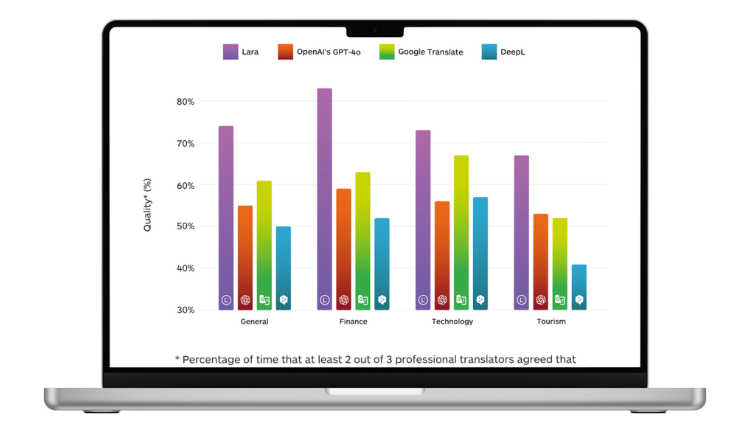
Translation styles matched to content type
Lara Translate offers three translation styles that can be applied per job, not just per account:- Faithful for technical product specifications, size guides, care instructions, and legal copy where accuracy and consistency matter above all.
- Fluid for general product descriptions, navigation labels, and informational content where readability is the priority.
- Creative for promotional banners, campaign copy, and seasonal messaging where brand tone and persuasion take precedence over literal accuracy.
Glossaries for SKU-level consistency
Product terminology is one of the hardest things to keep consistent at scale. If “running shoe” translates differently across 500 product pages, you lose both user trust and search relevance. Lara Translate supports custom glossaries that enforce specific translations for product names, category labels, attributes, and brand terms across every job, regardless of who runs the translation or when. Glossaries can be managed centrally and applied across teams and languages. See how glossaries work in Lara Translate.Context instructions for brand tone
Beyond terminology, eCommerce brands have a voice. Lara Translate’s context instructions let you define the audience, register, domain, and preferred phrasing for any translation job. A budget fashion brand sounds different from a luxury skincare line, even if both are translating product descriptions into French. Context is set once and applied consistently. See what context to provide to Lara Translate and common use cases with practical examples.70+ file formats including product feeds and catalog structures
eCommerce teams rarely work with clean Word documents. Product content lives in CSV exports, XML feeds, XLIFF localization files, and CMS exports. Lara Translate supports 70+ file formats (including CSV, XML, XLIFF, and PO) which means you can translate directly from your product management system or localization pipeline without manual copy-paste work. Batch translation lets you process multiple files across multiple languages in a single session. See multiple document translation in Lara Translate.MCP integration for full website and eCommerce localization
For teams that want to localize an entire eCommerce site, not just individual files, Lara Translate’s MCP (Model Context Protocol) integration connects directly to your existing tools, platforms, and workflows. Rather than exporting, translating, and re-importing content manually, MCP allows Lara Translate to operate as a translation layer inside your stack. This means product pages, category structures, navigation labels, checkout flows, and CMS-managed content can all be translated in context, with the same glossaries and style settings applied consistently across the entire site. MCP is especially useful for eCommerce teams managing continuous content updates: new products, seasonal campaigns, A/B test variants, all cases where a file-by-file workflow creates too much friction. The integration can also be combined with the Google Sheets extension for teams managing product copy in spreadsheets before it goes live. More on accessing Lara Translate’s API and MCP.Translate your eCommerce content with Lara Translate
Test Lara Translate on a real product page and see how it handles your terminology, context, and file formats.
Five principles for organizing your eCommerce translation workflow
Translation tools only work if the workflow around them is structured. Here are five principles that apply regardless of team size or catalog volume.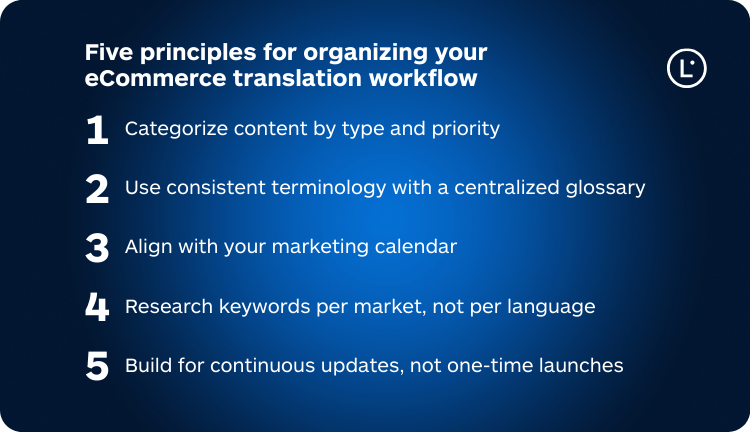
1. Categorize content by type and priority
Not all content needs to be translated at the same time or to the same quality level. Product detail pages, checkout flows, and main navigation have the highest impact on conversion and search visibility. Translate these first. Promotional banners and campaign copy come next, as they drive traffic. Blog content, secondary filters, and help articles can follow once the core experience is covered. This prioritization prevents the common mistake of treating all content as equal and spreading effort too thin at launch.2. Use consistent terminology with a centralized glossary
Consistent naming for product categories, specifications, and attributes matters for both user experience and local SEO. If the same product attribute is translated three different ways across your catalog, search engines and customers both lose confidence. A centralized glossary in Lara Translate ensures that every translator, human or AI, uses the same approved terms across all markets and campaigns.3. Align with your marketing calendar
Translation bottlenecks usually happen when teams request localization the week before a campaign goes live. Planning translations ahead of product launches, sale periods, and seasonal updates removes that pressure and allows for review before publication. Build translation into the campaign timeline as a non-negotiable step, not a last-minute task.4. Research keywords per market, not per language
What customers search for in Italy is not the same as in Germany or Japan, even for the same product. Keyword intent, search volume, and terminology vary significantly across markets. Invest in per-market keyword research before translating product titles and metadata. The translated content should reflect how local customers search, not just what the source text says. Lara Translate’s workflow supports SEO-aware content translation, but the keyword strategy has to come from your SEO team first. See what multilingual SEO means for more context.5. Build for continuous updates, not one-time launches
eCommerce never stands still. New SKUs, updated product descriptions, revised pricing pages, and seasonal copy changes mean translation is an ongoing operation, not a project with a finish line. Use batch translation and MCP integration to accommodate frequent updates without manual rework. Where possible, connect translation directly to your CMS or product management system so new content enters the translation workflow automatically.eCommerce product translation is a strategic investment
Adapting your eCommerce business to international markets involves aligning product content, operations, and communication with the needs of each local audience. Translation is one of the highest-leverage activities you can invest in to support that process, but only when it is done with structure, the right tooling, and a clear strategy per market. With Lara Translate, eCommerce teams can centralize that workflow: apply the right translation style per content type, enforce terminology through glossaries, preserve brand voice through context instructions, handle 70+ file formats including product feeds and catalogs, and localize entire websites or stores through the MCP integration. All without fragmenting the process across tools.Try Lara Translate in your own workflow
Test Lara Translate on a real client text and see how it handles your terminology, context, and formatting.
FAQs on eCommerce product translation
What types of eCommerce content should be translated first?
Prioritize content that directly affects the customer experience and purchasing decision. Product detail pages are the highest priority because they drive both search visibility and conversion. Checkout flows, main navigation, and error messages come next. These affect whether customers can complete a purchase at all. Category pages and promotional banners follow. Blog content, secondary filters, and FAQ pages can be translated in a second pass once the core commercial experience is covered. Translating everything at once is rarely the right approach; prioritizing by revenue impact gets your most important markets live faster.How do I keep product terminology consistent across thousands of SKUs?
The most reliable way is to build and maintain a centralized glossary before you start translating. A glossary defines the approved translation for every product attribute, category name, brand term, and specification label, and locks those translations in place across every job. In Lara Translate, glossaries are applied automatically to all translation sessions, so whether you are translating a single product page or a full catalog export, the same approved terminology is used throughout. This also helps when updating translations later: if a product name changes, you update the glossary once and all future translations reflect it. See how glossaries work in Lara Translate.Can I translate my entire eCommerce site, not just individual files?
Yes. Lara Translate’s MCP integration is designed for exactly this use case. Instead of exporting files, translating them, and re-importing manually, MCP connects Lara Translate directly to your platform or CMS so product pages, navigation, checkout flows, and CMS-managed content can all be translated in context with consistent glossaries and style settings. This is particularly useful for stores managing continuous updates: new products, seasonal campaigns, A/B variants, all situations where a file-by-file workflow would create too much friction. The MCP integration also supports batch operations, so you can localize large volumes of content in a single run rather than job by job. More on accessing the API and MCP.How does eCommerce product translation support multilingual SEO?
Multilingual SEO for eCommerce goes beyond translating visible text. Product titles and descriptions need to reflect how customers search in the local language, which often differs significantly from a literal translation of the English source. Metadata (title tags, meta descriptions) must be translated and keyword-optimized per market. URLs should follow local conventions and be accompanied by correct hreflang tags so search engines serve the right language version to the right audience. Lara Translate supports this process through context instructions (to keep product copy aligned with local search intent) and glossaries (to maintain consistent keyword usage across all pages in a language). SEO keyword research per market should feed into the translation brief before work starts. See what multilingual SEO involves and the best way to translate a website into multiple languages.How should translation fit into a product launch or seasonal campaign?
Translation should be scheduled as part of the campaign timeline, not added as a last step. For a product launch, that means finalizing copy in the source language early enough to allow translation, review, and CMS publishing before go-live, typically one to two weeks ahead depending on volume and language count. For seasonal campaigns, build a localization calendar that mirrors your campaign calendar. Lara Translate’s batch document translation and MCP integration help compress turnaround times significantly, but the process works best when translation is planned in advance rather than treated as a reactive step. Connecting translation to your broader content operations: product updates, A/B testing, and promotional copy, also prevents the fragmented workflows that slow global rollouts.Is Lara Translate suitable for high-volume eCommerce translation?
Yes. Lara Translate is built to support structured, high-volume workflows rather than one-off translation jobs. Batch document translation lets you process multiple files across multiple languages in a single session. Glossaries and context instructions apply consistently across every job, so quality does not degrade as volume scales. For teams managing very large catalogs or continuous content pipelines, the API and MCP integration allow direct connection to product management systems or CMS platforms, removing the need for manual file handling entirely. Lara Translate supports 70+ file formats (including CSV, XML, and XLIFF) so it works with most eCommerce product feed and catalog structures without format conversion. More on multiple document translation and the API.This article is about
- What eCommerce product translation requires and why it differs from standard content translation
- How to structure a scalable multilingual eCommerce workflow by content type and priority
- How Lara Translate’s translation styles, glossaries, and context instructions support eCommerce teams
- Using the Lara Translate MCP integration to localize entire eCommerce sites and product catalogs
- Best practices for multilingual SEO in eCommerce, including per-market keyword research and metadata localization
- How to align eCommerce product translation with product launches and seasonal campaigns