

Your marketing team wants to launch in three new markets next quarter. Support tickets are piling up in languages nobody on the team speaks. Product documentation sits untranslated while international customers give up and leave. Someone suggests using Google Translate. That suggestion is wrong, but not for the reasons most people think.
The problem is not that free tools are bad at translating words. The problem is that business translation has requirements free tools structurally cannot meet: data privacy, terminology consistency, file format support, workflow integration, and quality standards that vary by content type. Picking the wrong tool does not just produce awkward copy. It creates rework, compliance exposure, and a slow drip of brand damage in every market you enter.
This guide covers what actually separates the best translation software for business from the rest, including a side-by-side comparison of the leading tools, and a decision framework you can apply this week.
|
TL;DR
|
Not sure which tool fits your workflow?
Translate a real document with Lara Translate. 206 languages, 70+ formats, Faithful and Creative styles. See how it handles your terminology before you commit.
What makes translation software right for business use?

Consumer translation tools are built for speed and convenience. They handle a sentence, a paragraph, a quick lookup. Business translation has a different profile entirely: high volumes, sensitive content, multiple contributors, inconsistent terminology across documents, and file formats that break when a tool is not built to handle them natively.
Four factors separate tools that work for business from tools that almost work:
Data handling. Free tools use your translations to improve their models. That means confidential product roadmaps, customer data, and unreleased campaign copy become someone else’s training set. A business-grade tool has an explicit data policy, encryption in transit and at rest, GDPR compliance, and ideally an Incognito Mode that guarantees no storage after delivery.
Terminology consistency. When the same product feature translates three different ways across your documentation, customers notice. Glossaries and translation memories lock in approved terminology and carry it automatically across every document your team translates.
File format support. Converting everything to plain text before translating doubles your workload and destroys formatting. The right tool handles DOCX, PPTX, XLIFF, HTML, SRT, InDesign and more natively, and returns files that look exactly the way you sent them.
Workflow fit. A tool that sits outside your systems creates manual steps at every handoff. API access, CMS connectors, and CAT tool integrations determine whether translation happens inside your workflow or beside it.
Best translation software for business: comparison
Most comparison pages list 15 tools. That is not useful. The table below covers five platforms that business teams actually use, scored against the criteria that matter: privacy, format support, customization, and workflow integration.
| Tool | Best for | Privacy / Incognito | File formats | Glossary + TM |
|---|---|---|---|---|
| Lara Translate | Business teams, professional translators, developers | Incognito Mode, GDPR compliant, no training on user data | 70+ formats (DOCX, PPTX, XLIFF, SRT, HTML, PDF, and more) | Both included |
| DeepL Pro | European language pairs, high-accuracy text translation | No training on Pro data, GDPR compliant | DOCX, PPTX, PDF, TXT | Glossary yes, TM limited |
| Lokalise | Software and app localization, developer workflows | SOC 2 Type II, GDPR compliant | XLIFF, JSON, PO, Android/iOS strings | Both included |
| Phrase | Enterprise localization programs, complex workflows | ISO 27001, SOC 2, GDPR compliant | Wide format support including XLIFF, Android, iOS | Both included |
| Smartling | Enterprise content at scale, managed translation services | SOC 2, GDPR, enterprise SLAs | CMS connectors, XLIFF, HTML, JSON | Both included |
Start with your requirements, not the feature list
Most teams evaluate translation software the wrong way. They read feature lists and watch demos. Then they sign up, load their actual content, and discover the tool does not handle their file formats, or misses their key language pairs, or has no way to enforce the terminology their industry requires.
Start with what you are actually translating this quarter, not a hypothetical wish list. Document the specifics before you look at a single vendor:
- Monthly volume in words, pages, or files
- Content types: marketing copy, technical documentation, legal contracts, support content
- File formats you use most
- Critical language pairs (not just “European languages” but the exact ones)
- Team size and who will use the tool day to day
- Systems the tool needs to connect with: CMS, CAT tools, ticketing platforms
Volume alone shapes which pricing model makes sense. Fifty pages a month works fine on pay-as-you-go. Five thousand pages needs automation, volume rates, and API access. Getting this wrong at the start means paying for the wrong tier for six months before anyone notices.
Language coverage: quality matters more than quantity
Every vendor claims 100-plus languages. What they do not claim: quality across those pairs varies widely. A tool that produces excellent English-Spanish output may produce unusable Japanese-German. The advertised number tells you nothing about the pairs you actually need.
Test with your real language combinations during any trial period. Use difficult content: something with jargon, idioms, or technical terminology. Generic sample text will pass through any tool acceptably. Your actual content is the real test.
Regional variants add another layer. UK English and US English differ in ways that matter for legal and financial content. Brazilian Portuguese and European Portuguese are not interchangeable. If localization precision is part of your requirement, verify the tool handles these distinctions before you commit.
Security: what “safe” actually means for business translation
Free translation tools are free because you pay with data. Your confidential contracts, product roadmaps, and customer communications become training material. That content can surface in other users’ translations. For personal use, that trade-off might be acceptable. For business use, it rarely is.

Here is what a secure machine translation solution actually requires:
An explicit data handling policy. What does the vendor do with your content after translation? Do they store it? For how long? Is it used for model training? If the answer is vague, treat it as a no.
Encryption in transit and at rest. “We take security seriously” is not an answer. Ask for specifics: TLS version, encryption standard, where data is processed and stored.
Compliance certifications for your context. GDPR compliance is the baseline for anything touching EU data. ISO 27001 or SOC 2 matters for enterprise procurement. HIPAA matters if you translate medical content.
An Incognito Mode. For sensitive content, you need a guarantee that translations are not stored and not used for training after delivery. Not a policy statement — a technical mode that enforces it.
Translation quality is not just about accuracy
Accurate is not the same as good. A translation that faithfully renders every word but misses the register, mishandles an idiom, or applies formal tone to casual copy still fails the brief.
 Context handling separates good tools from mediocre ones. Segment-by-segment translation misses meaning that only makes sense at document level. A tool that processes the full document understands that “bank” in a financial services brief is not a riverbank.
Style flexibility matches output to content type. Marketing copy needs creative latitude. A legal contract needs precision and literal faithfulness. Technical documentation needs consistency above all. Tools that apply one style to everything produce output that is technically accurate but wrong for the use case.
Terminology consistency prevents rework. Without glossaries and translation memory, product names and technical terms translate inconsistently across documents. Your QA team catches it. They fix it. That time is a cost you can eliminate entirely with the right tooling.
Test quality with your hardest content, not your easiest. Give the tool a document full of brand-specific terms, technical jargon, and sentences where word order in the target language bears no resemblance to the source. That is where tools diverge.
Integration: where translation software either saves time or wastes it
A powerful translation tool that sits outside your existing systems does not save time. It shifts manual work around. The file still has to be exported, uploaded, translated, downloaded, reformatted, and reimported. Each handoff is a place where things break.
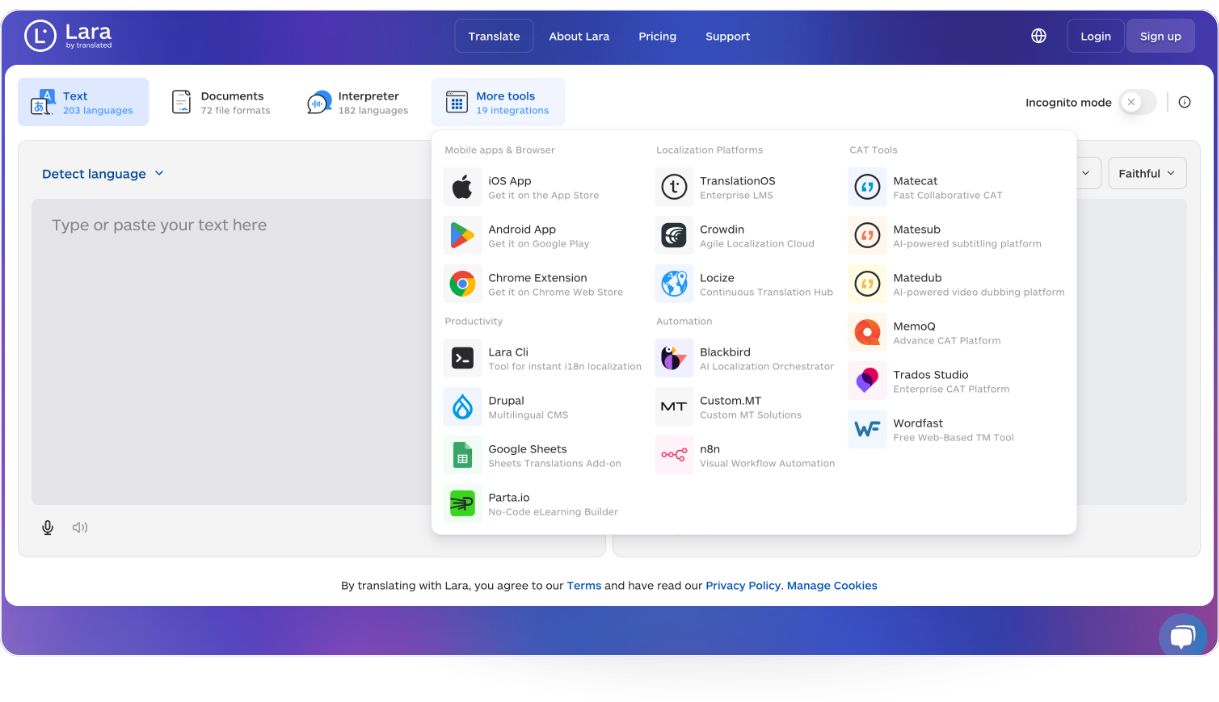
API access enables automation. Frequent translation becomes a bottleneck fast without it. With API integration, your CMS translates pages automatically, your support platform translates tickets as they arrive, your e-commerce catalog localizes descriptions without anyone touching a file manually.
Direct CMS integration eliminates the export cycle. If your content lives in WordPress, Shopify, or a similar platform, native integration means translating in place. The round-trip of export, translate, format, reimport disappears.
CAT tool compatibility matters if you work with translators. Professional translators work in tools like Matecat or MemoQ. If your translation software does not integrate with their environment, you force manual workarounds that slow delivery and introduce errors at the handoff.
Map your current translation process before evaluating any tool. Where does content start? Who touches it? Where does it end up? The right tool fits that flow. A tool that requires you to reshape the flow around it is the wrong tool.
Customization: making translations sound like your brand
Generic AI output sounds generic. Your brand has a voice. That voice needs to carry through in every language you operate in, or the translation undermines the copy it was supposed to deliver.
Glossaries enforce terminology. Upload your product names, technical terms, and brand vocabulary. The tool applies them consistently. Without this, AI may translate your product name differently on every document, or pick a local equivalent that carries the wrong connotation in that market.
 Translation memory captures your decisions over time. Every approved translation gets stored. The tool applies those decisions automatically on future content. Consistency improves with use, and editing time drops.
Style settings control register and tone. Some markets require formal address. Others read formal as cold and prefer a direct, conversational register. A tool that lets you configure this per language pair or per content type handles that complexity. A tool that applies one register everywhere does not.
How to read translation pricing
Per-word, per-character, per-document: these pricing models are not directly comparable. A tool at $0.03 per word is not necessarily more expensive than one at $0.005 per character. Convert everything to cost-per-page for your actual average document length before comparing.
Free plans have real costs. Character limits, quality restrictions, no glossary support, and data privacy trade-offs are the actual price. Factor them in.
A cheaper tool that needs 50% more editing is not cheaper. Calculate the full cost: translation fee plus editing time plus QA time. That is the number that matters for budget decisions, not the per-word rate in isolation.
Volume discounts require scrutiny. Verify what qualifies: monthly usage, annual commitments, per-project minimums. Some plans advertise volume pricing that only activates at thresholds most teams never reach.
A decision framework that actually works
You have done the research. Now you need a structured way to make the call.
Step one: eliminate on must-haves. Any tool that fails these gets cut immediately, regardless of how good the other features are:
- Supports your primary language pairs at acceptable quality
- Handles your critical file formats natively
- Meets your security and compliance requirements
- Fits within budget when total cost of ownership is included
- Integrates with the systems you cannot work without
Step two: score the remaining tools. Use weighted criteria based on what matters most for your content type:
| Criterion | Weight | Score 1-10 |
|---|---|---|
| Translation quality for your content type | 30% | Based on your test documents |
| Customization (glossary, TM, style) | 20% | Based on feature depth |
| Workflow integration and automation | 20% | Based on integration audit |
| Total cost of ownership | 15% | Including editing time |
| Team collaboration features | 10% | Shared glossaries, roles, review |
| Support quality | 5% | Response time, documentation |
Step three: run a real pilot. Demos show you the best case. A week-long pilot with your actual content, your actual file formats, and the people who will use the tool daily shows you the real case. Involve whoever handles QA. Their opinion on editing time is the most reliable signal you have.
Lara Translate: how it fits business requirements
Most teams hit the same friction point: tools that handle complex content well charge enterprise rates, and affordable tools lack the features professional workflows require. Lara Translate is built around a different position.
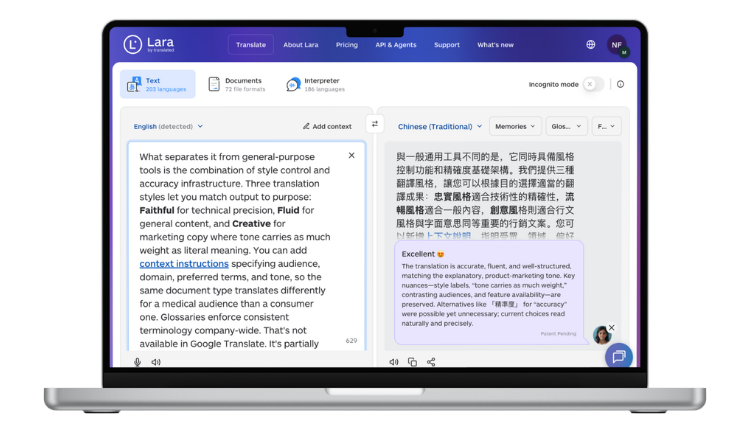
Lara is trained on 25 million human-translated documents. It processes documents in full context rather than sentence by sentence, which is why register and meaning hold up in longer, more complex content where segment-based tools lose the thread.
Lara Translate offers three translation styles that match output to content type:
- Faithful for contracts, specifications, and technical documentation where precision is non-negotiable
- Fluid for internal communications, reports, and general business content
- Creative for marketing materials and brand copy where tone matters as much as accuracy
Coverage: 206 languages across 42,000+ language pairs. File format support: 70+ formats including DOCX, PPTX, XLIFF, SRT, HTML, and PDF. For security: Incognito Mode guarantees no data storage and no use for model training after session delivery. GDPR compliant throughout.
Integration happens through the Lara Translate API and SDK, direct CAT tool integrations including Matecat and MemoQ, and MCP implementation for teams that want translation built into their existing workflow without separate steps. Glossaries and translation memory are included at every tier.
Test it on your hardest document
Upload a file with technical terminology, brand-specific language, or complex formatting. See how Faithful, Fluid, and Creative styles handle your content before choosing a plan.
Implementation: what the first four weeks actually look like
New translation tools take two to four weeks to settle into a workflow. Rushing past that window causes most of the problems teams blame on the software.
Start with one content type and one language pair. Validate quality, train your team on the tool, and establish the review process before expanding. Trying to migrate everything at once means you cannot isolate what is working from what is not.
Build your glossary from the start, not after problems appear. Enter your 20 to 30 most critical terms before the first real translation. The tool applies them immediately. You will catch the gaps during review and add to the list as you go. Translation memory builds automatically from every approved translation.
Define the quality control step before you go live. Who reviews translations before they publish? What is the feedback loop back to the glossary when a term is wrong? Document this as a process, not an assumption. Without it, every team member handles QA differently and inconsistencies multiply.
Monitor costs in the first month. Usage patterns in production rarely match what you estimated during evaluation. Check the actual numbers at week two and adjust your plan before you hit a limit that delays a deadline.
Mistakes that cost more than they look like they will
Optimizing for per-word rate instead of total cost. The cheapest tool that requires 50% more editing is not cheap. Calculate translation fee plus editing time plus QA overhead. That is the real number.
Skipping the pilot. A five-minute demo tells you what the tool can do on ideal content. A week-long pilot with your actual files tells you what it does with yours. There is always a gap between the two.
Not involving the people who will use it daily. If your translators or content team prefer a different tool, that preference is usually grounded in something real. Their feedback during evaluation is more reliable than any feature comparison.
Underestimating integration effort. “It has an API” and “it will integrate with our stack in two days” are different claims. Budget development time before committing, not after.
Setting unrealistic quality expectations. AI translation handles volume well and handles complexity adequately. Human review is still necessary for high-stakes content. The right expectation: AI translation reduces effort significantly and produces output that needs less editing than raw MT from five years ago. It does not eliminate editorial judgment.
FAQ
What is the best translation software for small business?
For small businesses, the best translation software balances quality, ease of use, and cost without requiring a full IT integration project to get started. Lara Translate’s free plan covers text and document translation with glossary support and Incognito Mode, which gives small teams professional-grade privacy without an enterprise contract. DeepL Pro is another strong option for teams focused on European language pairs where text-heavy content dominates. The right answer depends on your volume, formats, and how often you need to translate: a team translating ten documents a month has different needs than one processing hundreds. Start with a free trial on your actual content before committing to any paid tier.
What is the difference between free and paid AI translation tools?
Free tools use your content as training data, have no glossary or translation memory support, restrict file formats, and often cap character volume per day. Paid tools provide data privacy guarantees, glossaries, translation memory, full file format support, and team collaboration features. The practical difference shows up fastest in three places: sensitive content (free tools store it), technical terminology (free tools translate it inconsistently), and file formatting (free tools often strip it). For a single personal document, free tools are fine. For business translation where content is confidential, branded, or technically complex, the trade-offs of free tools accumulate quickly into real costs.
How do I evaluate AI translation quality for my specific industry?
Test with your hardest content, not sample text. Take three documents that represent your most difficult translation challenges: something with dense technical terminology, something with brand-specific language, and something where tone and register matter. Run them through each tool you are evaluating and have a subject matter expert review the output side by side. Pay attention to how the tool handles jargon, product names, and sentences where word order in the target language is very different from the source. Generic samples pass through any tool adequately. Your actual content is where quality differences appear.
Can AI translation tools integrate with our existing workflow?
Most professional translation platforms offer API access, SDK integrations, and direct connectors for CMS platforms, CAT tools, and content management systems. Whether integration is easy or difficult depends on your stack and how much development resource you have. Map your current translation workflow first: where content originates, who touches it, where it ends up, and what systems are involved at each step. Then verify the tool you are evaluating has specific support for each system in that chain, not just a general API. “It has an API” does not mean the integration you need exists out of the box.
What should I prioritize: translation speed or accuracy?
The right answer depends on what you are translating. For legal contracts, medical documents, or compliance content, accuracy is non-negotiable and speed is secondary. For high-volume marketing content or internal communications where the cost of an error is low and the cost of delay is high, speed and throughput matter more. Most business teams use both approaches simultaneously: high-accuracy mode for content with real stakes, faster throughput for content that gets human review before it publishes anyway. The better question is not speed versus accuracy but which content type needs which standard, and whether the tool you are evaluating lets you configure that distinction.
Thank you for reading 💜
As a thank you, here’s a special coupon just for you: IREADLARA26.
Redeem it and get 10% off Lara PRO for 6 months.
If you already have a Lara account, log in here to apply your coupon. If you are new to Lara Translate, sign up here and activate your discount.
Have a valuable tool, resource, or insight that could enhance one of our articles? Submit your suggestion
We’ll be happy to review it and consider it for inclusion to enrich our content for our readers! ✍️
Useful articles
- AI translation tool reviews: where to find reliable user feedback for your business needs
- How to Use AI Translation for Multilingual SEO: the guide