

The wrong English-to-Chinese translator costs more than a subscription fee. A tool that confuses Simplified and Traditional Chinese, drops your document formatting, or stores confidential content on servers you can’t audit creates real damage: rejected deliverables, frustrated clients, and compliance exposure. Six tools dominate this space. They don’t all solve the same problem. So what’s the best English to Chinese translator according to specific needs?
TL;DR
|
Why the right tool matters for English to Chinese translation
English and Chinese are structurally incompatible in ways that no word-for-word engine handles cleanly. English is alphabetic and linear; Chinese is logographic, with each character carrying meaning rather than sound alone. Word order, tense markers, and pronoun conventions diverge significantly. And then there’s the variant problem: Simplified Chinese serves mainland China, while Traditional Chinese is standard in Taiwan, Hong Kong, and Macau. Send the wrong variant to the wrong audience and you signal inexperience before the first sentence lands.
Professional tools handle these challenges differently. Some are built for speed and accessibility. Others optimize for contextual accuracy in formal documents. Enterprise platforms lead with security and workflow integration. That’s the whole point of this comparison: not to declare a winner, but to help you match a tool to a requirement.
Which is the best English to Chinese translator?
There isn’t one universal answer. Here’s a fast decision matrix before we go deeper:
| Tool | Best for | Chinese variants | Free tier |
|---|---|---|---|
| Lara Translate | Secure, style-controlled, multi-format | Both + Hong Kong | Yes |
| DeepL | Standard documents, formal tone | Both | Yes (limited) |
| Google Translate | Quick comprehension, camera input | Both | Yes (full) |
| Microsoft Translator | Microsoft 365 / Teams workflows | Both | Yes (limited) |
| Papago | East Asian language specialists | Both | Yes |
| Waygo | Offline camera translation, travel | Simplified | Yes (limited) |
How to translate English to Chinese effectively
Start by locking in your variant. Simplified Chinese is the standard for mainland China. Traditional Chinese serves Taiwan, Hong Kong, and Macau. Most platforms support both, but not all handle variant switching cleanly mid-workflow. Verify before you commit.
Test tools with content that represents your actual work, not the demo text on their homepage. Technical documentation may translate cleanly where marketing copy loses its voice. Legal content requires consistent terminology that some tools can’t enforce without a glossary. What performs well in a free trial on general text may fail entirely on your specific domain.
Consider integration last, not first. Standalone tools work for occasional needs. If your team translates regularly, a platform connecting via API or MCP to your existing CMS, CRM, or CAT tool will save more time than any individual accuracy improvement. That friction compounds fast.
1. Lara Translate: security, style control, and broad format support
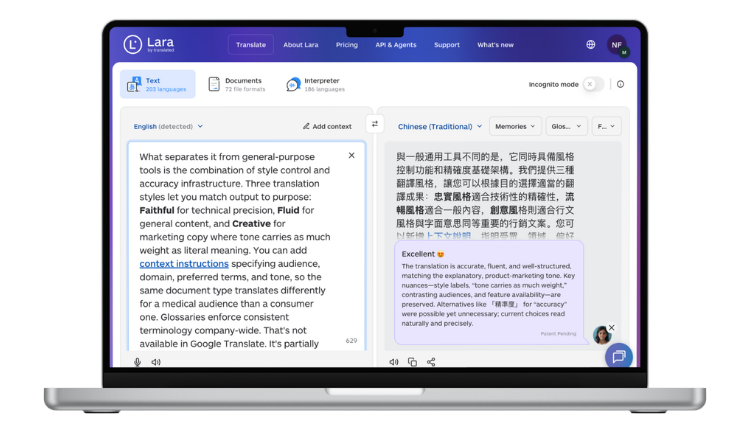
Lara Translate is built by Translated, trained on 25 million human-translated documents with expert annotations. It supports 200+ major languages, including Simplified, Traditional, and Hong Kong Chinese, across 70+ file formats.
What separates it from general-purpose tools is the combination of style control and accuracy infrastructure. Three translation styles let you match output to purpose: Faithful for technical precision, Fluid for general content, and Creative for marketing copy where tone carries as much weight as literal meaning. You can add context instructions specifying audience, domain, preferred terms, and tone, so the same document type translates differently for a medical audience than a consumer one. Glossaries enforce consistent terminology company-wide. That’s not available in Google Translate. It’s partially available in DeepL.
For teams handling confidential content, Incognito Mode prevents content from being stored or used to train models. All data processing and storage stays within the EU. Lara Translate also connects via API and MCP for integration into existing platforms and workflows without replacing your current stack.
Speed is 99% of translations completed in 1.2 seconds, which matters when translation is blocking a real-time customer workflow rather than sitting in a document queue.
Test English to Chinese translation with your actual content
Upload a real business document and see how Lara Translate handles your terminology, Chinese variant, and file format requirements.
2. DeepL: contextual accuracy for standard documents
DeepL uses neural networks trained on curated parallel corpora to produce natural-sounding translations. For professional business writing, that matters. Output reads like it was written rather than converted, and the platform supports both Simplified and Traditional Chinese.
Where DeepL earns its reputation is formal register. Business correspondence, technical documentation, and internal communications all benefit from its contextual sensitivity. The alternative-translation feature lets you inspect other valid renderings with contextual explanations, which is genuinely useful when exact wording carries legal or contractual weight. Glossary support maintains consistent terminology across multiple documents.
It’s not the right choice for teams with strict data residency requirements or for workflows spanning 70+ file formats. But for drafting professional content that a human will review before publication, it’s one of the most reliable options available.
3. Google Translate: fast comprehension without cost
Google Translate remains the most accessible entry point into English-to-Chinese translation. No account required, no usage cap, no subscription. Camera translation handles printed text in images. Offline packs work without internet access. That combination covers a lot of ground for teams that need quick comprehension rather than polished output.
The ceiling is clear, though. There’s no glossary enforcement, no customizable context, and no meaningful data privacy control. For understanding a supplier’s spec sheet or scanning a competitor’s landing page, it’s more than sufficient. For customer-facing content or anything legally sensitive, it’s a starting point that needs a human edit before use. Most professional teams use it for exactly that: first-pass understanding, not final output.
4. Microsoft Translator: native Office integration
Microsoft Translator connects directly with Word, PowerPoint, Excel, and Teams. If your organization runs on Microsoft 365, that integration removes the copy-paste friction that slows translation workflows down. You can translate a document inside Word without leaving the application, or enable real-time subtitle translation in a Teams call with Chinese-speaking partners.
Enterprise security compliance and dedicated support address organizational requirements that consumer-grade tools can’t meet. API access enables custom implementation for teams that need translation embedded in internal tools. The trade-off is that quality outside of Microsoft’s ecosystem is average, and it lacks the style-control and glossary sophistication that specialist translation platforms offer.
5. Papago: East Asian language specialization
Papago from Naver focuses specifically on East Asian languages: Chinese, Korean, and Japanese. That regional focus influences both training priorities and feature development. The platform includes handwriting recognition, which matters for teams that regularly work with handwritten Chinese documents or character input, and adapts over time to individual communication patterns.
If your work spans Chinese, Korean, and Japanese simultaneously, Papago’s regional specialization makes more sense than a general-purpose platform. For teams working exclusively with English to Chinese, the advantage narrows. The platform covers standard use cases but lacks the enterprise security controls and broad file format support that professional translation workflows often require.
6. Waygo: offline camera translation
Waygo does one thing: camera-based translation of printed Chinese text, entirely offline. Point the phone at a sign, menu, or document, and you get an instant translation without internet access. No data transmission means no connectivity cost and no roaming dependency.
That’s a narrow use case, and Waygo doesn’t pretend otherwise. It’s built for business travelers and professionals conducting site visits in Chinese-speaking regions where internet access is unreliable. Navigation, signage, and printed materials are where it earns its place. It’s not a document translation tool, and it won’t replace a platform for sustained professional workflows. But for what it does, nothing else offline matches it.
How to choose the right English to Chinese translation tool
Most teams pick the wrong tool for the wrong reason. They default to what’s free, or what’s already installed, rather than testing against the content type that actually drives most of their translation volume.
Content type is the first filter. Technical documentation needs terminology enforcement that only glossary-capable platforms provide. Marketing copy needs style control, not just accuracy. Customer support conversations need speed. Legal content needs both accuracy and a defensible data handling record. Pick the tool that fits the majority of your volume, not the one that handles a single edge case well.
Security requirements are non-negotiable for certain industries. Don’t accept marketing claims about GDPR compliance. Request the documentation. Ask where data is processed, whether content is used for model training, and what happens to translations after they’re delivered. That information should be readily available from any enterprise-grade platform.
Integration matters at scale. Translation that requires manual copying between platforms creates friction that compounds across hundreds of documents per month. If translation is a regular workflow rather than an occasional task, the ROI on a platform with API or MCP connectivity is immediate.
Thank you for reading 💜
As a thank you, here’s a special coupon just for you: IREADLARA26.
Redeem it and get 10% off Lara PRO for 6 months.
If you already have a Lara account, log in here to apply your coupon. If you are new to Lara Translate, sign up here and activate your discount.
FAQs
What makes English to Chinese translation harder than other language pairs?
English and Chinese are structurally incompatible at a fundamental level, not just superficially different. English is alphabetic and relies on word order and auxiliary verbs to signal tense and relationship. Chinese is logographic, where each character carries semantic meaning, and tense is conveyed through context rather than verb forms. Grammar structures diverge significantly. Add the Simplified versus Traditional variant divide, plus the lack of direct equivalents for many technical and legal terms, and you have a language pair where generic machine translation fails faster than almost any other combination. Professional content requires domain-specific glossaries and context instructions to bridge that gap reliably.
Can free translation tools handle professional business translation?
For comprehension and internal drafts, yes. For customer-facing or legally sensitive content, no. Free tools typically lack custom glossaries, meaning your brand terminology and product names translate inconsistently across documents. They rarely offer format-preserving document translation for more complex file types. And critically, they don’t provide the data handling controls that regulated industries require. Use free tools to understand incoming Chinese materials quickly. Use a professional platform when the output is going to clients, regulators, or public channels.
How do I know whether to use Simplified or Traditional Chinese?
Simplified Chinese is the written standard in mainland China. Traditional Chinese is used in Taiwan, Hong Kong, and Macau. If you’re targeting multiple Chinese-speaking markets, you need a platform that supports both variants and can handle each in a single workflow without requiring you to switch tools or duplicate the project. Mixing variants in a single document signals unfamiliarity with regional conventions and undermines trust with local audiences.
What translation speed do I actually need for business work?
Speed matters most in two scenarios: real-time customer support conversations where delays are visible to the client, and collaborative team workflows where translation is blocking the next step. For document translation that feeds into a review process anyway, a few extra seconds per page rarely matters. Match your speed requirement to your actual bottleneck. A tool that completes 99% of translations in 1.2 seconds removes speed as a constraint entirely for most professional use cases, including live workflows.
Should my translation tool integrate with existing business systems?
If translation is occasional, standalone tools are fine. If translation runs through your workflow daily, integration is worth prioritizing. Platforms that connect via API or MCP let translation happen inside the tools your team already uses, without adding a manual copy-paste step that slows adoption and introduces errors. The investment in integration setup pays back within weeks for teams handling high volumes of multilingual content.
Useful articles
- AI translation tool reviews: where to find reliable user feedback for your business needs
- Lara Translate integrations: the fastest way to go multilingual (and stay safe)
- Industry translation glossaries: the benefits by sector
Have a valuable tool, resource, or insight that could enhance one of our articles? Submit your suggestion
We’ll be happy to review it and consider it for inclusion to enrich our content for our readers! ✍️